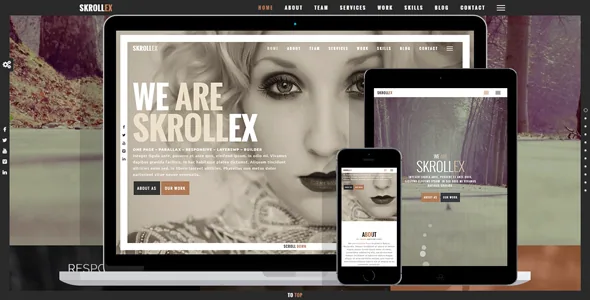
Three kinds of background, and one the vendor dropped
Skrollex's feature list names its background options separately: animated parallax backgrounds, YouTube video backgrounds and local video backgrounds. Those are not three settings of one control. Each has its own preparation work and its own failure mode.
Parallax backgrounds need images large enough to stay sharp while they travel at a different rate to the scroll. YouTube backgrounds depend on an embed and a network connection that you do not control. Local video means the file sits on your own server, so weight and bandwidth become your problem, and mobile visitors on cellular data are the ones who notice first.
The changelog shows where that trade-off has already bitten. Version 2.10, dated 10 June 2023, records: "Excluded Vimeo backgrounds due to hosting restrictions." Vimeo was once a supported background source and no longer is, which is worth knowing before you plan a page around a Vimeo clip.
The same changelog shows the vendor hardening the fallback path. Version 2.6 added support for self-hosted video backgrounds on mobile devices, and the 2.7 fixed build, dated 19 May 2021, repaired the alternative image shown in browsers that cannot play a background video. Two things follow: a video section should always carry a still fallback, and mobile is a deliberate part of that decision rather than an afterthought.
Fullscreen sections and a frame around the viewport
The theme's structure is built from fullscreen sections. In practice that means each part of the page is designed as a single screen-height panel, and the visitor's experience is a sequence of those panels rather than a scrolling article. The fullscreen menu belongs to the same logic: a navigation layer that takes over the screen instead of sitting in a bar.
This changes how you write. A section that fills the viewport has room for a headline, a short line of support and perhaps one action. Long paragraphs get pushed below the fold of their own panel, which defeats the format. The vendor describes the theme as suitable for portfolio showcase, agencies, photography, creative teams, resumes and personal sites, and the section model fits those uses because each one reduces to a handful of strong statements.
The viewport border is the theme's other structural signature, listed as a feature in its own right and patched in version 1.4.1 for its layout in admin mode. It frames the entire screen, so every section sits inside the same edge — a detail that will either unify a photographic page or fight a design that wants to bleed to the edges.
Layers is the builder, and the changelog is candid about it
Skrollex is described as "Built for Layers – Free Website Builder", and the marketplace attributes list Layers WP under both Framework and Compatible With. Layers is the editing layer here: the theme's sections are composed through it, which makes the builder a dependency rather than an optional extra.
The changelog shows how closely the two are tied. Entries track Layers releases from 1.5.3 up through 2.0.7, and version 2.0 was a substantial rebuild that updated the content editor, added toolbar items and improved Customizer performance. That history is useful context, but the entry that matters when you install is 2.4.2 from February 2020: it changed the documentation link for a fixed version of Layers and stated that to stop PHP warnings appearing, Layers should be downloaded from the new link and reinstalled.
Read that plainly. In some setups the theme's own advice was to reinstall the builder rather than the theme, and the fix lived in a separate build. If you build on Skrollex, treat Layers as a component you may need to manage independently of the theme files.
Presets, LESS and colour as the theming layer
The design controls in Skrollex are colour and code rather than block patterns. The feature list offers dark and light presets, unlimited colour customisation, and LESS stylesheets. That combination points at a variable-based system: pick a starting preset, change values, and let the stylesheet compilation carry the change across sections.
LESS is not a hidden detail. It tells you the styling is organised in source files that need compiling to CSS, and the marketplace's file list includes PHP, CSS and JS files. A child theme or a build step is the natural place to work if you plan to change more than colours. Version 2.2 also enabled the colour customisation panel on touch-screen devices, so changing presets does not require a desktop.
RTL language support arrived in version 1.4.0, and version 2.6 added Google Fonts including Arabic fonts. Worth stating clearly: the marketplace attribute Gutenberg Optimized reads "No". That describes which editor the theme was built and tested around — Layers — and does not by itself mean the block editor is unavailable on your install. It does mean the section workflow you read about here is the Layers one.
What the compatibility claims do and do not cover
The marketplace attributes, recorded on 4 November 2026, declare WordPress 5.0.x through 6.7.x, browsers from IE9 through Chrome and Edge, a responsive layout with 4+ columns, widget-ready status, high-resolution assets and documentation marked as well documented. The theme's last vendor update on the marketplace is dated 18 July 2024, and the marketplace's latest version is 2.10.
Those are vendor and marketplace declarations captured at the time of the item update, not test results from your own server. The gap between the newest declared WordPress version and any release after it is the thing to verify on a staging install before you commit a live site to this theme, particularly if the Layers builder has to run alongside current PHP and WordPress releases.
What you can count on from the listing is the shape of the package: PHP, CSS and JS files, with the demo imagery and stock video credited to third parties under their own licences. The theme does not ship its photographs, so the parallax and video sections that define the design need your own media — which loops back to where this theme asks the most of you in the first place.
Questions & answers
Can I still use Vimeo for a background video in Skrollex?
The vendor's version 2.10 changelog says Vimeo backgrounds were excluded due to hosting restrictions. The feature list names YouTube and local video backgrounds instead, so plan around those two sources or host the file yourself.
Do I need to install the Layers plugin?
The vendor describes the theme as built for Layers, the free website builder, and the marketplace lists Layers WP as both framework and compatible product. The version 2.4.2 changelog also documents reinstalling a fixed Layers build to clear PHP warnings, so treat it as a component you manage alongside the theme.
Does the Gutenberg Optimized "No" attribute mean blocks are unusable?
It records that the theme was not built or tested around the block editor. It is not evidence that the block editor is switched off. The section-editing workflow described by the vendor is the Layers one, and that is the path the design assumes.