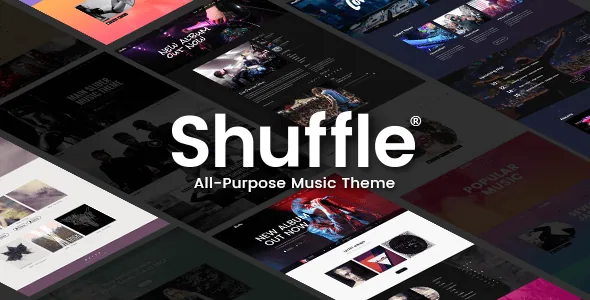
Eight genre skins against 18 homepages
Shuffle's own framing is a shelf of looks rather than one design. The vendor description names genre-specific skins for Hip Hop, EDM, Jazz, Metal, Indie, Pop and Rock, plus a Studio variant, and pairs them with 18 homepage examples. Instead of picking a layout and then recolouring it, you start from the skin that matches how the act is positioned.
Eight genres cover a lot of ground, but the seams are where most real artists live. A band with a metal record and an acoustic side project, or a producer who plays jazz festivals and releases club edits, will not find a skin called "both." The skins are starting points, and the description also lists styling options for elements, five header types with separate logos for light, dark, sticky and mobile versions, and typography settings with per-breakpoint controls and a Google Fonts library. Changing a skin's palette and type is expected work.
The 18 homepages matter less as a count than as evidence that the theme expects varied landing structures: a release page, a tour page, an artist intro. Only a few will be relevant to one act.
Tour dates as entries, not a page of text
The description lists an Events custom post type with two attachments that separate a real date list from a paragraph of upcoming shows: ticket status and custom map pins. Each show is an entry you fill in once - venue, date, ticket status, a location pin - and then surface wherever a list is needed through the Events List shortcode. A Countdown shortcode covers the next date.
Be precise about scope. Ticket status is a field on the event, not a ticketing system: nothing in the vendor's material claims checkout, allocation or a ticket-provider integration. If you sell through an external service, the theme gives the date a structured home and a place to signal availability; the sale stays where it already is. Map pins work the same way - they configure the theme's Google Maps element and say nothing about what a visitor sees on a given device.
A release carries more than a cover image
Albums are also a custom post type, and the vendor describes three album layouts plus a lyrics field. Add the track disc view and the album stops being a styled image: it becomes an entry with its own detail page, which is what keeps a catalogue manageable after the fifth release rather than the first.
The shortcode list shows how that content gets placed - Albums List for an index, Album Player and Album Disc for playback and tracklisting, Audio Playlist for a mix, Album for a single release block. This is a different workflow from stacking blocks into an album page, because the content lives in an entry and the shortcodes decide where it appears. Decide which model you want before you build: publishing dozens of releases with the same structure rewards entries, while one-off release pages may be quicker to compose directly in the builder.
Where the streaming and social connections actually sit
The description lists App Store, Google Play, Bandcamp, Spotify, Amazon MP3 and Deezer as music shop platforms the theme connects with, and the summary mentions embedding playlists from Spotify, SoundCloud and others. Read that as places you link to or embed from, not services the theme maintains on your behalf. The changelog supports that reading: version 1.8 removed the Edge Twitter Feed plugin after Twitter's API changes, and version 1.9 removed the Edge Instagram plugin because of Instagram API deprecation.
Those removals are worth knowing if a live Instagram strip or a Twitter feed in the sidebar was part of your plan. A curated gallery built from the Image Gallery shortcode, plus plain links to your profiles and store pages, does not depend on a third party's endpoint. Embed codes from streaming services carry the same kind of dependency, though they tend to be steadier.
Composition happens in WPBakery, content lives in entries
WPBakery Page Builder appears in the marketplace compatibility field and in the changelog, which records an update to 8.4.1 in version 1.9. Slider Revolution is bundled alongside it, at 6.7.34 in the same release, and the package includes a child theme for edits that should survive an update. Together that describes a two-layer site: page layout and section composition in the builder, tour and release data in their own post types, shortcodes as the bridge.
One consequence for planning: the custom shortcode collection is the theme's real vocabulary - album and event lists, device showcase, vertical split slider, image gallery, banners, call to action, infographic elements. Budget time to learn those names rather than treating the builder as a blank canvas. Nothing in the supplied material describes how the shortcodes behave with a different builder.
Declared compatibility and the demo imagery limit
As observed on the marketplace on 5 November 2026, the listing declares compatibility with WooCommerce 9.x.x, WPBakery Page Builder and WPML, and WordPress versions from 6.5.x through 7.0.x, with the latest marketplace version recorded as 1.9 from June 2025. WooCommerce is described in the vendor summary as included, so a merchandise store alongside the music content is part of the intended setup rather than an afterthought. These are vendor and marketplace declarations; they do not say how Shuffle behaves with your plugins, your PHP version or your host.
The packaging note is plainer. The vendor states that the images shown in the demos are presentational only and cannot be used on your site unless you license them from a stock image service. Your launch therefore starts with a photography or artwork budget - usually the album campaign's job anyway, but better known before the demo import looks finished.
Questions & answers
Does Shuffle sell tickets or connect to a ticketing service?
No such integration is described. The theme provides an Events post type with a ticket status field, so you can mark availability per show. The sale happens on whatever platform you use.
Can I keep a genre skin and still change the colours and fonts?
According to the vendor's feature list, yes: the theme has styling options for elements, typography settings with separate responsive controls, and a Google Fonts collection. Treat a skin as a starting palette and header arrangement rather than a fixed design.
Are the Instagram and Twitter feed widgets still available?
The widgets are still named in the feature list, but the changelog records the removal of the Edge Instagram plugin in version 1.9 and the Edge Twitter Feed plugin in version 1.8, both after platform API changes. Check the current documentation before building a sidebar around either.
Is Shuffle built for the block editor?
The supplied listing does not declare block editor optimisation, and the theme is built around WPBakery Page Builder and its shortcodes. That absence is not proof the block editor is unusable, but the supported composition workflow is the builder plus those shortcodes.