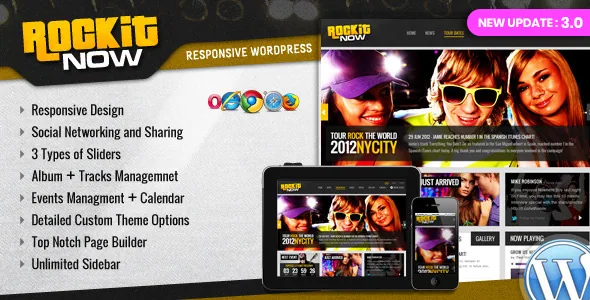
Five management modules instead of one flexible page
The vendor's feature list is short and structural: Event Management, Gallery Management, Album + Track Management, Slider Management, Sidebar Management, then "Powerfull Theme Options + Page Builder" underneath. Read it as a content model rather than a menu of extras. A band site publishes the same few things repeatedly — the next gig, the record from last year, photos from a show, a clip on the homepage — and each needs a screen where a new entry can be added without rebuilding a page.
That is the case for choosing Rockit Now over a general-purpose theme with a music-looking homepage. It is also where the description stops. Nothing here says how many fields an event or album carries, or how the templates render the entries together, so the layout itself has to be judged on the vendor demo.
Albums carry tracks, and 3.0 tidied the details
The changelog is more specific than the feature list about what an album page holds. The 3.0 entry records a fix for a "Lyrics popup issue in album detail page," which places a lyrics surface inside the album view instead of leaving lyrics to body copy. An older entry notes that the "View Albums URL is now dynamic," so the path to the discography is generated rather than hard-coded into a template.
For a band with a release schedule, that combination means a record page can carry a track listing and expose words per song without a separate page for each track. What the changelog cannot tell you is how the popup looks or how lyrics are attached to a track; check the album template on the demo if lyrics are central to what you publish.
The same 3.0 entry mentions styling fixes across the blog, event and album description pages, which suggests those three templates are maintained as a set.
Gigs depend on your own Google Maps key
Events are the part of a band site people act on, and 3.0 added a "Google Map api key field… for Google Maps & Event Locations." Locations can therefore be attached to event entries, with the key stored in theme settings rather than written into a file.
Budget for that as an admin task with a billing dimension: Google requires your own key tied to an account, so maps will not appear on a fresh install until someone creates one and pastes it in. Two related entries round out the gig tooling — an event countdown widget whose background image became dynamic, and an earlier release that updated the upcoming event widget. Together they describe a module built to show what is coming up and how soon, with both the widget and its background configurable.
Eight palettes, theme options, and layered artwork
The vendor says the template "comes in 8 pre made color variations" and that producing your own scheme "will only take one minute" with theme options. That is the everyday route: start from a variation, adjust colours in the settings panel, and skip CSS edits.
The second route matters if a designer is involved. The description states that "the PSD files included have been customized to allow fast skinning," and the file list names Layered PSD alongside PHP, CSS and JS files. Layered sources let someone recut headers, banners and image treatments in Photoshop and hand back exports, rather than rebuilding the look by inspecting the live page. If nobody on the project opens Photoshop, the theme options route covers the job and the PSDs stay unused.
A December 2019 sign-off, and what it means for hosting
The marketplace lists 3.0 as the latest version, and the vendor dates that release 4 December 2019. Its notes declare compatibility up to WordPress 5.3.x, with "Classic Editor" attached to that figure, and up to PHP 7.3. The marketplace's software range runs from WordPress 5.2.x back to 4.9.x.
That age is the most consequential fact in the listing. Current hosts commonly run PHP 8 and WordPress releases well past 5.3, so the thing to verify is the environment in front of you: check your host's PHP version and the WordPress release you are on, then run the theme on a staging copy before it goes near a live tour page. The marketplace also marks "Gutenberg Optimized: No," which describes how the theme is tuned rather than removing the block editor. The composition layer described here — bundled page builder plus theme options — fits a theme built for the classic editing era.
Package contents and declared attributes
Alongside the layered PSDs, the ThemeForest file list names PHP, CSS and JS files. The layout is marked responsive, widget ready and two columns, with high resolution assets listed and documentation noted. Facebook is the single declared compatible service.
Declared browser support runs from IE8 through Firefox, Safari, Opera and Chrome — a 2019 list that says nothing about today's browsers and little about phones beyond the responsive attribute.
The demo imagery is worth settling before you plan around any layout: the description makes no claim to include it, and the package list names only theme code, PSDs and documentation. Band photos, album covers and press shots are yours to supply.
Questions & answers
Do I need a Google Maps API key for event locations?
Version 3.0 added a key field specifically for Google Maps and event locations, which points to locations relying on Google's service under your own account. Create the key and enter it in the theme settings before expecting gig maps to display. The changelog does not describe any fallback for entries without a key.
Does the theme include the photography shown in the demo?
The vendor description makes no such claim, and the package list names only layered PSD, PHP, CSS and JS files plus documentation. Plan on supplying your own band photos, album art and press shots before the demo layouts look finished.
How does the lyrics feature work?
The 3.0 changelog records a fix for a lyrics popup on the album detail page, so lyrics are surfaced through a popup tied to the album rather than as free text on a page. The vendor does not describe how lyrics are attached to individual tracks, so inspect the album template on the demo if this is central to your release pages.
Can the layout be redesigned without editing code?
The vendor offers two routes: pick one of the eight pre-made colour variations and change colours through theme options, or rework the layered PSD files in Photoshop for a full reskin. The first needs no design software; the second assumes you have a designer or can work the files yourself.