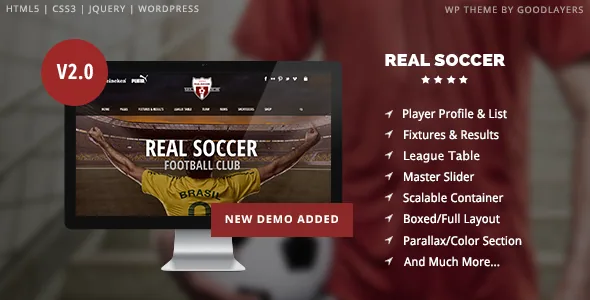
Five soccer modules, and the data you have to keep feeding them
Real Soccer is not a sports theme with a football badge pasted on. The vendor's feature list names five soccer-specific pieces: a Player List, a Player Profile, a League Table, Fixtures & Results, and a Match Report. Each of those is a place where a club publishes information that changes every week of the season, so the decision to use this theme is really a decision about who owns that upkeep.
The Player List and Player Profile pair imply a roster with individual entries — a squad page that links through to per-player detail. League Table is a standings view, the kind of thing that is either entered as data or embedded from a competition source; the description does not say which, so ask before you assume the table fills itself. Fixtures & Results covers the season calendar, and Match Report is the write-up layer that connects a result to prose.
What the vendor does not describe is how any of this is stored or generated. There is no mention of auto-import from a league feed, no calculation rules for standings, and no statement about whether a match report links automatically to a fixture. Plan to populate these manually unless your own inspection of the theme shows otherwise. That is not a flaw, but it does mean a club with a volunteer web editor should think about the weekly workload before committing.
The preset shortcut is not the same thing as the demo import
Two separate mechanisms sit inside the GoodLayers admin, and they solve different problems.
The first is a Page Builder Setting Shortcut Button. The vendor says one click applies page-builder settings similar to those used on the Homepage, Contact and Pricing pages. Read that as a starting configuration — a section structure and its settings loaded onto a new page — not as a finished page with your content in it. It saves the fiddly part of rebuilding a familiar layout.
The second is the GoodLayers Importer, described as turning your site into the demo site in a few steps, with a step-by-step video to follow. This is the broader operation: it brings across the demo's setup so you can see the whole thing working before you replace the content.
The order matters more than it sounds. If you import the demo first, you inherit its pages and can then strip them down. If you start with presets, you build from an empty site with the right skeleton. Either is workable; doing both at once tends to leave duplicate pages behind.
Where the design is actually adjustable
Design claims on this theme are modest, so it is worth separating the ones that give you a real handle from the ones that are just stated preferences.
The most useful is the customisable skin for each parallax or colour section. The vendor describes creating a skin in the admin panel and assigning it to a section, which lets you set font and link colours for that section specifically. On a page where a dark photograph sits behind text, this is the control that keeps the copy readable without editing a stylesheet. Parallax speed is adjustable, and the background can also be fixed rather than scrolling.
Sidebar width is a fixed menu, not a free value: five options at 16%, 25%, 33%, 41% and 50%, with 25% and 33% available when a layout carries two sidebars. The site container, by contrast, accepts any pixel width. Boxed and full-width layouts are both provided, along with three slider presentations — full-screen, full-width and boxed — and a mega menu built into the theme rather than sourced from a plugin.
Beyond that, the vendor lists unlimited colours, a font uploader, Google Fonts, Font Awesome, retina support and a customizer panel. Those are broad claims without numbers attached; treat the live demo as the place to judge whether the default look is close enough to what you want.
The shop is a shop, not a fixtures tool
WooCommerce appears in the compatibility attributes as versions 10.x, 8.x and 7.x, and the vendor describes the theme as turning many WooCommerce elements into a minimal design, with the cart placed in the header. That describes styling and placement. Nothing in the description connects WooCommerce to tickets, memberships, match entry or any other club transaction.
So if you are selling merchandise, the shop layer is there and dressed to match. If you are selling match tickets or season passes, that is a separate problem the vendor does not address, and it is worth settling before you build the site around the assumption.
WPML is listed for multilingual sites. The attributes observed on 3 November 2026 also show a WordPress range from 6.1.x through 7.0.x, which is a vendor and marketplace declaration rather than a record of testing your particular install.
What ships, and what stays on the demo server
The package files attribute lists layered PSD, PSD, PHP, CSS and JS. The PSD entry is the one people skip past: having layered source files means banner and header graphics can be rebuilt for your own club instead of approximated.
The vendor states plainly that images used in the preview site are not included in the theme package, and that other demo images were purchased from stock libraries. Every photograph you see in the demo has to be replaced with your own match photography, sponsor artwork or licensed stock. Budget for that separately — a soccer site lives or dies on its pictures.
The same applies to the demo's written content. Importer routines move configuration and pages, but the player names, results and match copy in the demo are placeholders for you to overwrite with your own season.
Bottom line
Real Soccer earns its place when a club genuinely wants to publish a roster, standings, a fixture list and match reports as separate, maintained pieces of content. The vendor lists those modules explicitly, and the surrounding tooling — preset page settings, per-section skins, sidebar width options, a styled WooCommerce shop — supports that without demanding a separate plugin stack for the mega menu.
It is a weaker match if you wanted a theme that pulls league data in automatically, or if nobody at the club wants to update results each week. All product details here come from the vendor's description and the marketplace attributes observed on 3 November 2026; none of it comes from installing or running the theme.
Questions & answers
Does the theme populate the league table from an external competition feed?
The vendor description does not say. League Table is listed as a feature, with no mention of import, automatic calculation or a data source, so assume you supply the standings yourself until you see otherwise.
Can I use the demo's football photography on my own site?
No. The vendor states that images in the preview site are not included in the theme package, and that demo images were bought from stock libraries. You need your own photos or licensed replacements.
Is the Page Builder Setting Shortcut Button enough to build a page from scratch?
It applies preconfigured builder settings similar to the demo's Homepage, Contact and Pricing pages. That gives you a section structure to work from; the content, imagery and copy still need to be yours.