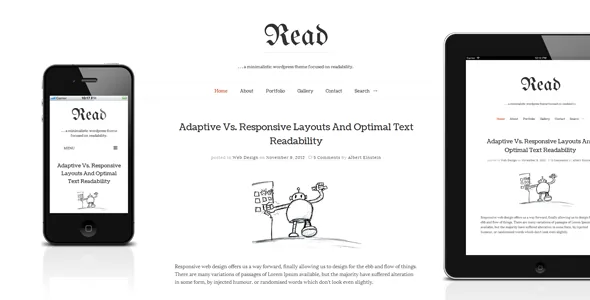
A quiet shell around a heavier media kit
Pixelwars sells Read WP as a responsive theme "focused on readability with a minimalist design," and a look at the vendor's demo makes that premise easy to accept. The feature list, though, is longer than a stripped-back blog would need. Beneath the quiet typography sit a full post-format system, self-hosted audio and video, filtered portfolio and gallery modules, and three distinct blog layouts.
That combination sets the decision for this theme. It is aimed at someone who writes first but occasionally publishes a podcast episode, a photo set or a project page, and who would rather keep those formats inside the theme than assemble a plugin stack for each one. The vendor's credits name Bootstrap 2, Modernizr, Isotope, Fancybox and Mediaelement.js among its libraries, which tells you the build descends from an earlier jQuery generation even though the marketplace currently lists WordPress 6.5.x through 7.0.x.
Post formats and self-hosted audio or video
The vendor describes Read WP as a "complete blog system (all post formats supported)." In WordPress terms that means the theme supplies presentation for the standard, aside, gallery, image, link, quote, status, video, audio and chat formats rather than treating every entry as a plain article. For a personal blog, this is the difference between a link post that looks like a link post and a short note that carries the same visual weight as an essay.
Audio and video are handled directly rather than through embed codes. The vendor says the theme supports "self hosted html5 audio/video (one .mp4 file for all browsers!)" using Mediaelement.js. A single MP4 uploaded to your media library plays in the theme's own player across browsers, so a podcast episode or a short film lives in your WordPress installation instead of on a third-party host. There is a trade-off worth naming: self-hosted media consumes your own bandwidth and storage, so a long-running audio series on shared hosting will feel different from one routed through a podcast host.
The description also covers embedding external video with responsive behaviour across several aspect ratios. That is useful for YouTube and Vimeo clips, but the detail on offer ends at the ratio handling. If you plan to mix self-hosted files and external embeds in the same feed, verify how each looks in the archive rather than assuming they match.
Portfolios and galleries with independent load-more
Two modules extend Read WP beyond blogging. The first is a filtered portfolio: the vendor describes category filtering, AJAX loading of further items, and a lightbox styled for mobile. The second is an image gallery with the same AJAX load-more approach.
What the "unlimited" label actually buys you is page count. The vendor lists "unlimited portfolios (multiple portfolio page support)" and unlimited gallery support, which means you can run more than one portfolio or gallery collection on the same site rather than committing to a single archive. For a photographer who keeps separate collections for commissioned work and personal projects, that structure matters more than the lightbox styling.
Both modules load more items without a page refresh, which keeps a long image index feeling continuous. The consequence is that those items will not have their own paginated URLs, so if search visibility for individual portfolio entries is part of your plan, treat those pages as secondary to your written archive.
Three blog layouts and sidebars you can multiply
The vendor names three blog layouts: sidebar, no sidebar and masonry. This is a narrower set than magazine themes typically advertise, and that is consistent with the theme's stated focus. Sidebar suits a blog with categories, recent posts or social links beside the text; no sidebar gives the prose the full column; masonry arranges entries of unequal height into a denser index, which tends to suit image-heavy posting.
Sidebars are not limited to one configuration. The vendor lists "unlimited sidebars" plus footer widget locations in either three or four columns, and the marketplace marks the theme widget ready. If you want the blog archive to show a category list while individual articles show author information and a different set of footer widgets, that is the kind of arrangement the sidebar system is designed for. The practical limit is administrative: each sidebar you create is another set of widgets to keep current.
Typography and customizer control
Read WP lists 600+ Google Fonts and Theme Customizer support. That is a familiar combination and not a differentiator on its own, but it does mean typography is a setting rather than a child-theme edit, which matters for a theme whose entire argument is how text reads.
The vendor also describes a custom settings panel. The description does not draw a line between what lives in that panel and what lives in the WordPress Customizer, so expect some overlap when you first configure the site. Translation is supported with .po files included, and the marketplace attributes list WPML and Contact Form 7 as compatible. Those are declarations from the listing, not verified integrations, so a multilingual personal blog should confirm WPML behaviour on a staging copy before committing.
The older foundation, and what it means for your build
The credits list reads like a snapshot of front-end practice from several years ago: Bootstrap 2, Modernizr, Fancybox, Isotope, jQuery Masonry, History.js and a detect-mobile-browsers script. The browser attribute still includes IE11. None of that prevents the theme from working, but it does mean the animation and filtering behaviour you see is driven by JavaScript libraries in the theme package rather than by small, modern scripts.
Set against this, the vendor's own record shows active maintenance. The marketplace lists the theme as updated in January 2026 and at version 4.6.5, with WordPress 7.0.x down to 6.5.x named as supported versions, observed on 4 November 2026. Treat that as a compatibility claim rather than a test result; the vendor's own browser list has not been trimmed to match.
The block editor attribute reads "Gutenberg Optimized: No." That does not mean the block editor is unavailable, only that the vendor has not declared the theme's templates and styling as tuned for it. If your writing routine depends on block patterns, group blocks or full-site editing, read the vendor's demo and documentation before assuming the editor experience will match a block-first theme.
Where Read WP fits a reading-first project
The theme's shape suits a personal site where articles are the main event and images, audio or short video appear regularly but not constantly. The bundled post formats, self-hosted media player, portfolio filtering and gallery loading mean fewer plugins to install and less chance of a plugin's styling fighting the theme's own.
It suits less well if you want a page builder to design layouts freely, since none is described here; if you publish at a scale that makes self-hosted audio or video costly; or if your editorial workflow is built around the block editor's layout tools. The pieces worth checking on a test install are the media player with your own files, a masonry index with your real images, and how the sidebar assignments hold up once you exceed the default set.
Questions & answers
Does Read WP require a page builder?
No builder is named anywhere in the vendor's description or the marketplace attributes. Layout is controlled through three blog layout options, the Customizer, a custom settings panel, unlimited sidebars and footer widget columns. That is a different editing model from themes built around Elementor or WPBakery.
Can I publish a podcast with this theme?
The vendor describes self-hosted HTML5 audio using a single MP4 file that plays across browsers through Mediaelement.js. That covers playback on the page. Feed generation, episode metadata and distribution to podcast directories sit outside the theme, so plan for a separate plugin if you need those.
How many portfolio and gallery pages can I create?
The vendor describes both modules as unlimited, with multiple portfolio page support. In practice the ceiling comes from your server and how long each filtered index takes to load, not from a fixed theme limit.
Is the block editor supported?
The marketplace attribute reads "Gutenberg Optimized: No," which records that the vendor has not declared the theme optimized for the block editor. It does not establish that the editor is disabled. If block-based layout is central to your workflow, check the vendor demo and documentation before deciding.


