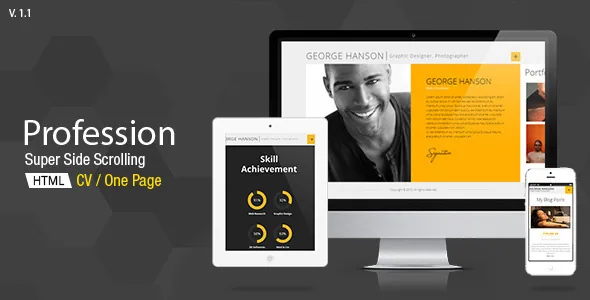
A resume that scrolls sideways on desktop and stacks on a phone
Most one-page themes treat layout as something you choose once. Pixflow's description of Profession makes the axis part of the responsive behaviour: the default is horizontal on desktop screens and switches to vertical on tablets and smartphones. A visitor at a wide monitor meets a side-scrolling resume; a phone visitor gets a stacked one, without you maintaining two builds.
The vendor's feature list also claims "2 unique versions, including Horizontal and Vertical layout," so the vertical presentation exists as a deliberate desktop choice too. The description adds that the layout can be changed and the theme used as a one-page site, which frames the horizontal arrangement as a page-level setting rather than a lock on the whole installation.
That is the first thing to picture: a CV page whose primary axis depends on the device, with a vendor-supplied alternative if you want the vertical flow everywhere.
Sections named by the theme, order controlled by the menu
The home page is described as a set of named sections — home, portfolio, resume and contact — with custom parts layered on top. The vendor records the custom part feature arriving in version 2.5 of the changelog, and the same entry explains how ordering works: changing theme section position now happens with menu items.
That detail changes the editing model. The sequence of your resume page is set through the WordPress menu rather than a builder canvas. Putting a skills block above your work history means reordering menu items. No Elementor, WPBakery or block-based builder is named in the vendor's feature list; the structure lives in theme options and the section system.
For anyone used to dragging rows onto a canvas this is a different habit to learn, and a reasonable one for a CV site that does not change shape often. Unlimited custom parts give the extra material somewhere to go — a speaking list, publications, a testimonial block — without waiting for the vendor to anticipate that section.
Shortcodes, a twelve-column grid and where colour is set
The feature list names an animated resume and skills area, a twelve-column grid system described as similar to Bootstrap, and a shortcode generator. Together those describe how the resume content is put together: shortcodes placed inside grid columns.
Shortcodes are text tags with bracketed parameters, not blocks, and the generator exists to produce them so you are not typing syntax from memory. If someone else will edit content later, expect to explain that workflow or to handle the updates yourself.
Colour works at two levels. Eight presets ship with the theme, and section colour is described as unlimited, so one section's palette can sit apart from the overall scheme. Headings use Google Fonts selected in the settings. The included files are PHP, CSS and JS, and High Resolution is marked No, so expect to style through the theme's own options and stylesheets rather than a layered design source.
Portfolio items carry media, not just a thumbnail
Profession's portfolio is described around content types rather than a uniform grid: an item can use a quote, an image, an image slider, a video or an audio clip, and the feature list groups these as portfolio types including audio, video, quote and gallery.
For a CV that is the difference between a page of screenshots and one that can show a recorded talk, a client quote or a project gallery. The changelog records popup and slider fixes across several releases, which is where that media presentation has historically been adjusted.
Alongside it, the theme includes a blog with sidebar and widgets — the marketplace marks Widget Ready as Yes — and names Contact Form 7 for the contact section. These are supporting parts, but they are what a visitor uses to read an update or send a message.
RTL, WPML and a map that needs your own key
RTL support was added in version 2.7, with rtl.css and rtl.xml files introduced in that release, and WPML is the single plugin listed in the compatibility attribute. The admin panel also includes a translation-ready feature. Between them you get an answer to the two questions a multilingual CV raises: whether right-to-left layout is handled, and whether translated content fits a standard workflow.
One requirement is easy to miss. A version 2.9.3 changelog entry adds a Google API key option to the theme settings and states the key is required to use the Google map. If an address map belongs in your contact section, budget for obtaining and configuring that key.
Social presence comes from an icon set the vendor counts at 20+ animated icons, with names added over time — Xing, Pinterest and Flipboard in version 2.8. A network that is not in the set is a small customisation rather than a setting.
The documented maintenance stops in 2016
The marketplace lists version 2.9.4 as the latest, and the changelog's final entry for it is dated 04 July 2016. The vendor's feature list still opens with WordPress 4, while the marketplace attributes observed on 4 November 2026 declare WordPress 6.5.x. Both statements sit on the same listing, with roughly a decade of WordPress releases between them.
That gap is not evidence that the theme breaks on a current install, and nothing here is a test result. It does tell you what the documentation and changelog actually cover. The most recent entries record an improved archive page, and before that a demo importer improvement and the Google API key option.
The Gutenberg Optimized flag is marked No. Read literally, the vendor makes no claim of block-editor optimisation; that is not proof the block editor cannot be used. Given that the theme predates the block editor and composes pages from shortcodes and theme options, plan on building pages the way the theme was designed.
Who the horizontal CV layout still works for
A personal CV site is low-volatility content: it changes when your career does, not weekly. Profession's horizontal desktop presentation reads as a deliberate design choice rather than a stock template, and the automatic flip to vertical means mobile visitors are not asked to pan sideways through your resume. Unlimited custom parts and menu-driven ordering leave room to grow the page past the four built-in sections.
It suits a project where you want that horizontal layout, are comfortable with shortcodes and theme options, and can accept documented maintenance that ends in 2016. The marketplace files it under personal blog and magazine themes, which matches what it is: a personal site with a blog attached, anchored by a resume page.
Questions & answers
Can I use Profession with a vertical layout on desktop?
Yes. The vendor supplies two versions, horizontal and vertical, and the description also says the layout can be changed. The default horizontal arrangement applies to desktop screens and switches to vertical on tablets and phones automatically.
Does Profession use Elementor, WPBakery or the block editor to build pages?
None of those builders appear in the vendor's feature list. Pages are composed from theme-defined sections and custom parts, with section order controlled by menu items, and the resume is built from shortcodes in a twelve-column grid. Gutenberg Optimized is marked No, meaning the vendor does not claim block-editor optimisation rather than proving blocks cannot be used.
Do I need a Google API key for the map?
The version 2.9.3 changelog entry adds a Google API key option to the theme settings and notes the key is required to use the Google map. Plan on obtaining one if you want a map in your contact section.


