Projects are a content type here, not a blog category
The vendor's description names the content set directly: projects, project details, blog and a testimonial page. Projects and project details as a pair is the part that matters for this trade. A completed bathroom refit, a boiler replacement or a commercial pipe run makes a better argument as its own case entry than as another paragraph of service copy, and the theme gives that work a separate place to live rather than filing it under blog posts.
Testimonials get a dedicated page in the same list, which is where a homeowner comparing leak repair companies tends to look. Both are content structures rather than styling options, so they depend on how you fill them: a project page with no job photos does not do the work.
Visual Composer is the editing path, and that shapes handover
The only page builder in the vendor's compatibility list is Visual Composer, and the feature list repeats it as "Visual Composer (Page Builder)." Gutenberg Optimized is marked No in the listing attributes.
That marks which editor the theme was built around; it does not remove the block editor from WordPress. You can still write ordinary posts in blocks. What you should not assume is that a block-built page picks up the theme's designed layouts or the builder elements the vendor created. If pages are meant to be assembled, they are assembled in Visual Composer's row and column model, and that is the skill the person maintaining the site needs after launch.
The 2019 changelog entry for version 2.3 records that new Visual Composer elements were added, so part of the toolkit is theme-specific rather than the builder's stock set.
The declared versions stop at WordPress 5.9.x
The marketplace listing, as observed on 4 November 2026, records version 2.6 dated 13 September 2021. That release covered updated plugins, minor fixes and optimised code. The entry before it, 2.5 from August 2020, added five demos alongside importer and activation changes.
The software version attribute runs from WordPress 4.9.x to 5.9.x with nothing above 5.9.x. Compatible browsers are listed as Firefox, Safari and Chrome with IE10 and IE11.
Those are vendor declarations, not test results. A theme declaring support to 5.9.x is not evidence that it fails on a newer release, and it is not evidence that it works either. If you install it on current WordPress, run a staging copy first and exercise the pieces you are relying on: the one-click demo import, the Visual Composer pages, and any plugin the site leans on. Check the version and file details in the place that actually serves the package rather than trusting a fixed number in an article.
Settings backup and the child theme are the launch-day features
Two items on the vendor's feature list are worth more after launch than during the design phase. Theme settings backup with import and export lets you carry a finished configuration from staging to the live site instead of re-entering option screens by hand. A child theme is named in the download contents, which gives CSS changes a place to live that survives a parent-theme file update.
WPML compatibility is also declared. Treat that as the starting point for a multi-language service site rather than a guarantee that translated layouts behave identically.
The download list also notes that preview images are not included. For a plumber that is a practical instruction: plan on real job photography rather than stock taps and wrenches.
Templates, headers and a shop you can leave off
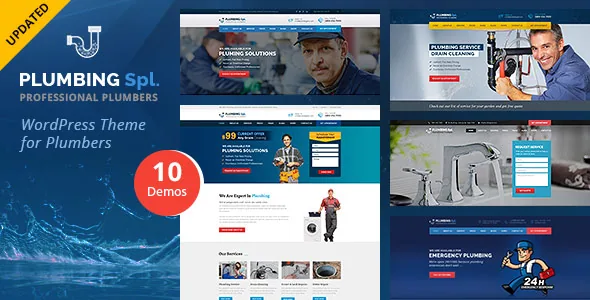
Multiple headers and multiple homepages are listed, and version 2.5 added five demos, so the template set is larger than the original 2017 release. One-click demo installation and the WordPress Live Customizer sit alongside a theme options admin panel.
WooCommerce appears on the feature list too. That means the theme is prepared to run a shop; it does not mean a plumbing site needs one. The listing does not describe what a plumber would sell, and shop behaviour comes from WooCommerce itself rather than from this theme. A service business that only needs project pages, testimonials and a way to get in touch can leave the shop switched off.
Several claims are broad enough to verify against the demo rather than take at face value: Bootstrap components compatible is a styling convention, not a promise about every element, and SEO friendly appears without a stated mechanism.
Who this fits, and the one constraint that decides it
Plumbing Spl fits a small plumbing or repair firm whose site is built once in Visual Composer and maintained by someone comfortable in that builder, with a project gallery, a testimonial page and a contact route carrying the sales work. The 2021 date on the last release and the 5.9.x ceiling mean a site running current WordPress should be validated on staging before you commit the build.
If the client expects to design pages with blocks, or if an actively maintained release history is a requirement, the constraint sits in the wrong place and this theme is not the starting point. The vendor's own demo site is the fastest way to judge whether the visual language suits a trades business at all.
Questions & answers
Can posts still be written in the block editor?
Yes. Gutenberg Optimized marked No describes the theme's design target, not a disabled editor. Ordinary posts work in blocks; designed page layouts are assembled in Visual Composer, and block-built pages should not be expected to inherit them.
Does the theme work on WordPress versions later than 5.9?
The vendor declares WordPress 4.9.x through 5.9.x only. Nothing in the listing says either way about later releases, so your own staging test is the only answer that applies to your install.
Do I have to enable WooCommerce?
No. WooCommerce is on the vendor feature list, so the theme is prepared for a shop, but the description does not require one. A service site can run projects, testimonials and a blog without it.