One theme, two page builders, and a migration action
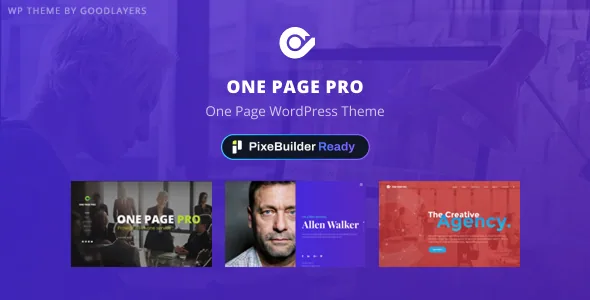
GoodLayers presents One Page Pro as ready for PixeBuilder while still supporting the company's classic page builder. The vendor describes both as live choices: build and edit pages in PixeBuilder, or keep working in the older builder. The description also names a "Migrate to PixeBuilder" action, so pages already built the classic way can be converted later instead of rebuilt from scratch.
That fork is the practical centre of the theme. A multipurpose one-pager is mostly an editing tool with a design attached, and this one asks you to decide which tool you open each day. Anyone who has used GoodLayers themes before will recognise the classic builder. If you are starting fresh, PixeBuilder is the direction the vendor is steering toward, and the migration action is what makes the choice feel reversible.
Choosing between the two builders before you build
The Corporate demo appears twice in the vendor's account: once as a demo and once as a PixeBuilder Demo with every page already built in the newer builder. The second version is the useful artifact, because it shows PixeBuilder across a full site rather than demonstrating a blank canvas.
What the description doesn't quantify is parity. It never says whether every classic-builder element has a PixeBuilder equivalent, or what a migration does to finely tuned layouts. The vendor frames migration as something available at any time, which reads as a route rather than a guaranteed lossless conversion. If a project already has classic-builder pages, test one migrated page against its original before converting the rest. New projects sidestep the question by picking a builder and staying inside it.
Bullet anchors are the visible one-page mechanism
The theme's named navigation feature is a set of bullet anchors on the right side of the screen that scroll to each section of the page. On a long single-scroll site this works as a permanent table of contents: a visitor sees how much page is left and can jump to a section without scrolling through everything in between.
The pattern rewards planning. Each section needs to work as a self-contained block with a clear title, which pushes you toward writing the section list before designing anything. The theme also keeps multipage capability, so the same install can carry a one-pager and a set of inner pages. Deciding early whether the anchors stay visible the whole way down, or sit quietly at the edge, is worth the five minutes.
Skin colours applied per wrapper section
The vendor's own example for custom skin colours is concrete: if a page has three wrapper sections, you can create a skin and use it in each. That is section-level theming inside the page builder rather than one global palette, and it fits a one-pager where the tone should shift between blocks — a light opening, a darker statement section, a neutral contact block at the bottom.
The trade-off is that consistency becomes your job. A single global colour setting keeps everything aligned; per-wrapper skins let sections drift apart. For a short page with three or four deliberately different blocks, the control earns its place. For a wider multipage build, settle on a small set of skins up front rather than inventing one per section. Full and boxed layouts and a 100% fluid content width sit alongside this, and they change how those section backgrounds travel across the screen.
Headers, footers and two different header counts
The feature list gives 18 header layouts with control over logo and navigation spacing, six footer layouts with an option to disable the footer or copyright block on specific pages, and secondary navigation that can use a slide or overlay style. Floating navigation and an optional top bar with social links run alongside them.
One inconsistency is worth knowing before you rely on a number: an older version of the same vendor text lists 19 header layouts, while the current description says 18. Neither figure tells you whether a particular layout exists, so treat the count as a rough inventory and pick from what the theme panel actually shows. Maintenance sits in the same picture — the vendor lists automatic theme updates and an import/export tool for theme options, widgets and custom page templates.
Three demos, only one built in PixeBuilder
The demo importer offers Corporate, CV and Creative. The vendor also mentions a multi-thread image importing technique intended to speed up the process, which matters because demo imports are usually slowed by media.
Only Corporate is described as also shipping as a PixeBuilder Demo with every page built in the newer builder. CV and Creative therefore serve as design references and classic-builder starting points, not as previews of PixeBuilder. If the newer builder is why you are looking at the theme, Corporate is the demo to import.
Images are a separate budget line. The vendor states plainly that images shown in the preview site are not included in the theme package, so an import gives you layouts and placeholder imagery rather than photography you can publish.
Compatibility as declared in November 2026
The marketplace attributes list WooCommerce 6.x through 10.x and WPML, with WordPress versions from 6.1.x through 7.0.x. The included files are recorded as PHP, CSS and JS. Those are vendor and marketplace declarations about supported ranges as listed in early November 2026, not the result of running the theme against a particular server or plugin set.
The CV and resume use case the vendor names shows why the distinction matters. A resume site that also takes payments through WooCommerce inherits whatever that plugin version and your other plugins produce. A staging install on your actual versions settles it, and the builder question belongs in the same test.
Questions & answers
Can I keep using the classic GoodLayers page builder after switching to PixeBuilder?
The vendor describes both builders as available and offers a Migrate to PixeBuilder action for converting existing pages. No reverse migration is described, so decide per project rather than assuming pages can move back and forth freely.
Which demo should I import if I want to work in PixeBuilder?
The Corporate demo. The vendor says it is also supplied as a PixeBuilder Demo with every page built in PixeBuilder; CV and Creative are described only as demos.