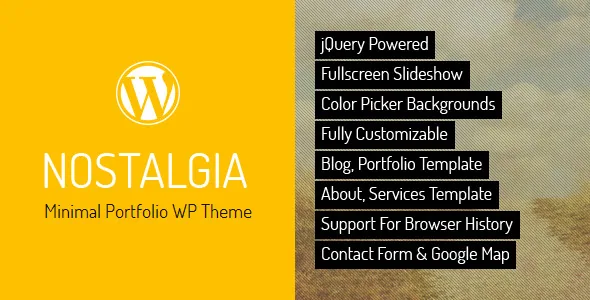
The site shape comes first: one fullscreen stage, pages that slide over it
Most portfolio themes ask you to think in sections and blocks. Nostalgia, from QuanticaLabs, asks you to think in pages layered over a single background. The vendor's description says the theme is "based on full-screen slider and sliding pages," and that you can add "unlimited number of pages in the form of scrolling menu."
That sentence is the whole architecture. There is a fullscreen slideshow behind everything, a menu that lists your pages as a scrolling sequence, and each page arrives over that stage rather than replacing it with a differently structured layout. The vendor describes the styling as a minimalist, contrasting treatment where background images kept in retro tones sit against modern minimal content.
If you have a fixed set of pages — work samples, an about page, services, contact — that is a coherent model. If your site needs long-scrolling marketing layouts with varied section rhythm, read the following sections before committing, because the theme's tools are built for the sliding-page pattern.
Ajax transitions and browser history: what a visitor actually gets
Two entries in the vendor's feature list describe how the sliding happens: "Ajax Based" and "Support for Browser History." Taken together, they mean page changes load without a full browser reload, while the address bar and back button still behave the way visitors expect.
The second half is the important one. Ajax-driven sites are easy to build in a way that breaks deep links and the back button, so a theme claiming history support is claiming the navigation stays addressable. The listing does not describe how those history entries are generated, whether each page has its own URL entry, or how the browser handles a refresh on a subpage. Those are the details to verify on the demo with a couple of tabs open.
The vendor also calls the theme "Responsive Layout" and says the fullscreen background "will adapt to any screen resolution." That is a declaration about the background layer; it does not describe how the slideshow behaves on a phone-sized viewport or whether the scrolling menu changes on touch devices.
The portfolio template: accordion categories, lightbox, embedded video
The portfolio is a built-in page template rather than a content type. According to the vendor's description, it presents categories "based on accordion," includes a built-in lightbox, and offers the possibility to play YouTube and Vimeo videos.
The accordion choice tells you something structural: categories expand and collapse within the same page, so visitors reveal more work without leaving the portfolio. Combined with the lightbox, the browsing loop is reveal a category, open an item large, move on. Adding video playback to the lightbox means a project entry can carry a clip as well as stills, which suits animation, film and motion-design portfolios in particular.
Read the boundaries of that claim carefully. Nothing in the vendor's description says the portfolio is built on a custom post type, that items are filterable by tag, or that portfolio pages are generated automatically from entries. It is described as a page template, and the description frames the interface as built-in and shortcode-driven rather than managed through the block editor.
Per-page colour and fixed icon sets are the customisation surface
The visual controls are unusual and narrow. The vendor lists "Custom Theme / Single Page Color From Colorpicker," six predefined page icons, ten predefined page header icons and ten predefined social icons.
A page-level colour picker means the accent can change from page to page, which fits the sliding-page model: each page carries its own tone against the shared retro background. The icon counts, on the other hand, are fixed sets. Six page icons and ten header icons are what ships; the number is your ceiling unless you write your own icon work.
The vendor also lists a "Background Music Player" as part of the package. On a portfolio site this is a presentation decision, not a content one. If you use it, give visitors an obvious control and expect some to leave because of it. The listing does not say whether it starts muted or whether it remembers a visitor's choice between pages.
The theme is marked widget ready, so sidebars and widget areas remain available alongside the template pages.
About, Services, map and contact ship as templates, not as free layout
The vendor's content pages are predefined. About and Services are "Built-In" page templates "implemented with Shortcode," the Google Map is a shortcode, and the contact form is described as a working form with its own configuration page.
In practice, you are filling in a shape rather than composing one. The contact page arrives with a map and a form, and the form's recipient and settings live on a configuration screen in the admin. That is a useful amount of work taken off your plate. It also means that if your contact page needs a different arrangement — multiple departments, an appointment scheduler, a form with conditional fields — you will be modifying the template rather than dragging something into place.
The same applies to Services. A shortcode-driven template gives you a consistent, styled way to present a list of what you do. Whether you can add a service without touching a shortcode block depends on how the theme exposes it, and the description does not say. Blog templates for an index page and a single post page are also included, with categories, comments and lightbox support on the single view.
The retro look is a typeface and image decision, not a colour scheme
The vendor's credits name the typefaces behind the preview: Dosis, Aldrich and DearJoe 5 Casual. The first two are open-licensed Google fonts; DearJoe 5 Casual comes from JOEBOB graphics and is the sort of handwriting face that carries the nostalgic tone on its own.
That matters for your own site because the atmosphere of the demo does not come from the theme settings you can change. It comes from the combination of a contrasting retro-toned background, the specific typefaces, and the credited Flickr photography. Swap in your own portfolio images — likely brighter, more contemporary work — and the retro frame will either complement them or fight them. Test the reaction with a handful of your real images before you build out the pages.
The vendor notes that the preview imagery is drawn from Creative Commons sources. Treat the demo photographs as illustrative of the style, not as assets you can republish as your own portfolio. The vendor also says PSD source files are available free of charge to buyers on request, which matters if you want to adapt the layered design work rather than only the live theme.
What the marketplace listing declares, observed 4 November 2026
The marketplace attributes attached to the product list WordPress 4.9.x through 7.1.x in the software version field, compatibility with WPML, and browsers including Firefox, Safari, Opera, Chrome and Edge. The theme is marked responsive, widget ready and Gutenberg optimized, with a two-column layout attribute. High resolution is marked "No." The ThemeForest file bundle lists PHP, CSS and JavaScript files, and the documentation is described as well documented. Those are declarations recorded on that date; they are not a report of testing against your PHP version, your plugins or your hosting.
The WPML entry is worth reading narrowly. It says the theme is listed as compatible with that translation plugin; it says nothing about translation files shipping in the package or about which languages the demo contains.
One structural note: the theme is judged here as a page-template and slideshow product. Its editing surface is not described in builder terms, so if your team expects to rearrange sections with a drag-and-drop editor, that expectation is the first thing to test on the demo — together with the back button, a deep link into a portfolio category, and the music player on a phone.
Questions & answers
Can I add new pages to the scrolling menu?
Yes. The vendor describes adding an unlimited number of pages in the form of a scrolling menu, and each can carry its own colour chosen from a colour picker. The listing does not describe a cap on menu items.
Does the portfolio behave like a filterable project archive?
Not according to the vendor's description. The portfolio is presented as a built-in page template with accordion-based categories rather than a custom post type with tag filtering, so portfolio items are added in the context of that template.
Is the theme built for the block editor?
The marketplace marks it Gutenberg optimized, and the vendor describes the About, Services, map and contact elements as shortcode-implemented templates. Those two statements coexist: expect the shortcode workflow for the built-in pages rather than a library of custom blocks.


