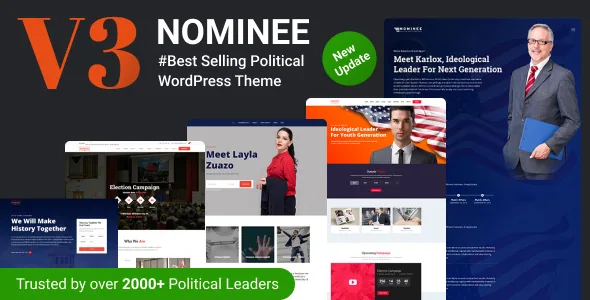
The page types are the product, not the homepages
Theme vendors usually sell homepage variety. Nominee's description sells something narrower: page types named after the documents a campaign actually produces. A Manifesto page described as a place to state what you stand for and pledge to do. A Biography page. A Video Gallery. A Success story timeline showcase. A Volunteer page.
That list is a useful self-check before you install anything. If you have written pledges you want published as pledges, a biography longer than an About paragraph, and a handful of dated milestones worth lining up in sequence, Nominee has a template slot for each. If your site is news posts plus a contact form, the most characteristic part of the theme goes unused. A manifesto is written before launch; a timeline only fills up after results exist; a volunteer page needs a recruitment process behind it, or the form collects names nobody contacts.
A volunteer page that assumes two jobs and a permission
The vendor describes the volunteer page as carrying a recruitment form and testimonials from current and past volunteers. Those are different tasks on one page: a signup path for newcomers, and social proof for anyone hesitating.
The testimonials are the part people underestimate. Quoting a named volunteer is a consent task before it is a design task, and it only works if the campaign has volunteers willing to be listed. The form side needs a destination too. The theme's feature list also names Contact Form 7, a Bootstrap framework, Font Awesome and Flaticon icon sets, and a MailChimp subscription block, so the supporter-facing machinery is conventional rather than proprietary. Confirm on staging which form plugin the imported page uses and where submissions land before you publish a link to it.
Donations: Charitable, forms and the reporting view
Nominee lists a built-in donation system, PayPal donations and offline donations, and integrates the Charitable donation plugin. The vendor describes Charitable's behaviour in some detail: unlimited fundraising campaigns with goals and optional end dates, donation forms with suggested amounts or open amounts, and forms that load in a modal, on a separate page or on the campaign page itself. A form can also be placed on any page through WPBakery, and a multi-label donation form is listed among the theme's features.
Administration matters as much as the form. The vendor says donations can be created and edited in the dashboard without an add-on, emails resent, donations sorted and searched, and a CSV report exported, with automated receipts, offline receipt text carrying payment instructions, and admin notifications.
None of that decides your donation policy. PayPal configuration, offline instructions, and how a gift is receipted and reported are your organisation's responsibilities, and local rules on political donations can be strict about who gives and how much is disclosed. A CSV export helps a treasurer; it does not make the ledger compliant.
Events and a countdown that stops being useful
Event publishing combines the theme's own modules with The Events Calendar. The vendor lists Event Countdown, Upcoming Event, Event Schedule, Event Speaker and a single event page among the theme's features, and says the modules can be customised and updated in seconds — an Event Speaker block implies programmed events with named participants, so rallies and canvasses without a lineup may need that block reworked or dropped.
The countdown is the module that changes a home page. It gives visitors one number to read, which suits a launch or polling day and reads as neglect a week later. The vendor describes the countdown text as changeable from an option added in an earlier release, which helps for relabelling, but decide before launch who removes or repoints the block once the date passes.
Editing between milestones, and where updates come from
Pages are assembled in WPBakery Page Builder, which the vendor includes and pairs with custom WPBakery templates so a section or a whole page can be placed without rebuilding it. That is the right unit of reuse for a campaign: the same hero, issue grid or donation block recurs across policy launches, and templates keep those repeats consistent once the first version is right.
Appearance runs through theme options: advanced typography managed there, Google Fonts selectable from the settings panel, unlimited preset colours, and four layout modes (fullwidth, boxed, frame, and fullwidth boxed). The feature list adds Issues, Reformation and Team member post types alongside the manifesto and timeline, plus standard and grid blog styles with nine post formats.
The changelog is worth reading as a maintenance plan rather than a feature list. Several releases bundle an updated WPBakery build and an updated TrendyTheme Core plugin; one entry states plainly that the core plugin must be updated before new demo imports or preset styles appear, and another fixes the demo import panel. In practice, builder and core plugin updates arrive with theme releases, so a site you intend to keep running needs an owner for that routine.
What the demo hands over, and what it does not
The vendor states that the images on the demo site are for demonstration only, are not included in the files, and require the authors' permission for reuse, with placeholder images supplied at each instance. For a candidate site this is the central content job, not a footnote: the visual argument is photography — portraits, crowd shots, event pictures — and someone has to license or commission it.
Treat the one-click demo import as a layout reference. Import it to see the manifesto, timeline and volunteer pages with their structure intact, then replace placeholders with images you have the rights to before the site is shared outside the team. The vendor's sales copy refers to five home pages in one place and seven in the feature list; the count is not the reason to choose this theme.
Declared compatibility and the multilingual case
As observed on the marketplace in November 2026, the compatibility field lists WordPress 6.6.x down to 4.9.x, WooCommerce 6.x through 8.x, The Events Calendar, WPML and WPBakery Page Builder, with Gutenberg Optimized recorded as Yes and the files listed as PHP, HTML, CSS and JS. Those entries are declarations at a point in time; only an install on your PHP version with your plugin set shows the combination working.
The vendor pairs WPML support with RTL readiness, which is the combination that matters for a campaign publishing in more than one language or script. Test on staging how the manifesto and timeline pages carry across languages before promising a bilingual site, since those page types are the ones with distinctive layouts to reproduce. WooCommerce is framed by the vendor as selling merchandise alongside the campaign rather than as the site's centre.
Questions & answers
Do I need the Charitable plugin to take donations with Nominee?
The vendor describes both a built-in donation system and an integration with the Charitable donation plugin, and details donation management, receipts and CSV export in Charitable's terms. Which component does the work on your site depends on the imported demo and your settings, so confirm it on staging before you promote a donation link.
Can the countdown stay on the home page after election day?
The module counts down to an event, election or campaign date, and the vendor describes the countdown text as editable. It does not describe an automatic post-date state, so decide in advance whether the block comes off the page or is repointed at another milestone.
Can I use the photos from the Nominee demo?
No. The vendor states that demo images are for demonstration only, are not in the download, and require the authors' permission for reuse. Placeholder images are supplied for each instance, so plan on commissioning or licensing your own photography.