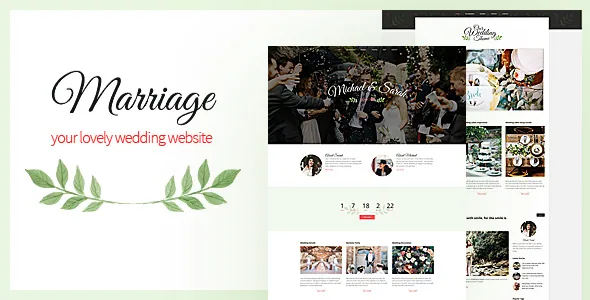
The wedding site lives in one custom panel
Marriage's settings are gathered in a "simple nonbranded ajax powered admin panel" with a custom colour picker, according to the marketplace description. No Customizer workflow is described, and no page builder is listed. The theme's appearance is changed from a theme-owned screen that saves without reloading the page.
That is a sensible arrangement for this kind of site. A couple builds the whole wedding presence once, in one place: colours, the home page media, a few content pages. The panel also has a RESET tab, so the vendor expects people to be able to wipe and restart its settings. Anything the panel does not cover is meant to be changed in the theme's CSS file, which the vendor names as the second route to customisation.
If you are comfortable with CSS, that is a direct path. If you expect to change spacing, typography and layout by dragging blocks, plan for a different sort of work.
Slider, carousel and countdown as front-page parts
The feature list gives the home page a featured slider, a featured carousel and a featured countdown. In wedding terms those map onto the pictures and the date: engagement or venue photographs in the slider, a rotating image row in the carousel, and a counter running toward the ceremony.
All three are described as home page features rather than general modules you drop anywhere, and the marketplace does not describe a homepage builder. Think of the front page as a supplied arrangement you fill with your own images and date, not a canvas you design from scratch. The vendor also lists a full-width page layout with multiple section arrangements and a 4+ column, widget-ready layout, which is how inner pages get their structure.
RSVP and contact, and what the vendor leaves open
A "working rsvp and contact form" is on the feature list, and it is the detail most couples will care about beyond the design. The description does not say where submitted RSVPs are stored, whether they are exported, or how guest counts are handled. That gap matters on a site where the form may become the record of who is attending.
Send a test entry before you rely on it. Check where the response lands, whether you receive it as an email, and whether a copy is kept inside WordPress. If guest numbers have to be auditable, keep your own list alongside whatever the form collects.
Photo Album and blog as separate page types
The feature list names a Photo Album page and a Blog design page as two distinct items. For a wedding site that separation is useful: photographs from the engagement shoot, the venue or the day itself are not the same as written updates, travel notes or a schedule of events, and neither needs to compete with the other inside a single post archive.
The description does not specify album layouts, lightbox behaviour or how images are grouped once they are on the page, so the album is best treated as a page template whose look you judge on the theme's own preview. What the evidence does support is the intent: a dedicated photographic page, plus a blog for text.
Shortcodes, widgets and the jQuery menu
Custom widgets, a jQuery drop-down menu, Google web fonts and "smart shortcodes" complete the toolkit. Shortcodes are how theme elements get inserted into ordinary page content when there is no panel field or template slot for them. It works, but a shortcode deleted by accident takes its output with it, and a shortcode pasted without its closing tag can break the rest of the page. Keep copies of page content before large edits.
The Google web fonts entry refers to font loading rather than a font manager in the panel; the description lists no typography controls beyond the colour picker. Google also changed how its font service is delivered over the years, so check that the fonts you want still render as expected rather than assuming the list is current.
An older editing model, stated plainly
The marketplace attributes list Gutenberg Optimized as No and declare support for WordPress 5.5.x through 6.0.x, with the vendor record last updated in April 2019. Those fields describe how the theme was built and described, not a switch that turns the block editor off. What they do tell you is that the panel, shortcodes and CSS are the surfaces the theme was designed around, and that block-based page building was not part of the plan.
Compatibility statements are claims, not results. Run the theme on your actual WordPress version and PHP build with your plugins active, then check the slider, carousel, countdown and both forms on a phone before the invitations go out. A wedding site has a fixed deadline, so leave time to fix what the check turns up.
Rebuilds after an update: the vendor's own warning
The most practical line in the description is about updating. The vendor states that updating from an older version of Marriage requires replacing the theme files and then re-adding content for the home page slider, the carousel and the photo album page, suggesting the supplied demo XML to repopulate those areas and a RESET of the custom admin panel afterwards.
Read literally, that means panel settings and media blocks are not guaranteed to survive an upgrade untouched. If you have set colours, chosen slider images and filled an album, record those values outside the site before you update. On a site that has to stay live through an engagement period, plan the update for a quiet moment, or skip it until after the event.
Files in the package
The marketplace file list names a layered PSD along with PHP, CSS and JavaScript files. The PSD is the item worth knowing about: if a designer needs to reuse the theme's styling in a printed invitation or a save-the-date card, the layered source saves rebuilding it from the browser.
Help files are listed as included and the documentation is recorded as well documented, which makes the documentation the place to look for panel specifics the description skips. Neither entry promises support duration or update entitlements.
Questions & answers
Where do RSVP submissions go?
The vendor lists a working RSVP and contact form but does not describe storage or export. Send a test reply immediately after setup and check both the email inbox and the WordPress admin, then keep your own guest list if attendance numbers need to be reliable.
Does the theme have a page builder?
None is described. The theme is configured from its own ajax admin panel, with shortcodes for inserting theme elements into page content and CSS for anything beyond the panel's settings.
What should I back up before updating Marriage?
The vendor's update note says slider, carousel and photo album content must be re-added after replacing the theme files, and that the custom admin panel should then be reset. Save your images and note your panel values elsewhere first.