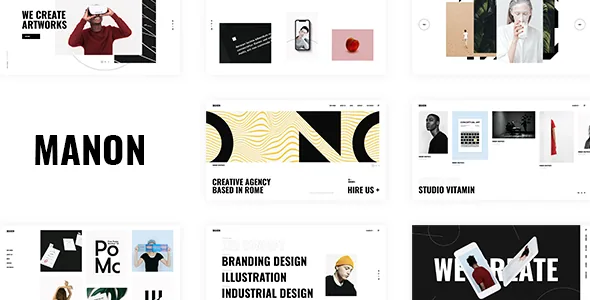
A portfolio built as a set of layouts, not one grid
Plenty of agency themes ship a portfolio grid and a filter, then leave you to it. Edge-Themes describes Manon around the opposite idea: the vendor summary claims "a collection of more than 30 creative portfolio layouts," and the feature list backs that up with separately named portfolio elements rather than a single gallery block.
That distinction matters when you are planning how a visitor moves through your work. A studio with twelve case studies and a studio with ninety need different browsing mechanics, and the theme's feature list treats list layout, pagination, filtering and animation as independent settings. You are choosing a browsing model, not just a skin.
One thing to keep separate: the marketplace attributes flag the theme as Gutenberg Optimized: No while also listing Block Editor among compatible platforms. That attribute describes the vendor's stated optimisation, not a ban on WordPress's block editor — and the changelog shows a block route was added deliberately.
The list shortcodes and the scanning job each one does
The feature list names the portfolio list elements individually, which is more useful than a layout count. Portfolio List is the general workhorse. Portfolio List – Horizontal, Portfolio List – Stacked and Portfolio List – Tooltip are three distinct treatments of the same projects, and each implies a different reading rhythm.
A horizontal list pushes a visitor sideways through a small number of strong pieces; it suits a homepage where you want a handful of projects to feel curated. A stacked list builds a vertical scroll of overlapping or layered entries, which favours sequence and pacing. The tooltip variant puts project detail behind hover, hiding metadata until the pointer reaches the item — good on a desktop where detail is secondary, less helpful on touch devices where hover has no equivalent.
Two more elements fill in the edges. Portfolio Slider cycles through projects without requiring a click, and Portfolio Vertical Loop presents projects as a continuous vertical run. Portfolio Category List sits alongside them as a way to expose the taxonomy itself, so a visitor can enter through service type or sector instead of a flat list of projects.
The vendor also lists hover types for portfolio lists and a variable grid size, so the same shortcode can be recombined rather than requiring a different theme for each arrangement.
Pagination, animation and filters change how people browse
Three pagination types are listed: standard pagination, Load More and Infinite Scroll. These are not interchangeable conveniences. Standard pagination gives each page its own URL and a clear end point, which helps when someone wants to return to a position or share a page. Load More keeps the visitor on one page and lets them pull in the next batch deliberately. Infinite Scroll removes the decision entirely and keeps appending, which works on a gallery of images and wears thin when a visitor is trying to reach a footer with contact details.
The feature list also names two toggles that sit on top of the list: Enable Article Animation on portfolio lists and Enable Category Filter on portfolio lists. The first controls whether entries animate as they enter view; the second adds a category filter so a visitor can narrow the list themselves. A filter only earns its place if your projects actually divide cleanly — branding, web, packaging — rather than clustering under one label.
Worth checking before you commit: these are vendor-listed options, not settings we have configured or tested. Whether a specific combination of shortcode, pagination and hover type behaves the way you want is a question for a staging install.
Where a single project gets argued rather than listed
The list gets someone interested; the project page is where you make the case. The feature list separates single-project layouts into named types: Portfolio Single Slider, Portfolio Single Gallery, Portfolio Single Masonry, Portfolio Full Width Custom, Portfolio Custom, Portfolio Small Images and Portfolio Small Masonry.
These read as different amounts of authored structure. A slider layout puts the images in a controlled sequence, so you decide the order and the pace. A gallery or masonry layout hands more control to the visitor's scroll and suits a large photographic set where no single image is the point. The custom layouts suggest a free-form builder canvas for a page that needs a written narrative between images. Small Images and Small Masonry trade visual scale for density — practical on a desktop screen showing a wide contact sheet, less so on a phone.
Three more elements support the write-up: Portfolio Project Info, Portfolio Inline Project Info, and an Image Gallery shortcode. Project info is the place for the client, the date and the disciplines involved — the metadata that tells a reader what kind of problem you solved. The Interactive Link Showcase shortcode is listed separately and points toward project pages that present links or destinations rather than only stills.
Three editing routes, and what each one implies
The feature list names WPBakery Page Builder as included, and the changelog tracks its version release by release. Slider Revolution is also listed as included alongside the bundled builder. That is the traditional route: build pages on a WPBakery canvas, place the portfolio shortcodes, and manage sliders in Revolution's own interface.
The theme is also stated as compatible with Qi Addons for Elementor, and Elementor editor behaviour appears in the changelog — including a fix in version 2.7.2 for Elementor editor loading when the smooth page transitions preloader is enabled. That entry is a useful reminder that the Elementor route is maintained rather than merely declared.
The third route is Gutenberg. Qi Blocks for Gutenberg is listed as compatible, and the changelog for version 2.4 records both "Added Qi Blocks as required plugin" and "Added Gutenberg demo import option." A separate import option suggests the block route has its own starting point rather than being a skin over the WPBakery demo. If a particular demo design is the reason you are considering Manon, confirm which editor that demo was built in before planning your build around it.
The changelog also shows the pattern of maintenance you would expect from a long-lived theme: version 2.7.2 in September 2025 added WordPress 6.8.x and WooCommerce 10.2.x compatibility and refreshed the bundled plugins. Marketplace attributes captured on 4 November 2026 declare WordPress 6.5.x through 7.0.x, WooCommerce 9.x and 10.x, WPML and Elementor among compatible platforms. Those are vendor and marketplace declarations, not a record of testing against your host, PHP build or plugin set.
Headers, one-page anchors and split-screen structure
Four header types are listed: Standard, Minimal, Vertical and Vertical – Right. A vertical header runs down a side of the screen instead of across the top, which frees horizontal room for wide imagery — a layout choice that changes how a portfolio homepage reads before any project appears.
The theme also lists Anchor functionality for One Page sites, and the vendor summary mentions split-screen layouts. Together they point at a structural option some studios want: a single scrolling page split between a persistent brand panel and shifting content, with menu links that jump to sections instead of loading new pages. Smooth scroll and smooth page transitions are both listed, and the changelog shows the transitions were the source of a real bug — the Elementor editor loading fix in 2.7.2 — so expect to verify page transitions against whichever editor you use.
Header behaviour is configurable beyond the type: the feature list names a Side Area, integrated search, a separate mobile header logo, separate styles for the mobile header, separate logos for light and dark header versions, and a separate logo for the sticky header. Widget areas exist at the top and bottom of the header, plus custom widget areas. The practical consequence is that a logo cut for a light background will not be forced onto a dark header or a sticky bar.
Commerce and the wishlist claim, in proportion
WooCommerce compatibility is declared, and the vendor summary highlights full compatibility with QODE Wishlist for WooCommerce, which it describes as letting visitors create and share lists of products they are interested in. The changelog places this in context: version 2.6 added the wishlist plugin as a required plugin, and version 2.7 added QODE Quick View for WooCommerce in the same way.
"Required" is the word that matters there. A declared integration is not proof that a shop runs out of the box; it tells you the theme's own setup expects those plugins present. If your project is a portfolio with a small print or product section, that is worth knowing before you add a store. If it is a portfolio pure and simple, the commerce layer is likely to sit unused.
One inconsistency is worth flagging rather than resolving: version 2.6 of the changelog records "Removed Manon Twitter Feed Plugin due to Twitter API changes," while the feature list still names a Twitter List shortcode and a Twitter Feed widget. Treat any social feed element as something to verify on your install rather than assuming it works.
When the portfolio matrix is the reason to choose Manon
Manon earns its place when the work you are showing needs more than one presentation: a curated horizontal run on the homepage, a filterable list on the work index, and a slider-led page for the flagship case study. The named list and single-project layouts, the three pagination modes and the filter toggle all exist to let those decisions be made per section rather than baked in.
If your needs are simpler — one grid, a few project pages, no store — much of that apparatus will sit untouched. The theme's remaining strengths (four header types, vertical and split-screen structures, bundled WPBakery and Slider Revolution, a child theme and WPML compatibility) are also available elsewhere, and the images in the demo are presentational only: the vendor states plainly that they are not licensed for your site.
Before you build, check which editor the demo you like was made with, confirm whether the wishlist and quick view plugins are part of your plan, and test the pagination and transition settings on a staging copy. The layout claims above come from the vendor's feature list and changelog, not from hands-on configuration.
Questions & answers
Does Manon work with the block editor, given the marketplace marks Gutenberg Optimized as No?
The theme is listed as compatible with Qi Blocks for Gutenberg, and version 2.4 of the changelog records adding Qi Blocks as a required plugin along with a separate Gutenberg demo import option. The Gutenberg Optimized attribute describes the vendor's stated optimisation level; it is not a statement that the block editor is unavailable.
Which page builder should I plan around?
The feature list names WPBakery Page Builder as included, alongside Slider Revolution, and states compatibility with Qi Addons for Elementor and Qi Blocks for Gutenberg. Three routes are therefore documented. Since a demo design may have been built in one specific editor, confirm that before committing your build.
Can I use the demo images on my own site?
No. The vendor states that it does not own the copyright for the images used in the demos, that they are presentational only, and that you would need to license them from a stock image source yourself.