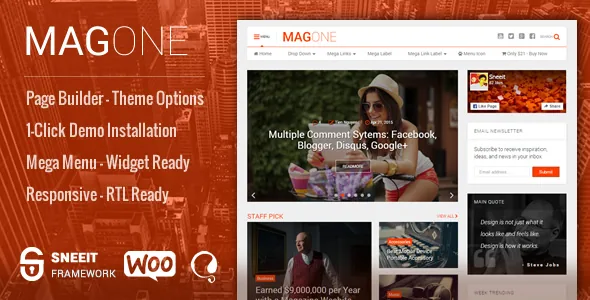
A front page assembled from feed modules
MagOne's main-features list begins with "a lot of article boxes: slider, ticker, carousel, grid, columns, blog roll." That line describes how the vendor expects a newspaper or magazine front page to be built. Rather than drawing one layout and dropping in a single loop, you stack repeated feed modules, and each module presents the same pool of posts in a different rhythm — a ticker for breaking headlines, a slider for the lead story, a grid for a section index.
For a publication this is the difference that matters. The home page becomes a series of editorial calls: what holds the top slot, what scrolls through the ticker, which category fills the carousel. MagOne supplies the containers; you set the order.
These are vendor-described modules. How they behave with your own headline lengths and image crops is something the demo site shows better than a feature list.
Comments and user ratings as theme features
The vendor treats discussion as part of the theme rather than a plugin decision. MagOne supports the native WordPress comment system alongside Facebook Comments and Disqus, and the description says you choose which is primary and can disable the ones you don't want. Readers can insert images, animated images, video and emoticons into a comment, and media links in comments are converted into embedded objects or players.
A second layer is the review system: the vendor lists point-style and star-style rating schemes for reader feedback. If your site publishes scored reviews, a rating can sit in the post itself.
The trade-off is moderation. Three comment systems mean three surfaces to police, and comment media adds another. Pick the one your editorial team will actually watch.
Ad spots, subscription boxes and the shop side
Advertising is handled through designated ad spots: the vendor says you paste your ad code into a spot and it renders there, and describes the placements as designed for click-through. Standard-sized ad blocks are said to be built into the package, with the Affiliate Marketers Blog demo given as the example.
Email capture is a widget matter. The vendor describes simple subscription boxes that you place wherever you drop the widget, with multiple sidebars plus custom sidebars you define.
The listing also declares WooCommerce compatibility for versions 5.x through 8.x, as observed on the marketplace on 4 November 2026. That is a declaration, not a test of how a shop behaves against your own plugin stack.
Built for a deep category tree
On a publication with a dozen sections, navigation does real work. The vendor describes MagOne's mega menus as supporting link groups and both simple and complex category content — the structure that lets a header hold a top-level section, its subsections and a feed preview instead of a long list of plain links.
Header layout is switchable, and the vendor says the switch is a one-click choice in the Customizer or Theme Options. Those two panels both exist: a Customizer with custom font upload and unlimited colours and backgrounds, and a separate Theme Options screen for anyone who does not want to work in the Customizer. The vendor also lists automatic social counters.
Post-level presentation gets attention too: tags above or below the content, social share elements, author profile information, and popular-post widgets that can show trending items, most-viewed posts or most-commented posts.
The Sneeit builder and a shifting editor relationship
Layouts on individual pages come from a drag-and-drop page builder shipped as part of the Sneeit Framework, alongside shortcodes and menu-location tools. The vendor calls the builder light and casual to work with.
Its relationship with the block editor has changed more than once, and the release notes are the place to see it. Version 7.4.7.6 (April 2021) added page-builder support on Gutenberg and stated the Classic Editor was no longer needed. A July 2019 entry required the Classic Editor; a 2024 entry requires both the Classic Editor and Classic Widgets to work. The marketplace attribute for Gutenberg Optimized reads No, which states that the vendor has not declared the theme as optimised for the block editor — not that the block editor is unavailable.
If your editors work in Gutenberg blocks today, the current behaviour is worth confirming before you commit. The marketplace file list for the item names PHP files only, so do not assume bundled design source files.
What the long release record tells you
A theme with release notes going back years reveals more than a feature list does. The entries record the builder being repaired between 2020 and 2022, mobile sticky-menu fixes, an AdSense rendering fix for the header ad slot, and comment-system fixes — including Facebook Comments not displaying in November 2025.
Two entries should be read without euphemism. Version 8.8.8.4, dated August 2024, is logged as fixing unauthenticated remote code execution. A March 2026 entry records a patched cross-site scripting vulnerability. These are vulnerabilities the vendor reported and says it fixed. The useful conclusion is that the theme is security-maintained, and that a current release is the one to run rather than an old copy.
As observed on the marketplace on 4 November 2026, the listing records version 9.1 with a March 2026 vendor update and declared support for WordPress 5.3.x through 6.5.x. Those are vendor and marketplace declarations, not results from testing against your PHP build or plugin mix.
Ten demos, ten different editorial briefs
The vendor lists ten demos: Tech Magazine, Fashion Website, Trending News, Flat Design, Affiliate Marketers Blog, Ecommerce Store, Music Website, Lifestyle Website, Writers Website and Creative Portfolio Website. That spread is wider than a typical magazine theme, and it frames the practical choice. A tech publication leaning on tickers and grids, an affiliate blog leaning on ad blocks and a music site leaning on imagery want different arrangements of the same article boxes.
The vendor says each demo imports in one click from the admin area together with its layout and demo blocks. Demo imports write content, menus and widget settings, so run them on a staging site first.
The decision comes down to whether your front page is genuinely a stack of feed modules. If it is, the box inventory is the reason to look at MagOne. If your home page is a hand-composed editorial page, the builder carries more of the weight — and the editor-compatibility question above becomes the one to settle first.
Questions & answers
Do the article boxes only show posts from the theme's own layouts?
The vendor describes the boxes as reusable modules — slider, ticker, carousel, grid, columns, blog roll — and the page builder as placing blocks anywhere on a page. Choosing both the module and its position is the working assumption; how each module filters content is documented in the theme's own documentation rather than summarised here.
Does the review system replace a reviews plugin?
The vendor lists point-style and star-style rating systems built into the theme for reader feedback on content. That covers user ratings on a post; it is not described as a separate product-review or comparison system with its own data model.
Do I have to use the Classic Editor with the page builder?
The release notes disagree across time: Gutenberg support for the builder was added in April 2021, a July 2019 entry required Classic Editor, and a 2024 entry requires the Classic Editor and Classic Widgets. The listing marks Gutenberg Optimized as No. Test your own editing workflow before committing to a build.


