Four ways to lay out a portfolio list
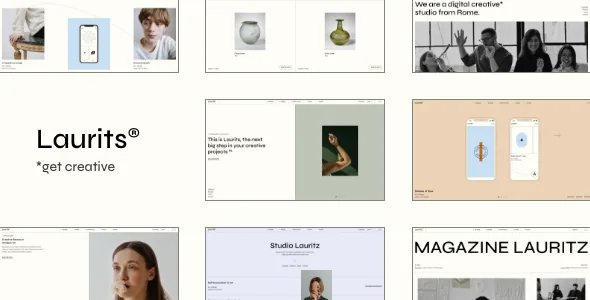
The marketplace feature list for Laurits spends more lines on portfolio display than on anything else, and that is the right place to start judging it. A Portfolio List shortcode can run in Gallery, Masonry, Slider or Justified Gallery layout, and each one handles uneven work differently. Gallery suits a collection with consistent crops. Masonry and Justified Gallery both absorb mixed image proportions, but they distribute the remaining space in different ways. Slider takes over the section and presents one project at a time.
That choice is per shortcode, so a studio site can put a Justified Gallery on the work archive and a Slider on a services page without switching themes or rewriting templates.
Hover animation on list items and an optional category filter sit alongside the layout setting. The filter is the practical one for a photographer or agency with many projects: visitors narrow the grid before clicking through, instead of scanning everything.
Pagination as a browsing decision
Three pagination types are listed for portfolio lists: Standard pagination, Load More and Infinite Scroll. These are not interchangeable decorations. A deep archive of case studies usually benefits from a numbered standard pager, because people return to a specific page or send someone a link to it. Load More gives a visitor a deliberate action that reveals a batch of new work. Infinite Scroll removes that action entirely and keeps the page filling as it scrolls.
For a portfolio that doubles as a portfolio-plus-blog site, the choice may differ between the two archives. Laurits applies the setting to portfolio lists specifically, so the blog feed keeps its own configuration rather than inheriting the portfolio behaviour.
Single project pages and the two showcase shortcodes
Project detail pages get their own set: Portfolio Gallery in Big and Small layouts, and Portfolio Images in Big and Small layouts. Put plainly, you decide whether a project is told through a gallery arrangement or a straight image sequence, and then how much weight each image carries on the page. A photographer with wide landscape frames tends to want a different setting from a studio posting device mockups.
Two shortcodes go further than a grid. Fullscreen Portfolio Slider gives a single project or a curated selection a full-viewport presentation. Interactive Portfolio Showcase is listed separately, which suggests a display that responds to visitor interaction rather than playing on its own. Both are worth previewing on the vendor demo before you commit to the structure, because they change how much of the page belongs to imagery.
A standard set of supporting shortcodes fills out the rest of the page: Section Title, Info Section, Image Gallery, Clients List, Clients Showcase, Team List, Testimonials List, Video Button and Social Share. An agency site can assemble a project page, an about page and a contact page from these without a second plugin for each element.
Header types and logos that swap by context
Laurits lists four header types: Minimal, Standard, Vertical Sliding and Tabbed. The fourth is the unusual one. A tabbed header makes navigation a panel that opens rather than a bar that stays, which is a design decision as much as a navigation one.
More useful in day-to-day operation is the logo handling. The feature list includes an optional separate logo for the mobile header, separate styles for the mobile header, separate logos for light and dark header versions, and a separate logo for the sticky header. If your brand mark is dark and your hero image is dark, this lets you keep a light version for that state instead of forcing one logo to work everywhere. Header Top and Header Bottom widget areas, a customizable mega menu, a Side Area and integrated search complete the chrome.
Two editing paths: Elementor and Qi Blocks
The theme is positioned for both Elementor and the block editor. Elementor support is listed as plugin compatibility, and the changelog records improved Elementor compatibility in version 1.5. On the block side, Qi Blocks for Gutenberg is described as compatible, and version 1.2 added it as a required plugin along with a Gutenberg demo import option. Gutenberg Optimized is marked Yes in the marketplace attributes, and Block Editor appears in the compatibility list.
The required-plugin entry is the detail that matters when you plan a build. Whether your site ends up in Elementor or in blocks, the practical answer comes from installing on a staging copy and importing a demo, not from the feature list. The theme also includes a child theme, which keeps customisations out of the parent files if you edit templates.
Slider Revolution and the demo images
The vendor states that the Slider Revolution Responsive WordPress Plugin is included, valued at $109. That is a vendor claim about the package rather than something confirmed here, and the changelog supports it indirectly by recording Revolution Slider version updates in each release, most recently 6.7.51 in version 1.6.
Images are a separate matter, and the vendor is explicit: the photographs in the demo are not owned by the theme author, are used for presentation only, and cannot be used on your site unless you license them from a stock source. A one-click demo import gives you layout and styling; the photography that makes the demo convincing is your own asset or a separate purchase.
Declared compatibility, versions and what is not guaranteed
As recorded on the marketplace listing on 4 November 2026, the latest version is 1.6, with the vendor's last update dated 24 March 2026. The declared software range is WordPress 6.5.x through 7.0.x, and the compatibility attribute names WooCommerce 10.x.x and 9.x.x, WPML and Elementor. The changelog backs some of that up: version 1.6 improved WooCommerce styles and updated the WPML config file, while version 1.5 added that config file and improved PHP 8.3 compatibility.
What the same release notes do not describe is equally relevant. Version 1.6 lists improvements to font and pagination helper functions and a fix for custom font adding, but says nothing about the portfolio shortcodes or the header mechanics this theme is sold on — so nothing in the record confirms that a later WordPress release leaves those parts behaving as the demo does. Treat that as an open question rather than a fault, and settle it on your own PHP and plugin versions. The package is listed as containing PHP, CSS and JavaScript files, widget ready, high resolution and well documented, with a responsive layout supporting four or more columns.
Questions & answers
Can I use Laurits as a shop as well as a portfolio?
The vendor lists WooCommerce 10.x.x and 9.x.x as compatible and provides a Product List shortcode, a WooCommerce DropDown Cart widget and a WooCommerce Side Area Cart widget. The changelog for version 1.6 records improved WooCommerce styles. Commerce is a secondary capability here; the feature list is weighted toward portfolio display.
Does Laurits work with the block editor or only Elementor?
Both paths are declared. Elementor is listed as compatible, and Qi Blocks for Gutenberg is described as compatible and was added as a required plugin in version 1.2, which also introduced a Gutenberg demo import option. Gutenberg Optimized is marked Yes. Confirm on a staging install which editor you want to build in before importing a demo.
Are the demo images included with the theme?
No. The vendor states that the images in the demo are used for presentation only, are not owned by the theme author, and cannot be used on your site without purchasing a licence from a stock image site. Plan for your own photography or image licensing alongside the theme.