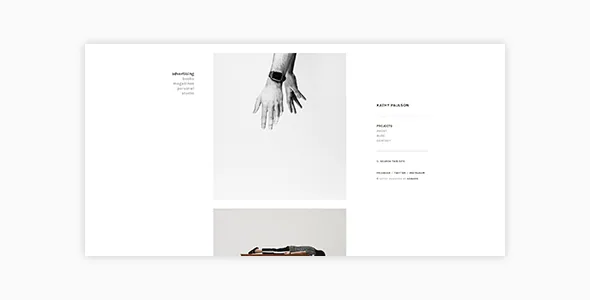
A side menu that frames the images instead of sitting above them
Kathy's defining choice is structural. The vendor offers two site layouts: a right site menu, which is the default, and a left site menu. Navigation and identity occupy a column beside the content, so a photographer's images sit next to a persistent panel rather than beneath a horizontal header.
The left-hand option is not original-equipment: version 2.1.0 added it under Customize > Theme Settings > General Settings, according to the changelog. Earlier releases fixed the vertical centring of that side panel and its copyright and social icon placement on mobile viewports, so the panel has been the theme's centre of gravity since the start.
What that means for your site: the panel holds the navigation, so a long primary menu with many top-level entries will crowd it. Plan a short menu, or a flatter structure grouping projects into a few portfolio categories.
List or grid from one portfolio listing template
Portfolio work is published through a dedicated page template, and the vendor provides two layouts for the listing itself: list and grid. The demo shows them on the same site, with the grid reached by a layout parameter in the demo URL rather than through a separate demo install.
The choice is really about how many projects a visitor should absorb at once. A grid rewards a set with consistent crop ratios and tonal range, because the images are compared side by side. A list gives each project more vertical room, which suits a body of work where one frame per entry does the arguing.
Portfolio styles and the options that shape the listing are grouped in the WordPress Customizer, so the layout configuration lives on the standard settings screen instead of a separate theme panel.
Each project is published as an image, a video or a mix
Item format is set per project, not per site. The vendor's feature list names three formats — image, video and mixed — and points to a demo project for each.
That distinction matters most for the mixed case: a single project page can carry stills and moving image together, so an installation documentation piece or an editorial commission with a film element does not have to be split into two entries. Video items also have a caption field, which the changelog shows being added in version 1.0.1 and later widened to allow basic text formatting.
Whatever the format, the project still occupies one slot in the listing, so your index does not need special handling for video entries.
Typography, colours and the lightbox toggle live in the Customizer
The vendor describes typography as a combination of settings rather than a single font choice: font size, weight, letter spacing and colour can be adjusted in various areas, with Google Fonts available in the typography section. Blog excerpt length is a Customizer option too.
The lightbox switch is the setting most photographers will reach for. It enables or disables a lightbox on portfolio single pages; leaving it on pushes visitors toward full-size frames, turning it off keeps the project page self-contained. Version 2.1.0 added a Fancybox 3 choice for the lightbox.
That same release mentions fast preview when adjusting colours and other styles, meaning the Customizer preview updates without a page reload. Version 2.1.1, dated 8 May 2022, fixed errors in the Customizer — a housekeeping release rather than a feature one. These are vendor statements about the settings surface; how far each control reaches is something to judge on the demo.
The demo's photographs are placeholders, not package contents
The vendor states plainly that most photos in the live preview are not included. Instead, the import XML creates image placeholders for every area, so you can drop your own files into the positions the layout already defines.
That placeholder set is more useful than it sounds. The grid's crop ratios and the framing of single-project pages are reproducible with your own photographs without hunting for images that match the demo's dimensions. What you cannot do is launch with the preview's look as-is.
The same import file covers posts, pages and portfolio items, giving you a content structure to replace rather than build from scratch. The vendor also notes that Kathy is for self-hosted WordPress installations and not for wordpress.com sites.
Language plugins, the block editor and child themes
The vendor lists WPML and Polylang compatibility alongside translation readiness and a POT file. The marketplace attribute observed on 3 November 2026 records only WPML under Compatible With, but the changelog for 2.1.0 adds Polylang support and fixes a portfolio category menu that failed to display under WPML — so the description and changelog agree, and the attribute is the narrower record. If your site is translated, note that the portfolio category menu was the fragile part in both plugins.
The vendor describes the theme as WordPress Block Editor optimized, and the marketplace attribute agrees; version 2.1.0's changelog entry confirms it as an update. Blog-side options added in that release include blog meta display, post navigation links and category descriptions.
The vendor states full support for WordPress child themes, which is the usual way to keep your edits when the parent theme is updated.
Declared versions, and where the vendor record stops
Marketplace attributes observed on 3 November 2026 list WordPress 5.8.x through 6.2.x, Gutenberg Optimized set to Yes, responsive layout, widget-ready areas and PHP, CSS and JS files in the package. The marketplace's latest version is 2.1.1, and the vendor's last recorded update is dated 10 May 2022.
Treat those versions as a declared range rather than a verdict. A listing that stops at 6.2.x neither proves Kathy breaks on a newer WordPress release nor proves it works there — the record simply ends. If you run a current version, test the theme with your image sizes, caching and plugins on a staging copy before you commit.
Questions & answers
Can one portfolio project contain both stills and video?
Yes, as a per-item choice. The vendor lists image, video and mixed formats for portfolio items and provides a demo project for each. Mixed items combine stills and video on a single project page, and video items have a caption field.
Can I switch the side menu to the other side?
The vendor offers a right site menu (default) and a left site menu. Version 2.1.0 added the left layout under Customize > Theme Settings > General Settings, so the switch sits in the Customizer rather than in a separate theme panel.
Will my site look like the demo straight after import?
Not with the demo images. The vendor says most preview photos are not included; the import XML supplies image placeholders in the same positions, so the layout matches but the photographs are yours to supply.


