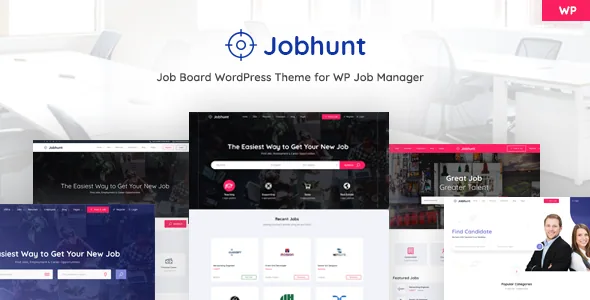
The theme decides how it looks; the plugin decides what it does
MadrasThemes states its design principle before it lists a single feature. The description argues that a theme's job is how a website looks, that functionality belongs to plugins, and that themes which absorb job-board features trap the owner: you cannot change the theme without risking the site's data and behaviour. Jobhunt is built to that division, with WP Job Manager supplying the job board and the theme supplying the styling.
That is a claim about architecture, not a demo screenshot, and it has a concrete consequence. Job records, submissions, dashboards and search behaviour are stored and handled by the plugin. If you later move to a different theme, the listings stay where they are. What you would lose is Jobhunt's specific layouts — which is the trade the vendor is asking you to accept.
Treat it as a vendor principle rather than a measured guarantee. The claim is credible because of what the theme actually contains: templates and style variants, not a parallel set of job-board fields.
Three ways to list jobs, three ways to show one job
The listing side is where the separation becomes visible. Jobhunt offers job listings in modern, grid and classic styles, and separately lets you pick one of three single job page layouts. Those are independent choices, so a summary-heavy index and a detail-heavy job page can use different treatments without touching the underlying data.
Filters and sorting work through widgets covering job listings, employer listings and resume listings. The vendor also built autocomplete for job titles using WordPress's own jQuery autocomplete, and location autocomplete through Google GeoLocate. Location suggestions therefore depend on a Google service, which is worth knowing before you plan a search-heavy board.
The structured data on individual job pages is described as a WP Job Manager output, not a theme feature. That detail matters for how you think about the site over time: if the schema comes from the plugin, it follows the plugin's updates rather than the theme's.
Employers and candidates — and the paid line between them
Companies get their own listing page, a single employer page and an employer dashboard where a poster manages their own postings. The vendor lists four employer listing styles and two single-employer styles. For a board where recruiters post repeatedly, the dashboard is the practical piece; the listing styles are what a candidate sees.
Candidates are different. The vendor's feature list titles that section "Candidates ( plugin sold separately )" and describes three candidate listing styles, two individual candidate page styles and a candidate dashboard. The marketplace description repeats the point at the top: the live demo mixes pages from the free WP Job Manager plugin with pages from the paid Core Add-On bundle, and the vendor offers to clarify which is which on request.
So the demo is a showroom for the whole stack, not a checklist of what the theme alone delivers. If candidate resumes, alerts or applications are central to your plan, price those add-ons before you commit, and confirm the boundary with the vendor rather than assuming a demo screen is theme work.
King Composer, five headers and five footers
The homepage is the theme's own construction. Jobhunt ships five home page layouts and more than fifteen blocks, assembled with the King Composer drag-and-drop editor, so a homepage can be recombined rather than replaced. King Composer is the editing surface here, and the observed attributes record Gutenberg Optimized as No — that reflects where the demo layouts are built, not a statement that WordPress's block editor is switched off for your posts.
The header is built with actions and comes in five variants; the footer is widgetized and also comes in five variants. The distinction is useful if you maintain a child theme or add hooks: headers follow the theme's action structure, footers follow widget areas. Rounding it out are three blog styles, eight static pages beyond the home pages (two contact pages, About, Job Packages, FAQs and three others), and Font Awesome plus the 674-icon Line Awesome set.
What the v2.2.0 release notes say about upkeep
The most recent entry in the supplied release history, dated 10 February 2026, is mostly groundwork. Company logo rendering is improved, the Single Job v1 layout moves to CSS grid, and the demo import is faster. Two changes sit lower but matter more to anyone touching templates: a deprecated call is replaced with WP_Query, and template-specific functions are moved out of the templates themselves.
A separate fix in the same release covers thumbnail display and the title and subtitle of jobs and companies. Read together, the release describes a theme being kept clean against WordPress's own direction rather than one adding new feature surface.
The changelog excerpt also references an earlier Elementor compatibility update. That is a version note in the vendor's history; the editing workflow described in the feature list is King Composer, so check the current documentation if Elementor is your preferred builder.
Declared compatibility and what ships
As observed on 4 November 2026, the marketplace attributes declare WordPress 5.9.x through 7.0.x and WooCommerce 6.x through 10.x, with the theme built on the Underscores framework. Browsers listed are Firefox, Safari, Opera, Chrome and Edge, and the theme is marked widget ready and responsive. Package files are listed as PHP and CSS; High Resolution is recorded as No and documentation as well documented.
Those are declarations, not a tested matrix for your PHP version, caching setup or plugin list. WooCommerce compatibility matters mainly if you charge for postings: the vendor says Jobhunt works with the WooCommerce Paid Listings and Simple Paid Listings plugins, both sold separately. A live trial is offered through the vendor's support channel if you want to see the board before paying for anything.
Where the architecture earns its keep
Jobhunt suits a board where the listing data needs to outlive the design. If you expect to restyle the site in a year or two, or to add job-board features from plugins the theme has never heard of, the separation the vendor argues for is a real benefit: the functionality stays put while the presentation changes.
The cost is that the theme gives you layouts, not capability. Resumes, alerts, applications and paid postings all sit in add-ons that are sold separately, and the demo will show screens your theme-only install may not have. Decide on the full stack — theme plus the add-ons your board actually needs — rather than judging by the demo's page count.
Questions & answers
Do I need the paid WP Job Manager add-ons to use Jobhunt?
Not for the core board. Filterable listings, submissions and the employer dashboard come from the free WP Job Manager plugin. Candidate resumes, job alerts, applications and paid listings come from add-ons the vendor describes as sold separately, and the vendor says its demo includes those paid screens.
Can I keep my job listings if I switch to another theme later?
The vendor's design intent is that listings and board behaviour live in WP Job Manager, so the data stays with the plugin rather than the theme. You would lose Jobhunt's specific listing and single-job layouts, but the records themselves belong to the plugin.