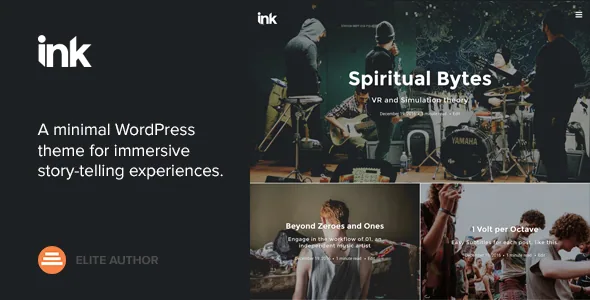
Fewer settings, on purpose
Most themes sell the size of their options panel. Codestag describes Ink the opposite way: the marketplace listing says the complexity of a "new Options Panel" is gone, replaced by a selected number of options inside the WordPress Live Theme Customizer, where changes preview as you make them. Read that as a design brief rather than a gap. The vendor's argument is that the layout decisions a good blog needs are already made, and what remains is narrow enough to live in WordPress's own settings screen.
What remains, per the vendor, is typography and colour: switch fonts through Google Web Fonts, set an accent colour with a picker, and preview the result live. If your working method is to push a theme into a specific look and structure, this is a poor match — there is no visual canvas and no panel of hundreds of switches. If you would rather make four or five decisions and start writing, the constrained surface is the point. Ink is built on the Underscores framework, which is Automattic's own starter theme, so the underlying template structure will feel familiar to anyone who has worked on a hand-built WordPress theme.
The homepage is built from four Section widgets
Ink's front page does not come from a page builder. The vendor describes a widget-based layout approach: you create as many widgetized pages as you want, then fill them with custom widgets that carry a "Section" prefix so they sort together, reordered by drag and drop. Four of them are named in the listing, and each does one job.
Static content outputs the body of any static page, which lets you put an About block or an editorial statement into the flow. Recent Posts renders a block with a background image and a chosen number of recent posts over it. Recent Posts (Grid) pulls a chosen number of posts into a grid. Contributors displays the site's contributing authors, which matters if you run a multi-writer publication and want the masthead visible on the front page rather than buried in a menu.
The practical consequence is that layout freedom is bounded. You can stack, order and repeat those blocks, and each block has its own settings, but you are not composing arbitrary column structures. Whether that is a limitation or a relief depends on how much of your homepage changes week to week.
Nine blog layouts, chosen where you can see them
The vendor lists nine layout options for the default homepage and/or the Blog page, all selected in the Live Customizer. That is a meaningful number for a theme with so few settings, because the decision is about the index — how entries appear when a reader lands on the blog — rather than the article template.
The listing also notes custom video and image headers, and describes combining a latest-posts homepage with a header showing an image or video. Note the vendor's own redirection: the video and image header example is in the alternate demo rather than the main one, so look there before assuming the primary preview shows the header treatment you want. The comparison work — trying one layout against another — happens in the Customizer preview, which is the whole reason the vendor kept these controls there.
Cover backgrounds set per post and per page
The feature that distinguishes Ink's post presentation is a Background Settings panel for post covers. You adjust opacity and background colour to control the contrast between a featured image and the post title, and the vendor says this works on a per-page and per-post basis rather than as one global setting.
That distinction is worth pausing on. A single global overlay cannot handle a bright beach photo and a dark interior in the same issue; one will wash the title out or the other will crush the image. Per-post control lets the title stay legible in each case, at the cost of one extra step when you publish. The theme also lists full-width images inside post content, which pairs naturally with the same concern for images carrying the page.
Memberships run through a plugin you buy separately
Ink's listing states compatibility with Restrict Content Pro, the membership plugin, for turning a blog into a paid or free-membership site with restricted content. The wording is careful and so should your reading be: this is a stated compatibility, not a bundle. RCP is a separate plugin the vendor says requires its own purchase and licence.
So the theme supplies the blog presentation and RCP supplies the gate, the subscription plans and the access rules. If memberships are central to your plan, evaluate RCP's own pricing and feature set before committing to Ink, and confirm the two work together on your install. Nothing in the listing suggests membership functions live in the theme itself.
Fonts, languages and Sass in the package
Beyond layout, the vendor describes the usual supporting cast for a blog: a responsive layout with retina and HiDPI optimisation, a child theme ready structure, full localisation support with .po and .mo files included, Sass source files and a Compass config. It also names compatibility with StagTools, a free plugin that adds shortcodes and custom widgets, and with Stag Custom Sidebars.
The included file types listed on the marketplace are PHP, CSS and JavaScript, and the theme is marked widget ready, high resolution and well documented, with a dedicated support desk mentioned. None of that is unusual for a ThemeForest blog theme, but the Sass source and child theme readiness are the parts that matter if you plan to work below the Customizer layer.
A 2022 theme, and what that asks of you
The declared software range on the listing runs from WordPress 5.0.x to 6.0.x, and the vendor's last item update is recorded as 19 July 2022. The marketplace lists version 2.3.5 as current. Gutenberg Optimized is marked Yes, and the browser list still includes IE9 through IE11 alongside Chrome, Firefox, Safari, Opera and Edge — a fingerprint of the theme's age rather than a current compatibility statement.
Treat the version range as the vendor's declaration, not a boundary that stops the theme from running. WordPress moves quickly, and a theme untouched since 2022 has not been tested against later releases. Before you commit, install Ink on a staging copy running your actual WordPress version with your actual plugins active, build one post with a cover image and one widgetized page, and look at the result at phone width. That is the only check that answers the question for your site.
Questions & answers
Does Ink need a page builder to compose the homepage?
No. The vendor describes a widget-based approach instead: you fill widgetized pages with four custom Section widgets — Static content, Recent Posts, Recent Posts (Grid) and Contributors — and reorder them by drag and drop. Layout freedom is bounded by those blocks rather than open canvas design.
Can I use Ink for a multi-author publication?
The Contributors widget is listed specifically to display a site's contributing blog authors, so a masthead or contributor list can be part of a page layout. Nothing in the listing describes per-author archives or author-specific templates beyond that widget.
Is Restrict Content Pro included with Ink?
The listing describes Ink as compatible with Restrict Content Pro, but names the plugin as a separate purchase with its own licence. The theme does not bundle the membership features; it provides the blog presentation that RCP restricts.
Will Ink work on the latest WordPress release?
The declared support range ends at WordPress 6.0.x and the item was last updated in July 2022, so no later version is claimed. Test it on a staging install with your own WordPress version and plugins before relying on it.


