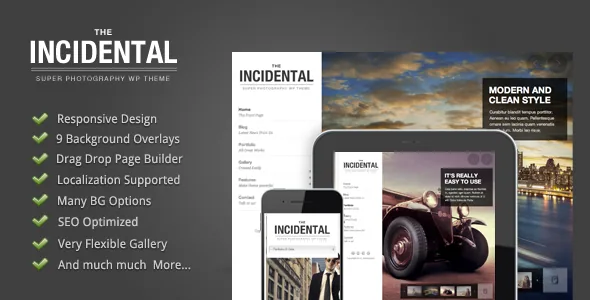
Two gallery presentations, one drag-and-drop gallery tool
The vendor description for Incidental spends its opening sentences on one subject: the gallery. It describes a flexible drag-and-drop tool for managing galleries, and says you can publish a gallery full screen or, if you prefer the traditional route, build it as a column layout.
That is the decision most photographers actually face. A full-screen gallery gives one image the whole viewport and turns browsing into a sequence; a column layout lets a visitor scan several frames at once and judge a series as a set. Incidental treats these as two presentations of the same body of work rather than two site structures. The feature list adds a detail that separates gallery editing from page editing: images can be dragged and dropped directly in the gallery post type, so reordering a set does not mean opening each attachment.
Background sliders, overlays and what sits on top of the work
Behind the images there is a second layer of controls. The vendor lists a drag-and-drop slider manager and describes options for the background slider: enabling or disabling thumbnails, captions and arrows, and enabling or disabling page content altogether.
Those switches matter more on a photography site than they might first appear. Captions and arrows are interface furniture over your work, and whether they belong depends on whether you present photographs as objects with titles and credits or as a continuous visual sequence. The page-content toggle is what keeps a landing view to just the image.
The feature list also names nine built-in background overlays. An overlay is the tint or gradient layered between a background image and whatever type sits over it. White studio shots or bright landscapes behind light text become unreadable without one; nine options give you room to match the tint to the photography instead of applying one fixed treatment everywhere.
Three separate drag-and-drop systems
"Drag and drop" appears three times in the vendor's feature list, attached to three different jobs: moving images inside the gallery post type, the slider manager, and the page builder that arranges content modules. Keeping them apart helps before you plan a build.
The gallery tool controls the order and grouping of photographs. The slider manager controls slides and how they behave as a background or presentation element. The page builder arranges content blocks on a page or post. Which one you open depends on whether you are rearranging images, changing what happens over time, or changing the layout of text and sections.
Alongside the builder, the vendor lists built-in shortcodes and a widget-ready theme, recorded as Yes in the listing attributes. Widget-ready means widget areas exist for blocks from WordPress or other plugins; it says nothing about how many there are or what each contains, so compare the demo against your planned content.
Thumbnails that can be a still, a slider or a video
Individual items offer a choice of thumbnail media: a static image, a slider or a video. For a photographer that widens an index page beyond a grid of stills. A press page can carry a short clip, a project entry can preview a series with a small slider, and most listings can stay single images.
The layout counts are modest and specific: two blog styles and three portfolio styles. If you want a catalogue of grid variants to pick from, this theme is not that. What it offers instead is a small number of presentations with adjustable media, which suits a portfolio where the photographs carry the page.
The vendor also lists a price table and shortcodes, plus social sharing for posts and social links in the sidebar. Those are secondary for a photographer, though a price table has an obvious use for print sales, session pricing or licensing rates.
Branding and translation controls
Visual settings are exposed as options rather than code edits: unlimited colour, 450+ available fonts, a font uploader and a logo uploader. Together that is the usual set needed to make a template look like your studio without touching PHP or CSS.
Translation is handled more than one way, which is worth knowing if you publish in a second language. The vendor ships a .pot file so theme strings can be translated into .mo files, and lists a built-in translator as a feature. WPML appears under Compatible With in the listing attributes. Those are vendor declarations about language handling; they do not establish that a particular page built with the page builder translates cleanly, so test your real layouts if a multilingual site is the plan.
The included files are listed as Layered PSD, PHP, CSS and JavaScript. The PSDs are the practical inclusion for a studio brand: a designer can adjust logo or graphic assets in Photoshop instead of rebuilding them.
Declared compatibility and the fixed two-column frame
As observed on the marketplace listing on 3 November 2026, the declared software range covers WordPress 6.1.x through 7.0.x, and the declared browsers are Firefox, Safari, Chrome, Edge and IE11. Treat both as declarations rather than tested results. Whether a combination holds up depends on your plugin stack, PHP build and hosting, and the version number on the theme screen inside WordPress is the only figure describing the code you actually installed.
Layout is recorded as fixed with two columns, and documentation as well documented. A fixed layout is a real constraint if you expected every page to be a fluid canvas; the gallery presentations are where the theme stays flexible, while the surrounding page structure is set.
The vendor also makes specific markup claims: heading tags for titles, main content placed above sidebars in both sidebar layouts, and support for image alt attributes. The reading-order point is narrower than it sounds. Putting main content before sidebar markup shapes how a page is parsed, but the alt text on each photograph is still something you write yourself.
Questions & answers
Can one site use both the full-screen and column galleries?
The vendor presents full screen and column layouts as options within the same gallery system rather than as separate themes or templates, so the choice is made per gallery. The description does not say whether a single page can mix both, so check that against the demo if your design depends on it.
What are the included PSD files for?
The listing records Layered PSD files among the package contents alongside PHP, CSS and JavaScript. The vendor does not describe which design elements they cover, so treat them as source material for adapting branding such as the logo and check their contents in your own copy before committing design work.
Is WPML needed to translate the theme?
No. A .pot file ships for translating theme strings and a built-in translator is listed, with WPML named only as a compatible plugin. Which route fits depends on whether you are translating interface text only or full pages of content.


