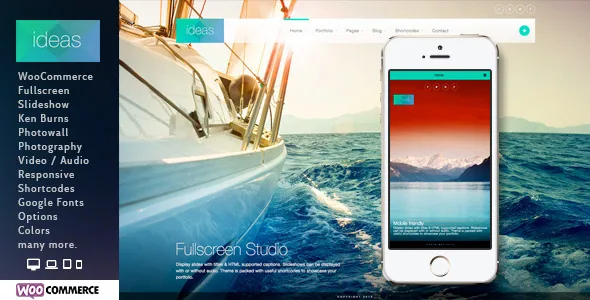
Seven ways to fill the screen
Ideas does not lead with a page builder. The vendor's feature list leads with a post type: the fullscreen post, offered in seven forms. Slideshow with captions or with captions off. Slideshow with audio. Kenburns with or without audio. Photo wall. YouTube. Vimeo. Static image.
Treat that list as editorial choices rather than a feature count. Captions on suits documentary or reportage sets where each frame needs a name, place or date. Captions off lets the pictures stand alone. Kenburns gives a single still movement without any video editing. The audio variants attach a soundtrack you supply. The video modes hand the opening screen to something you have already cut.
Because each mode is its own post, the decision is per entry rather than per site. Three series can open three different ways. A fourth can be one photograph.
The same idea runs in the other direction too. The theme's bundled shortcodes include a Thumbnails shortcode, which the vendor's description ties to bulk image drag and drop, so fullscreen imagery is not only a page-top device.
The photowall is an index as well as a texture
The Photo Wall mode is the one that changes how a photographer works rather than how a page looks. The theme descriptions mention "shortcode thumbnail generations with reusable / bulk image drag and drop capability" — in other words, you build a wall of many images in bulk instead of assembling a gallery one file at a time.
Version 2.3 widened what can sit in that wall. The changelog records "Photowall now supports portfolio displays" and adds a Portfolio Album shortcode, plus RTL support. So the wall does not have to remain a decorative field of frames; it can draw from portfolio content, which makes it a way into the work.
That pairing suits a large archive. The wall is the scanning surface, and the portfolio entries behind it carry titles, text and larger images. For a wedding archive or a stock library, the bulk assembly is the part that earns its keep.
Three portfolio grids and what each is for
Below the fullscreen layer, the vendor lists three portfolio listing modes: Ajax Portfolio, Filterable Portfolio and Normal Portfolio, each available in one, two, three or four columns.
The distinction that matters is how the visitor moves. An Ajax portfolio suggests the project opens without a full page reload, which keeps a browsing rhythm going when someone is working through a body of work. A filterable portfolio lets a visitor narrow a mixed archive — say, by client or by series — before choosing. A normal portfolio is the plain grid: every item visible, each one linked. Choosing among them is a judgment about catalogue size and about whether your categories are meaningful to the people looking.
The column count is the other lever, and four columns of frames at full width behaves very differently from two. The changelog is not much help here: version 1.5 records a fix for the filterable portfolio as used through the shortcode generator, which suggests the filterable mode is the one most tied to the shortcode layer.
On a project page, six settings are chosen item by item rather than globally according to the vendor's list: a slideshow header, a video header, an image header, a vertical image list, and column, left-or-right sidebar and fullwidth layout support. A moving-image piece can open with video, a still series with a slideshow, and a wide landscape set can run the full width.
Language files, the social header and the demo content
WPML appears in the compatibility list, and the vendor states the theme is WPML ready with .po and .mo language files in the package. The social header area is described as designed for the WPML widget and social link widgets, which is the small detail a translated portfolio needs: a language switcher in the header without custom layout work. For a photographer working across two markets, that pairing is more useful than the compatibility list on its own.
The vendor also spells out what is not in the pack. The demo photographs are not included; the preview images were bought from a stock service, and the demo music and video came from outside sources. Budget for your own photography — which, for a photography theme, is the content that carries the site anyway.
The declared file list covers layered PSD and PSD files, PHP, CSS and JS. Theme options handle colour changes and offer a large Google Fonts selection. Contact Form 7 is named as compatible with custom styles, and there is a built-in contact template.
What the version declarations mean for a live site
The marketplace attributes, observed on 3 November 2026, declare support up to WordPress 4.9.x, and the vendor's last update on the listing is stamped 17 July 2019. Browser support is declared from IE8 through Edge. Those are statements attached to the product, not the results of an install test, and a current WordPress release sits well outside the declared core range.
WooCommerce appears in the compatible-with list from 2.0.x through 3.0.x, matching the version 2.0 changelog entry that added WooCommerce templates. The later changelog available in the source is largely fixes: 2.1 handled theme option values in the dynamic CSS, 2.2 renewed the shortcode generator, 2.2.1 fixed an options upload button. Nothing visible extends the declared compatibility.
Two practical readings follow. If your project can run on the stack the vendor declares, the fullscreen and portfolio workflow described above is intact. If it needs current core and current plugins, treat those declarations as the boundary of what is supported and test on a staging copy before committing a client site. The marketplace listing marks the theme Gutenberg Optimized: No, which fits a design routed through custom post types, theme options and shortcodes rather than blocks.
Questions & answers
Can different posts use different fullscreen treatments?
Yes. The slideshow, captions-off slideshow, audio slideshow, Kenburns variants, photowall, YouTube, Vimeo and static image are separate fullscreen post modes, so the choice is made per post rather than once for the whole site.
Is the photowall limited to static images?
No. The version 2.3 changelog states that the photowall now supports portfolio displays and adds a Portfolio Album shortcode, so the wall can be built from portfolio content.
How do the three portfolio grids differ?
The vendor lists Ajax Portfolio, Filterable Portfolio and Normal Portfolio, each in one to four columns. The Ajax mode suggests opening a project without a full page reload, the filterable mode lets visitors narrow a mixed archive, and the normal mode is a plain linked grid.
Are the demo photos included in the package?
No. The vendor states that photos are not included in the download pack and that the preview images were purchased from a stock service. The demo music and video are credited to outside sources as well.


