A changelog built around three bundled plugins
Most theme listings describe pages and palettes. NanoCare's update history describes something more useful for a buying decision: from version 1.0.8 through 1.2.2, the vendor mostly ships plugin version bumps. Release after release names the same three components — Slider Revolution, ACF PRO and WPBakery Page Builder — moving together. The 1.2.2 entry dated 25 September 2026 updates them to 6.7.58, 6.8.10 and 9.0.1 respectively.
That rhythm tells you what the theme actually is. NanoCare is a wrapper around a small, fixed plugin stack, and the vendor's maintenance work goes into keeping that stack current rather than into redesigning templates. If you already work with WPBakery and Advanced Custom Fields, the pattern will look familiar and reassuring. If you planned on a block-based build with no third-party builder, this is where the mismatch appears.
What the plugin stack means when you edit a page
The changelog names the components, and the fixes confirm their roles. WPBakery Page Builder owns layout: version 1.1.6 records "Layout broken when updating WPBakery page builder," and 1.1.2 records "Layout broken when deactivate WPBakery page builder," which is a direct signal that page structure lives in the builder rather than in theme template files alone. The same 1.1.2 entry mentions the frontend editor working with Carousel and ImageBox elements, so you can reasonably expect to compose those modules visually.
ACF PRO is the custom-field layer. A home care provider typically wants structured content — service descriptions, staff bios, care-plan details — and custom fields are how that content gets its own entry screen instead of being pasted into a single text block. Slider Revolution handles the hero and other slide areas. Both are bundled rather than optional extras according to the update entries, which means each one is an update you track.
The maintenance consequence is worth planning for. A plugin bundle needs its three parts updated in step, and the vendor's own history includes layout breakage when the builder was updated or deactivated. Keep a staging copy, and update the trio together rather than one at a time.
Choosing which license tier the site needs
The changelog's most consequential entry for anyone planning a paid build is the one in 1.2.2 that reads "Fix - Broken Access Control." That is the vendor's stated patch, and it belongs in the same picture as the plugin bumps: the theme's job includes keeping a page builder and a fields plugin current.
Version 1.1.9 adds "Fix - Some warnings on php 8" along with "Ability to bulk install the plugins." The bulk installer matters if you build more than one site — the three required plugins arrive together rather than one at a time. Earlier, 1.2.0 recorded "Fix - Customize not working on WordPress 6.7," which shows the theme is adjusted release by release as WordPress changes, rather than being left at an old ceiling.
The vendor's description does not go into detail about which page templates exist or how many demos ship. What it does say is that the blue shades are meant to read as medical competence and that cheerful visuals should leave visitors feeling confident about the care on offer. Treat that as a design brief, not a feature list: the palette and imagery decisions are yours to make on top of whatever the demo shows.
Home care as the intended audience
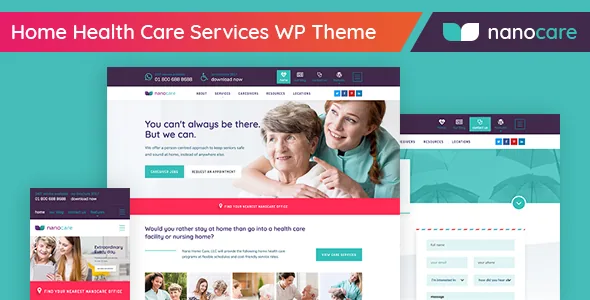
LineThemes frames NanoCare narrowly: home health care, everyday nursing, caregivers presented as experienced professionals. The reasoning in the vendor's description is about trust — families handing over the care of a relative need to believe the organisation is reliable, and the blue palette plus bright imagery is meant to carry that impression before anyone reads a service page.
For your own build, that framing suggests what content the theme's structure is likely to suit: service overviews, caregiver or team introductions, contact and enquiry paths. It also suggests what it will not do for you. The vendor description does not claim booking, scheduling, patient intake or appointment logic, so a site that needs to take appointment requests directly should plan on a separate form or booking plugin rather than assuming the theme supplies one.
Reading the compatibility declarations
The marketplace attributes observed on 4 November 2026 declare WordPress 6.9.x down to 6.0.x and WooCommerce 6.x.x. Those are vendor claims, not the result of running the theme against a particular PHP build, cache layer or plugin set. The same attributes list the package as PHP, HTML, CSS and JS files, a responsive layout at four or more columns, widget-ready areas and high-resolution graphics, with documentation marked as well documented.
Gutenberg Optimized is declared as No. That attribute says the vendor has not certified block-level optimisation; it does not mean the block editor is unavailable, and it should not be read as a ban on using it for ordinary posts. It does mean the theme's own described workflow runs through WPBakery, so page layouts you inherit from the demo will be builder content rather than block patterns.
The declared browser list includes IE9 through IE11 alongside Firefox, Safari, Opera, Chrome and Edge. Modern builds rarely need legacy Internet Explorer support, but the list is a hint about the age of the underlying codebase and the era its markup was written for.
Is NanoCare the right base for a care provider site?
The decision comes down to how much of the theme you will actually use. If your site is a care organisation's brochure — services, people, contact, a few WooCommerce items — and you are comfortable editing in WPBakery with custom fields in ACF PRO, NanoCare gives you that combination with a vendor who has kept the plugins current through September 2026.
If your plan depends on block-editor templates, an in-house booking system, or a modern plugin stack with no page builder, this theme asks you to maintain three plugins you would otherwise skip. Either way, the changelog is the most informative part of the listing: it shows a maintained product whose maintenance is concentrated in the bundle. That is the closest thing to a promise here, and it is a specific one.
Questions & answers
Do I need WPBakery Page Builder to use NanoCare?
The vendor's changelog records layout breakage both when WPBakery is updated and when it is deactivated, which indicates page layouts depend on the builder. The theme's described editing workflow runs through it, so plan on using WPBakery rather than removing it.
Does NanoCare include booking or appointment functionality?
The vendor description does not claim booking, scheduling or patient intake features. It presents the theme as a way to present home care providers and their services, so appointment logic would come from a separate plugin.
What does Gutenberg Optimized: No mean here?
It means the vendor has not declared block-level optimisation for the theme. It does not prove the block editor is unusable; the theme's own composition workflow is described through WPBakery Page Builder.