Five listing layouts, set once for the whole blog
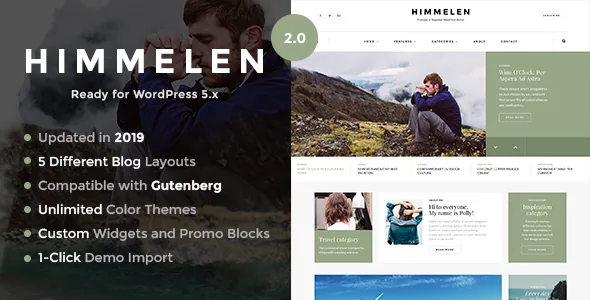
Himmelen's feature list spends most of its space on arrangement rather than page building. The named options are five blog listing layouts — Default, Vertical, 2 Column, Compact List and Masonry — plus a Featured Posts Slider with two layout variations, available fullwidth or boxed. Colour skins run to 12 predefined sets with the option to build your own, and 650+ Google Fonts sit in the same panel.
These are global settings, not block arrangements. Choose 2 Column and every category and archive page follows that grid until you change it. Masonry suits a photo blog whose thumbnails vary in height; Compact List fits a daily journal where more headlines should sit above the fold. Because the decision is made once, the useful work happens before you build anything — decide what a reader should meet first on the listing page, then let the theme apply it everywhere.
The slider sits on top of that choice, and its fullwidth or boxed option controls whether the featured block fills the viewport or stays inside the content column.
That description of the theme's options comes from the marketplace listing; it isn't the result of installing Himmelen on a test blog.
Sidebar widths change per post, not per breakpoint
The vendor separates two things that themes often merge: where menus live and how wide the content column is. Menu positions number three across top, header, footer and an offcanvas drawer that floats in from the right, with different header style combinations, a sticky header and several footer layouts behind them. Widget areas are five — Left, Right, Footer Light, Footer Dark and Offcanvas — alongside three custom widgets that ship with the theme.
The per-content control is the part to plan around. The description says sidebars are managed for every page and every post with Left, Right and Fullwidth choices. That lets one long essay run fullwidth while a recipe post keeps a right-hand column, both under the same sticky header.
Two smaller inclusions are easy to miss. Body background and header background images can each be set, so a minimal blog can carry a texture or photograph behind the whole site rather than only inside posts. A built-in Coming Soon or Maintenance mode with a custom page is also there, which means the site can be closed to readers while the first posts go up.
Separating the thumbnail from the article's opening image
Two features address the recurring problem of a blog that is mostly pictures. A Post Image Header adds a custom header image to each individual post, distinct from its featured image. Separately, the featured image on a single post can be switched off for one post or for all of them.
The distinction is practical. A featured image usually does the work of a listing thumbnail; the post image header is what a reader meets after clicking through. If you want a controlled archive grid but a full-bleed photograph at the top of each story — or a striking thumbnail with a plain article opening — those two controls let you split the jobs without editing templates. The global off switch matters most for galleries and photo essays, where the theme's image styling competes with the picture.
Post formats are listed as Gallery, Video, Audio, Quote, Link and Status, each with its own presentation rather than a shared generic layout. A Popular Posts homepage block, drawing on most-viewed entries, is listed alongside them.
Nine bundled plugins, and what their presence costs you in upkeep
The vendor states that nine WordPress plugins come with the theme at no cost, and the feature list shows what that kind of plugin does here: Instagram feed, MailChimp newsletter signup, social share and social follow, contact forms, and a lightbox with gallery support for images inside posts. WooCommerce support is pitched as a way to add shop features to a blog, and WPML compatibility is stated as 100 percent. The changelog refers to a Himmelen Theme Addons plugin, whose version was rolled forward in the 2.0.2 and 2.0.3 releases.
A bundled plugin has its own life: its own licence terms, update cycle and support channel, and a copy inside a theme package can fall behind the author's current release. Treat the nine as a convenience that saves sourcing each one, then decide who keeps them current. The vendor's release history shows regular "plugins updated to latest versions" entries, which is a sign of upkeep rather than a guarantee about any particular copy.
The one-click demo import is described as bringing in all demo data and pages from the preview site, giving you a working arrangement of listings, slider and widget areas to reshape.
Where the version statements disagree
Two parts of the listing do not line up, and the gap matters if you run a current site. The marketplace compatibility attribute, as observed on 4 November 2026, declares WordPress 4.9.x through 6.9.x. The release history in the description records version 2.4.3 (25 May 2026) adding WordPress 7.x support, and version 2.4 (7 April 2023) adding WordPress 6.x support. Nothing in what's supplied shows new WordPress versions being tested rather than declared.
The Gutenberg Optimized field reads No, while the changelog records Gutenberg support arriving in version 2.0 (15 January 2019). That label describes how closely a theme's design is built around the block editor's default styles; it does not mean the block editor stops working. A practical reading of both statements is that Himmelen's structure lives in its own control panel, so listing style, sidebar width and header choices are set there rather than inside block templates.
No page builder is named anywhere in the description. Included files are listed as PHP, CSS and JS, with responsive layouts built on Bootstrap 3 and retina support. If your workflow depends on Elementor or WPBakery, this theme is not pitched that way, and the version lines describe compatibility ranges rather than the outcome of running Himmelen against your PHP build, plugins and host. Version 2.0 also carries a warning to read the update instructions before upgrading, because the theme code was refactored.
Questions & answers
Does the Gutenberg Optimized "No" label stop me using the block editor?
No. The field describes whether the theme's design is tuned for the block editor's default styles, not whether the editor runs. The changelog records Gutenberg support added in version 2.0, while structure such as listing layout and sidebar width still comes from Himmelen's control panel.
Are the nine bundled plugins covered by the theme's support?
Each plugin keeps its own licence, update cycle and support channel, so a bundled copy is a starting point rather than a managed dependency. The release history shows the vendor refreshing plugin versions in several releases, but check what you have against the plugin authors' releases before relying on an older copy.
Will updating break my layouts?
The 2.0 release from January 2019 carries a warning in the changelog to read the update instructions before upgrading, because the theme code was refactored. Later entries do not repeat it, and the vendor keeps update instructions in the archive's documentation folder.


