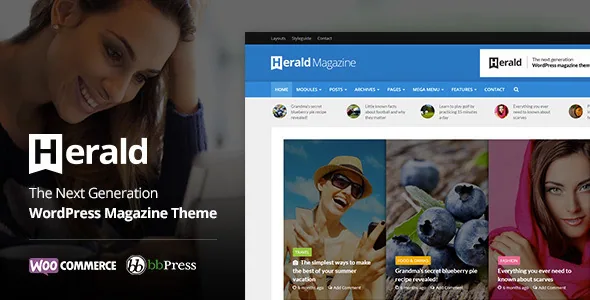
The front page is a stack of modules, not a designer canvas
Herald's central idea is stated plainly in the meks description: a "highly flexible yet easy to setup module system where you can combine and display your articles in various ways," which the vendor summarises as more than 500 home page layouts. Nothing in that sentence is about freeform design. A module is a container that pulls content by a rule — a category, a tag, a set of authors — and renders it in one of several arrangements.
For a news site this changes what a redesign means. Instead of rebuilding a homepage whenever the lead story changes, you adjust which module sits where and what it filters. The published homepage becomes a composition of queries, and the work of a morning shift is choosing the right query rather than editing layout markup.
The count of 500-plus variations describes combinations of those modules, not 500 finished designs you can install. Treat it as a measure of how many arrangements the module options permit.
Authors and categories become module content
Most magazine themes let you place posts. Herald extends the same container to two other things, which the vendor calls author and category modules: you can "display your authors or categories in modules, just like you would posts or text." A masthead page or an about section built from author cards is then an ordinary module placement rather than a custom template.
Smart Categories is the companion setting. Each category can carry its own layout and colour, so a sports section and a culture section can look different at the archive level while sharing one theme. On a site where sections have distinct identities, that removes the need for a separate child theme per desk.
The vendor also states that any registered public custom post type is detected in modules automatically. That matters if you plan to run something besides articles — a reviews post type, say — and want it surfaced on the front page in the same visual language as news.
A header you build in three bands
The vendor describes a header builder with top, middle and bottom areas plus a sticky header, and says a mega menu is supported. On a news site the header carries the section navigation, the date, search, and often a breaking-news slot, so splitting it into bands lets you keep navigation stable while the middle band changes.
The sticky behaviour is the part worth thinking about in advance: a tall three-band header that sticks can consume significant vertical space on a phone. The changelog records an option added in version 2.1.4 to choose which elements appear in the responsive header, which is the control to look for when trimming the mobile version.
Four ways to move through an archive
Herald offers four pagination types, and the vendor names them: classic older/newer posts links, numeric pagination, a load-more button, and infinite scroll. These are not interchangeable decorations. Numeric pagination gives readers a sense of position and gives search engines stable, linkable pages. A load-more button keeps the reader on the index while still requiring a deliberate action. Infinite scroll removes that action entirely — good for continuous browsing, awkward for anyone who wants to return to where they were.
Because pagination is a theme-level choice in the description rather than a per-template one, decide early which reading habit you are designing for. A high-volume portal with a strong front page often suits load-more; a reference-heavy archive suits numbers.
Ad slots, multi-page posts and view-count ordering
Monetisation gets its own controls. The vendor describes a Simple Ads Manager with predefined ad slots for banner placements, and a changelog entry from version 2.1 adds the ability to disable ads on specific pages such as a contact page or a 404. That second detail is small but practical: it lets you keep ads on editorial pages without them appearing inside utility pages.
Herald also builds paginated, multi-page posts, described by the vendor as a design for splitting long articles across pages — a pattern aimed at page-view-driven advertising. Separately, the theme supports the Entry Views plugin for counting views, and version 2.3.2 added WP-PostViews as an alternative; the vendor says modules can select and order posts by view count. That is the mechanism behind a "most read" block.
Related posts are included in the theme rather than left to a plugin, and the vendor provides nine single-post layouts. Which of those nine you use is a per-post-presentation decision, and the vendor does not describe a limit on mixing them.
The widgets and options panel live in companion plugins
Version 2.2 changed where parts of the theme live, and the changelog is explicit about it. The Theme Options panel was removed from the theme and reappears once the Redux Framework plugin is installed and activated. The theme's custom widgets were removed and come back through a plugin called Herald Buddy. Social sharing moved to Meks Easy Social Share. All three are activated from an Appearance → Herald plugins screen.
If you have seen Herald described as having its own widgets or its own options panel, that remains true — provided those plugins are active. Skip them and the theme still runs, but the module widgets that make the front page interesting are not there. Additional CSS moved into the native WordPress customiser field at the same time, and the vendor points to a separate Insert Headers and Footers plugin for custom scripts.
What the declared compatibility says, and what it does not
Marketplace attributes recorded on 4 November 2026 list WordPress 4.9.x through 7.0.x and WooCommerce 5.x.x through 10.x.x, with a browser list that still reaches back to IE9, IE10 and IE11. The package is listed as PHP, CSS and JavaScript files, responsive with four-plus columns, widget ready and high resolution. The listing itself was last updated on 29 August 2023.
That browser range is a sign of how long the theme has been sold, not a promise about current rendering. And a declared WordPress or WooCommerce range is a vendor claim about intended compatibility; it is not a record of testing your particular combination of plugins. The changelog ends with entries tested against WordPress 6.3 and PHP 8, and the final release adds TikTok, Mastodon and Truth to the social network options.
For a news build, the pieces to check on a staging copy are the module widgets after activating the companion plugins, the header behaviour at mobile widths, and whether the pagination mode you chose behaves as expected with your permalink structure.
Questions & answers
Do I need to write code to build a Herald front page?
The vendor describes the module system as requiring no coding knowledge, and the options live in the theme options panel rather than in template files. You do need the companion plugins active — Redux Framework for the options panel and Herald Buddy for the custom widgets — since version 2.2 moved them out of the theme.
Does Herald support right-to-left and translated sites?
The vendor lists RTL support as a simple option for right-to-left reading, and describes a built-in theme translator with .po and .mo language files provided, plus support for standard WordPress translation and WPML.
Can non-post content appear in Herald's modules?
Yes, according to the vendor: any registered public custom post type is detected automatically and can be chosen in modules. Author and category modules extend the same idea to people and sections.


