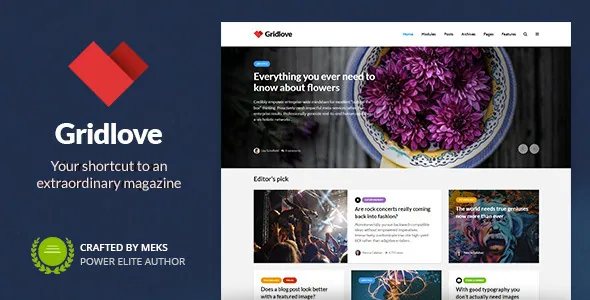
The homepage is a stack of post modules, not a page layout
Most magazine themes sell you a fixed homepage with a few widget areas. Gridlove's vendor description frames it differently: you display an unlimited number of post groups chosen by specific criteria and arrange them with a drag-and-drop modules system. The unit you work with is a block of posts, and the homepage is whatever sequence of those blocks you build.
That matters once your front page has to serve several editorial jobs at once — a lead story, a category feed, a most-read strip, a sponsored label. Instead of negotiating with a single template, you decide how many groups the page holds and what each one pulls. The vendor also states that when you pick posts manually inside a module, a search field replaces typing post IDs, which is the difference between a workable and an abandoned manual selection step.
Modules can hold something other than posts
Two vendor features break the assumption that a module only outputs articles. First, you can inject custom content into post modules, replacing posts with text, ads or newsletter forms. Second, any public custom post type registered on the site is automatically detected in modules.
The practical effect is that a newsletter signup or a house ad can sit in the flow of the grid at the size of a post block rather than being squeezed into a sidebar. Similarly, a review, recipe or listing post type appears as an option inside the same module builder without you writing a query. Set against the neighbouring Cake and Classiera pages on this site, which turn on demo tiers and category-specific custom fields, Gridlove's distinction is this composition unit — not a bundled plugin and not a design motif.
Layout and pagination are set per category and per page
Below the homepage, the vendor gives the same listings system to archives. Each category can carry its own layout and its own colour, so a fast-moving news section and a slower long-form section do not have to look identical. Four pagination types are available — classic older/newer navigation, numeric pagination, a load-more button and infinite scroll — and the vendor says the choice is not restricted to one global setting; you can apply different types to different pages.
That combination is where a magazine's structure actually lives. A dated archive reading chronologically suits numeric pagination; a high-volume category may be better with load-more. Assigning those separately avoids forcing one browsing habit onto every section.
The single post side follows the same pattern: the vendor lists several single post layout options, post formats for video, audio, image and gallery, and paginated multi-page posts with their own design. Multi-page splitting is described as a monetisation device for ads, which is accurate about the mechanism — it increases page views — without guaranteeing revenue.
Ad placement is a theme option, including the option to switch ads off
The vendor describes placing banner ads on the homepage, archive pages or single posts. The changelog fills in the placement granularity: version 1.8 added an Archive Ad slot displayed between posts across archive templates, and version 1.7 added the ability to disable ads on specific pages such as contact or 404.
That last item is the one worth noticing. Ad plugins tend to insert everywhere a slot exists; a theme-level switch to suppress ads on pages where they make no editorial sense is a small but real control. It also means ad configuration lives in the theme options, so budget for re-checking slots after a redesign rather than assuming they travel with your content.
Options panel, custom widgets and social sharing are separate plugins
Version 1.9 of the changelog records changes made to satisfy marketplace requirements: the theme options panel was removed from the theme and now requires the Redux Framework plugin, the theme's own widgets moved into a plugin called Gridlove Buddy, and social sharing moved to the Meks Easy Social Share plugin. All three are installed through Appearance → Gridlove plugins.
Read this before you plan your setup time. If the options panel does not appear after activation, that is the expected behaviour, not a broken install. The same release notes show additional CSS moving into WordPress's native Appearance → Customize → Additional CSS field, and the custom JavaScript field being dropped in favour of a separate headers-and-footers plugin. Count these as part of the theme's real dependency list rather than optional extras.
What the version record does and does not tell you
The most recent entry in the vendor's changelog is 2.1.2, dated 28 August 2023, and it reports testing with WordPress 6.3 and PHP 8. The marketplace listing, observed on 3 November 2026, declares a much wider range: WordPress 4.9.x through 7.0.x and WooCommerce 5.x.x through 10.x.x, with PHP, CSS and JS files in the package, and widget-ready and responsive attributes marked yes.
Those two records answer different questions. The changelog says what the vendor last reported testing. The listing attributes are declarations, and nothing here was installed or run against a current stack to verify them. If your site runs a recent WordPress release, treat the compatibility line as a claim to confirm on staging rather than a settled fact. The theme's own listed integrations — Co-Authors Plus for multiple authors per post, Entry Views for view counts and view-filtered modules, bbPress for forums, WPForms — are similarly vendor statements about support, not evidence that each one is configured for you out of the box.
Questions & answers
Do I need Redux Framework to reach Gridlove's options?
According to the vendor's changelog for version 1.9, yes. The theme options panel was removed from the theme and requires the Redux Framework plugin, installed via Appearance → Gridlove plugins. The same release moved the theme's custom widgets into the Gridlove Buddy plugin, so a bare theme activation gives you an incomplete toolset.
Can a homepage module show something other than an article?
The vendor says yes: post modules accept injected custom content such as text, ads or newsletter forms. Separately, any public custom post type registered on the site is detected automatically and can be selected in modules instead of standard posts.
Is the declared WordPress 7.0.x compatibility verified?
No. The listing observed on 3 November 2026 declares support from WordPress 4.9.x through 7.0.x, but the latest changelog entry, version 2.1.2 from August 2023, only reports testing with WordPress 6.3 and PHP 8. The wider range is an attribute claim; test your own versions on staging.


