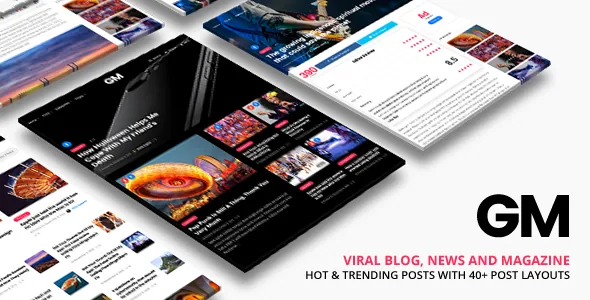
Grand Magazine's front page can rank posts without an editor touching it
The vendor's headline feature is a "What's hot & Trending" surface that shows visitors which posts have the most shares, comments and views. Taken literally, that means part of your homepage responds to reader behaviour instead of a hand-built list of links.
That is a specific editorial stance, and it explains the rest of the theme's settings. Grand Magazine pairs automatic ranking with two human-curated categories, which makes it a tool for a publication that wants both recency-driven attention and deliberate placement. The details below come from the vendor's feature description and the marketplace attribute record; neither is a substitute for running the theme against your own post volume.
Hot Posts and Trending Posts are two setting groups with the same controls
The vendor describes both modules with three controls each: a highlight colour, a period used to select posts, and a number of items. Because the period is a setting rather than a fixed rule, you decide what each label means. Hot could cover the last day and Trending the last month, or the other way round, depending on how fast your publishing cycle moves.
The two blocks also share a visual language you have to separate on purpose. If both use the same highlight colour and only differ by time window, readers will read the pair as one list rather than a hierarchy. Give each its own accent, or accept that the distinction exists only in the settings panel.
Since the ranking is built from shares, comments and views, a new site has little to rank. The blocks will thin out until articles accumulate readers, so it is worth deciding whether they belong on the homepage from day one.
Featured and Editor Picks give editors a say the rankings cannot override
Two categories carry curated weight. A Featured Posts category displays at the top of the homepage, and an Editor Picks category is selected in theme options. Between them, an editor can promote a piece regardless of how it performs on shares.
Editor Picks also travels into the article page. The related-posts settings let you show related posts, posts from the same category, and posts from the Editor Picks category, with a separate item count for each group. A story can therefore close with same-topic reading alongside a segment chosen by an editor, and the two lists do not have to be the same length.
In a multi-author setup this is a structure you can hand over without template edits: writers write, and the category assignments decide where their work appears beyond the index.
Twelve single-post arrangements, set per post
The vendor advertises "20+ predesign templates to choose for single post." The post options state the arrangement concretely: four content treatments — Parallax Content, Static Content, Title Before Parallax Content, and Minimal — each crossed with a right sidebar, a left sidebar or fullwidth, for twelve combinations.
Those are chosen per post rather than only globally. The vendor describes page and post options as overriding theme options so an individual item can sit outside your global settings. Featured content type is a per-post decision too: an image, a gallery, a YouTube video or a Vimeo video, each rendering differently on the single post page.
A photo essay can run fullwidth with a parallax header while the rest of the site keeps a right sidebar, without a second template being built. Note the difference between what is documented and what is counted: the twelve arrangements are named in the options list, while the broader "20+" figure refers to the layout library as a whole, not to twelve-plus-something specific single post designs.
Gallery editing and parallax backgrounds
The gallery editor is described at the level of day-to-day details: bulk image upload, drag-and-drop reordering, and sorting by newest, oldest, random or title. Gallery pages come in two, three and four column templates, and the theme supports unlimited gallery pages grouped by gallery categories. A lightbox caption toggle handles the display side.
For headers and section backgrounds, the vendor lists a parallax effect set by choosing an image and a height, plus a video parallax option. The description also claims smooth scrolling "with rendering performance of 60fps" — read that as a vendor claim about the theme under ideal conditions, not a measurement of your site.
On the index, infinite scroll loads more articles as a visitor reaches the end of the page. The vendor attaches a condition: infinite scroll requires advanced pagination to be enabled, and that setting is what loads new posts without a page refresh.
Menus, mobile navigation and sidebars assigned per page
The theme registers five menu locations: Primary, Secondary, Top Bar, Side (Mobile) and Footer, with submenu ordering by drag and drop. Two sticky behaviours are separate options — a standard sticky menu that stays fixed while scrolling, and a smart variant that appears on scroll down and hides on scroll up. A Top Bar above the main menu can hold contact hours and a phone number, and a side menu can be enabled on desktop.
Sidebars are not one global widget area. The vendor describes building custom sidebars without code and assigning different sidebars per page, and the listing marks the theme Widget Ready. The bundled widgets are magazine furniture: About Me, Category Posts, Popular Posts, Recent Posts, Social Profiles, Instagram, Flickr, Twitter, a map and a custom menu.
The Instagram, Flickr and Twitter widgets depend on external services answering. If a feed stalls, that is a third-party problem rather than a theme fault — relevant when deciding whether those blocks belong above the fold.
Design work happens in the Customizer
The marketplace marks Gutenberg Optimized as No, and the vendor points design changes at the WordPress Customizer instead, describing it as fully integrated with live preview for colours, backgrounds, typography, layout type, text and images. Typography is drawn from a library the vendor puts at over 500 Google Fonts, with size, style and colour adjustable without code. Layouts include boxed or wide, an optional frame with a colour picker, and background images, patterns or colours with repeat options.
Two switches are worth knowing before launch. Responsive display is on by default and the vendor says it can be turned off with one click — useful only in narrow cases, and worth leaving alone unless you have a reason. A Customizer control also previews the site at laptop, tablet and phone widths.
The Gutenberg flag is a statement about where the theme puts its design controls. It does not establish that the block editor is unusable for post content.
What the marketplace record declares
Observed on 5 November 2026, the record lists 1,135 sales and a 4.69 rating from 58 ratings, with the latest marketplace version at 3.5.8. The attributes declare WordPress 5.0.x through 7.0.x and browsers including Firefox, Safari, Chrome, Opera and Edge, plus compatibility with WPML, bbPress 2.5.x, Facebook and WooCommerce 6.x through 9.x. Files are listed as PHP, CSS and JS with layered PNGs, and documentation as Well Documented.
Those are vendor and marketplace declarations, not results from running the theme against your PHP version, caching layer or plugin set.
The question the description never answers is how the Hot and Trending queries behave on a large archive. If ranking blocks run against a big post table on every page load, the cost appears in page timing rather than in the feature list. That belongs in a staging install with your own article volume.
Questions & answers
Do Hot Posts and Trending Posts need a separate plugin?
The vendor describes both as built-in theme settings with their own controls for highlight colour, selection period and item count, and credits the theme itself with showing posts by shares, comments and views. No required third-party plugin for the ranking blocks is named in the description.
Can one post use a different layout from the rest of the site?
According to the vendor, yes. Post options let you pick one of twelve single-post arrangements — Parallax, Static, Title Before Parallax or Minimal content, each with a left sidebar, right sidebar or fullwidth — and the vendor states that per-post options override the global theme options for that item.
Is infinite scroll available without enabling advanced pagination?
The vendor ties the two together: infinite scroll requires advanced pagination to be enabled. That pagination setting is also what loads new posts without refreshing the page, so plan on switching both on if you want continuous loading on the blog index.
Does Grand Magazine work with WooCommerce and WPML?
The marketplace compatibility attributes, observed on 5 November 2026, list WooCommerce 6.x through 9.x, WPML, bbPress 2.5.x and Facebook. These are declared compatibility entries, not tested results for your particular plugin versions and configuration.


