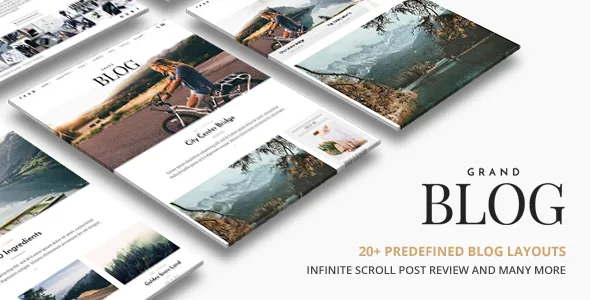
A front page you pick from a list, not one you build
ThemeGoods lists over 20+ slider and blog combinations for Grand Blog, plus two named slider layouts: Fullwidth and 3 Columns Layout. One-click demo import fills a fresh install with a working magazine front page assembled from those pieces.
So the front page is a choice between prepared arrangements, not a canvas. That suits an editorial site with a settled shape: a lead story, a grid of recent posts, a category strip. If you expect to drag modules into arbitrary positions, there is nothing in the description pointing to a builder surface. The theme ships as PHP, CSS and JS files.
Treat the "20+" as a count of vendor-made arrangements. How much they differ from each other is a question for the demo, not the feature list.
The Customizer owns the look; the child theme owns the templates
The vendor describes full Customizer integration, so changes preview before you publish. Typography, font size, style and colour are editable there without code, and a colour picker sets element colours.
That split is sensible for this theme: the structure comes from the chosen combination, and the appearance comes from settings. A heading face, a text colour and an accent can all be set from the Customizer.
What it does not cover, judging by the description, is per-post or per-page layout design. For structural work the vendor points to child theme support, described as a way to customise without losing changes to future theme updates. A modified post loop or a new front-page block belongs there, not in the parent files.
The one-click switch that turns responsiveness off
Among the listed features is an option to deactivate responsive features with one click in the backend. That line is unusual enough to read twice before buying.
Responsive design is otherwise claimed for mobile devices including iPhone and iPad, alongside an optimise-for-Google-Mobile-Friendly-Check entry. Switching responsiveness off is for a site that needs a fixed desktop presentation, such as a design-heavy layout signed off at one wide view. It is not a performance setting and does nothing for phone readers; it removes the adaptation they would otherwise get.
How a reader moves through the site
Several listed features shape movement through a post-heavy site. Infinite scroll keeps loading posts as the reader reaches the bottom, and the changelog records a fix for duplicated posts in that feature as far back as V1.1.3, which shows infinite scroll interacts with whatever else governs post queries. A reading indicator bar on single posts marks progress inside an article, and instant AJAX search returns results without a reload.
Navigation is described as several modes rather than one menu: a sticky main menu that stays visible while scrolling, an off-canvas side menu, and mega menu support for deeper category structures.
If your editorial plan depends on paginated archives or a firm stopping point at the end of each page of posts, infinite scroll is the first setting to inspect on the demo. The vendor also lists an option to show or hide post excerpts, which changes how much of each story appears in those lists.
Vendor content types: video, galleries and review posts
Blog posts are described as supporting various content, naming photo, gallery, video and SoundCloud, with Vimeo and YouTube support called out separately. A gallery admin is listed as accepting multiple images in one upload, and WP Review plugin support covers review posts.
Shortcodes are part of the content model too: the vendor lists built-in shortcodes, column shortcodes for 2, 3, 4 and 5 columns, and a shortcode generator plugin. For an editorial team, that combination suggests post layouts were designed around shortcode and classic content rather than block patterns. The marketplace marks Gutenberg Optimized as No, which says the vendor makes no optimisation claim for the block editor; it does not remove blocks from WordPress, so a representative post is worth testing in your own install.
Declared integrations, and the one that needs watching
The compatibility attributes list WPML, bbPress 2.5.x and WooCommerce 6.x through 9.x, plus Facebook. The feature list separately names WPML support for multi-language, translation-ready mo/po files, Instagram and Flickr photostreams, social profiles for Facebook, Twitter, Pinterest and Google+, and support for WP Super Cache, W3 Total Cache and Yoast SEO.
These are compatibility declarations, not bundled software, and a listed plugin is not a requirement for every demo. WooCommerce support means the theme is stated to work alongside a shop; nothing in the description says storefront templates ship with it.
The Instagram entry deserves a closer look. The changelog shows the photostream and widget being repaired repeatedly as the service's API changed, from 2016 through the most recent entry naming it in 2020. A feed built on a third-party API is the part most likely to need attention, so check that widget on the demo rather than assuming it runs untouched.
Sidebars, widgets and what the package contains
The theme is widget ready, with the vendor describing unlimited sidebars that you create and assign per page, and footer support for sidebars and widgets. On a magazine site that lets a category page carry a different sidebar from a single post.
Documentation is marked well documented, and the listed files are PHP, CSS and JS. The changelog's record of support additions is the practical reading material for a current stack: PHP 8.3+ support arrived in V3.1.3 and WordPress 6.8.1 in V3.1.4, dated June 2025, while the marketplace lists the theme at version 3.1.5. The software-version attribute spans WordPress 4.9.x to 7.0.x. Those are two separate vendor records, observed on 4 November 2026, and neither is a test result, so compare them against the copy you actually install.
Questions & answers
What is the difference between the Fullwidth and 3 Columns slider layouts?
The vendor names both without describing either in detail. The names suggest one runs a single story across the content width and the other splits the slider into three columns, which changes whether the front page leads with one story or several at once. The demo shows both in context.
Does the deactivate-responsive option help performance?
No. It removes the responsive adaptation, so the site stops adjusting its layout to smaller screens. If much of your audience reads on phones, leave it on and treat the switch as an escape hatch for a fixed desktop presentation.
Is the Instagram photostream a plugin or part of the theme?
The feature list presents Instagram and Flickr photostreams as theme features rather than as separate plugin bundles. The changelog shows the Instagram widget repaired several times as the service's API changed, so verify the feed renders with a current account before relying on it on a live site.


