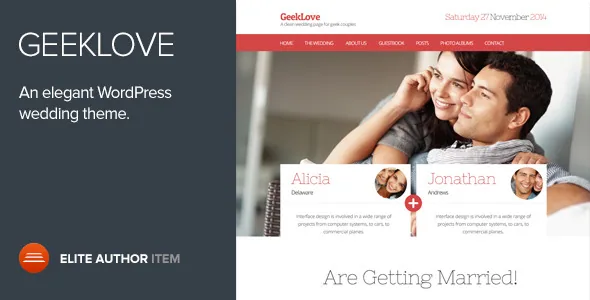
An RSVP form that ends in the WordPress admin
Most wedding themes hand you a homepage and let you decide what a guest does with it. GeekLove is described by Codestag around the opposite arrangement: the RSVP form sits on the homepage, and what guests submit becomes something you keep. The vendor states that attendees are then managed through the admin panel, and lists Attendees as one of the theme's custom post types.
That distinction is worth pausing on. An RSVP that arrives as an email is a message you re-read and copy into a spreadsheet. An RSVP that arrives as a stored entry can be listed, counted and edited alongside the rest of the site's content. If you are the couple, a friend coordinating replies, or a photographer who also maintains the site, this is the difference between a inbox and a guest list.
The vendor does not describe the field set on the form, the notification emails it sends, or whether guests can amend a reply after submitting. Treat those as things to confirm on a staging copy before the invitation link goes out.
Two forms guests fill in, not one
The RSVP is the practical front-end action; the Guestbook is the social one. Codestag describes it simply: visitors get a place to write down their wishes for the wedding. A Guestbook page template is listed among the theme's page templates, so the page exists as a designed layout rather than something you assemble from scratch.
Read the two together and the theme's model becomes clear. Both collect input from people who are not logged in and are not editors. Both surface on the public side of the site. The difference is who reads the result: the guestbook is meant to be seen by other guests, while the RSVP record is meant for whoever is running the day.
If you want the guestbook visible and the RSVP replies private, that separation is already implied by the two post types and two templates. Whether the theme enforces visibility in its defaults is not something the vendor copy states, so check it before publishing.
Events as pages that give directions
The vendor's description of the Events custom post type is specific: each event gets a dedicated page, and that page is where you describe the event and give directions for guests. For a wedding this usually means the ceremony, the reception, and perhaps a morning-after brunch or a rehearsal dinner, each with its own address and timing.
A single long page of logistics is easy to write and easy to get wrong — one guest scrolls past the ceremony details while looking for parking. Separate event pages let you link directly to the one a guest needs, and they give you a place to put a map without stretching it to cover arrangements that happen somewhere else.
The shortcode list includes Google Maps, which is the plausible route to those directions. The vendor names the shortcode but not how the map is configured, so plan on entering addresses yourself rather than expecting the theme to geocode anything.
A gallery type and a gallery page template
GeekLove lists Gallery as a custom post type and Photo Gallery as one of its page templates. Having both suggests two ways to present images: individual gallery entries, and a page layout that presents photographs as a set.
The vendor also declares the theme retina ready and high resolution, which matters for wedding photography more than for most subjects — guests will open the site on phones with dense screens, and guest-supplied images tend to arrive in whatever size the camera produced.
What the theme does not do, according to the listing, is supply the photographs. The included files are layered PSDs, PHP, CSS and JavaScript. Demo imagery is not part of that list, so assume you are sourcing and optimising your own pictures before the site resembles any preview you have seen.
The homepage is a stack of widgets you reorder
This is a theme from the widget-era approach to homepage composition, and the vendor is explicit about it: a fully widgetized homepage with ten custom widgets, and the ability to re-order every homepage section.
That means your homepage structure is a widget order, not a canvas of draggable columns. You do not place a hero row and then nest a two-column block inside it. You decide which of ten widgets comes first and switch some on or off. For a wedding site this is usually enough — cover image, a welcome note, the RSVP, the event list, a gallery strip, the guestbook — and it is considerably harder to break than a free-form builder.
The vendor lists StagTools and Stag Custom Sidebars as the plugins that supply much of that widget and shortcode behaviour. Neither is described as optional in a way that lets you take the widgets elsewhere, so if you want a widget area in a sidebar or footer, check the theme's registered areas rather than assuming the ten homepage widgets travel.
The styling decisions you will actually make
Beyond structure, the controls the vendor names are modest and practical. An accent colour picker handles the theme's highlight colour, Google Web Fonts can be changed without editing files, and every page can carry its own cover image. Those three cover most of what a couple or a photographer wants to change after the content is in.
The listing also mentions inbuilt SEO settings, full localisation with .po and .mo files, and child theme support. The last one is the relevant detail if you plan to alter templates rather than just colours: a child theme keeps those changes out of the parent files.
Ten layered PSD files ship with the theme, which is useful if you want to redesign a graphic element in Photoshop and keep the theme's visual language, and useless if your plan is a five-minute setup.
Version, compatibility and the gap to now
Codestag's listing declares WordPress compatibility from 5.0.x through 6.1.x, and the vendor's last update date on the listing is 30 January 2023. The marketplace records the theme at version 3.2.0, observed on 3 November 2026. Those three facts sit at different moments, and the useful reading is that the declared WordPress range stops well before the current release line.
WPML and Gravity Forms are both listed as compatible, and the vendor is clear that neither is included in the package. If you need a multilingual site or a more elaborate form than the built-in RSVP, budget for those separately. Gutenberg Optimized is marked Yes, but the vendor does not explain how the block editor and a widget-built homepage share the same theme, so that is a question for your own test install rather than something to take on faith.
None of this reflects an install on your server. The version ranges and browser list — Firefox, Safari, Opera, Chrome and Edge, plus legacy Internet Explorer entries that date the listing — are declarations from the vendor.
Questions & answers
Where do RSVP responses go?
Codestag describes RSVPs being managed through the admin panel and lists Attendees as a custom post type, so replies are stored as entries you can view and edit in WordPress rather than only arriving as email. The vendor does not publish the exact fields or notification behaviour.
Do WPML and Gravity Forms come with the theme?
No. The listing names both as compatible and states separately that each is not included in the theme package. Gravity Forms is only necessary if you want more than the built-in RSVP form.
Can the ten homepage widgets be used outside the homepage?
The vendor describes them as homepage widgets and does not state that they are registered for other widget areas. Stag Custom Sidebars is listed as a companion plugin, but relying on it to move the same widgets elsewhere would need testing.