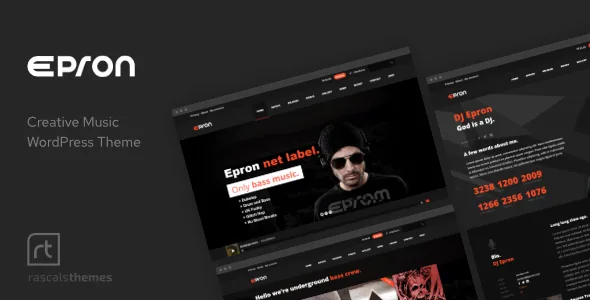
Playback that survives page changes
Most music themes treat audio as a widget you drop into a sidebar, so the track stops the moment a visitor clicks through to the tour dates. Epron's marketplace metadata states the opposite intent in one line: "One Page WordPress Music Theme With Continuous Music Playback." Playback is the product identity, not an add-on.
That shapes the rest of the theme. A one-page layout with anchor navigation keeps a visitor inside a single scroll, which is the environment where continuous playback makes the most sense. The vendor also lists smooth page transitions and anchor functionality in the menu, connecting to any section on the same or a different page — the structural pieces a site built around uninterrupted listening needs.
Treat the continuity claim as the vendor's stated design goal. Whether the audio keeps running across every layout, browser and mobile device is something you confirm in the demo and on your own device before committing.
Two audio routes: your own files or someone else's player
Epron supports self-hosted and hosted MP3 files, Shoutcast streaming, playlists and favourite tracks, with autoplay as an optional setting. In that setup the audio lives with you and the theme's own Scamp player is the interface.
The second route is embeds. The vendor lists support for players from Spotify, Soundcloud, Mixcloud and Bandcamp. That is a different arrangement: the file sits on a third-party service, the service's player handles delivery, and the theme provides the frame around it.
The choice matters more than it looks. Self-hosted MP3s keep the playlist under your control and inside the theme's player, so a visitor's listening session stays connected to your track pages and favourite-track feature. Service embeds offload bandwidth and work with whatever catalogue you already keep elsewhere, but you inherit that platform's player behaviour. For a band with a Bandcamp habit and a label with a growing internal catalogue, those are genuinely different builds.
Tracks Manager and the five custom post types
The player is fed by content, not by a static settings list. The vendor's feature list names five custom post types with AJAX sorting: Music, Events, Gallery, Artists and Tracks Manager. Playlist content can be loaded into the player dynamically, which means adding a track is an editorial action inside WordPress rather than a rebuild of the page.
AJAX sorting across those archives changes how a fan moves through the catalogue. Filtering by artist or release on the music and artist archives happens without a full page reload, so the listening context survives a browse. The vendor also describes post filtering by selected categories, post IDs, offset and limit — useful if you want a homepage section that pulls only the latest three tracks, or a label page that shows one roster.
One practical consequence: plan the vocabulary before you import anything. If artists, releases and tracks are three separate post types, deciding which one owns the cover artwork and which one owns the audio file prevents duplicated entries later.
Where you actually build pages: King Composer Pro
Editing happens in a front-end drag-and-drop builder. The vendor names King Composer Pro specifically, lists 32 premium modules for it, and includes Revolution Slider in the package. Sections can be re-ordered by dragging, and the WordPress Customizer handles live edits to theme options.
That is a builder-based workflow rather than a block-based one, and the vendor's changelog shows the stack being maintained against modern WordPress and PHP releases — version 2.3.0 added PHP 8.3 and WordPress 6.7 support, and 2.3.1 added WordPress 6.8. The marketplace attributes record WordPress 6.8.x and 6.9.x under software version.
If your team already works in the block editor or in Elementor, this is the decision point in the whole theme. King Composer Pro is where page structure lives, and the vendor documentation is the right place to check how modules behave before you plan a content model around them.
Ad slots placed inside the music
Monetisation is unusually specific here. The vendor describes more than eight responsive ad positions: six predefined ones — Header, Footer, Article Top, Article Bottom, Sidebar and Tracklist Inline — plus custom spots.
Tracklist Inline is the one worth pausing on. Advertising that sits inside a track listing is a different proposition from a sidebar banner, because it interrupts the act of choosing what to play next rather than sitting beside the page. For a label site or a music magazine running AdSense, that placement plus the article and header positions gives you inventory without building ad markup yourself.
How the slots are filled — whether through the theme options panel or an ad plugin — is not spelled out in the vendor description. Check that before you promise an advertiser a specific position.
Events with countdowns and automatic archives
The Event Manager is the second content axis. The vendor describes repeating and multi-day events, a countdown to the next event, and archive behaviour where events move from future to past automatically once they happen. Individual events can be placed with Google Maps, and each one gets a single event page carrying the full details.
For a touring act this is the difference between a static list you edit by hand every month and a gig page that ages itself. A countdown also gives the homepage a reason to change without you touching the layout.
The description does not say how recurring event instances are generated for ticketing or how time zones are handled. If your dates span regions, verify that in the demo rather than assuming it.
What the changelog settles about older copies
Version 2.3.2, dated 25 January 2025, records a security fix: the Theme Panel previously used PHP unserialization, and import/export now uses JSON instead. The same release updated the bundled Toolkit plugin and Revolution Slider.
Read that entry precisely. It tells you the theme panel's import and export handling changed in that release. It does not tell you anything certain about a copy built before it, and it is not a statement about the theme being audited, tested or cleaned in any broader sense. If you are working with an older archive, the safest assumption is that its panel behaves as the older code did, and that is a reason to prefer a current build rather than to patch the panel yourself.
The marketplace attributes also record the package as including PHP, CSS and JS files along with layered PNG and PSD assets, widget-ready sidebars, multiple custom sidebars, WPML integration, Contact Form 7 and MailChimp integration, and a child theme starting point. Those are vendor declarations — useful for planning, not proof of behaviour on your server.
Questions & answers
Do I need to host my own MP3 files to use the player?
No. Epron supports self-hosted and hosted MP3 files and Shoutcast streaming, and the vendor also lists embeds from Spotify, Soundcloud, Mixcloud and Bandcamp. The trade-off is where the audio lives: the theme's own player keeps the playlist and favourite-track feature in your control, while an embed hands delivery to that service.
Is the theme built around the block editor?
The vendor names King Composer Pro as the front-end page builder, with 32 modules, and describes a drag-and-drop workflow with section re-ordering. WordPress 6.8 and 6.9 appear in the declared software version range, but that is a compatibility statement, not a description of block-based editing.
Can I sell music or merchandise from the site?
Yes, the vendor lists WooCommerce integration, so products can be sold through the shop layer. The description does not go into detail on how music products, affiliate goods or coupon codes are configured, so plan to check the documentation for the specifics you need.