Seven LMS plugins, one theme
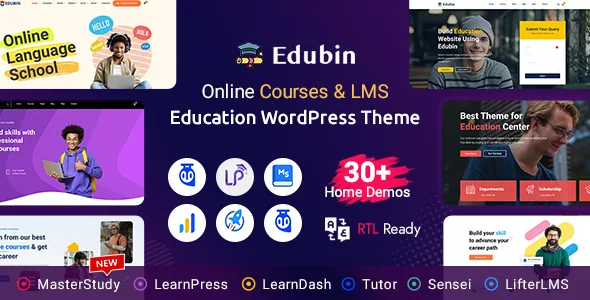
Pixelcurve's description leads with compatibility for seven LMS plugins: LearnPress, LearnDash, Tutor LMS, Lifter LMS, Sensei, Academy LMS and MasterStudy LMS. That list is the theme's main structural promise. Education themes usually tie themselves to one course engine, and the course pages, student dashboards and enrolment flows follow from that choice. Edubin is sold as neutral ground, so you pick the LMS first and the theme's templates sit over it.
What that buys you is room to change course. If a course library starts on LearnPress and later needs LearnDash's assessment tools, the vendor's framing is that you swap the plugin rather than rebuild the site. Whether the swap is clean depends on how each LMS stores its courses and how much custom layout you have wrapped around them, so treat "without any limitations" as the vendor's phrasing rather than a guarantee about your particular content.
Three bundled LMS plugins, and the activation notices
The vendor says LearnDash, Academy LMS and MasterStudy LMS are included with the theme at no extra cost. That is a vendor bundle claim about what the theme package is intended to carry, and it is worth reading alongside the note Pixelcurve adds on the same subject: bundled premium plugins are provided for convenience, activation notices can be safely ignored, and updates arrive through theme updates rather than directly from the plugin authors. The vendor also says you can buy individual plugin licences if you want direct updates.
That note tells you how the bundle is maintained. Plugin updates arrive on the theme's release cycle, so the plugin version you run tracks the theme version you have, not the plugin vendor's own release notes. If a specific Learning Management System (LMS) feature you need is newer than Edubin's last update, the bundle will not carry it until the theme catches up.
Live teaching with Zoom, recorded video with more sources
Zoom integration is listed as a theme feature, described for hosting live classes, webinars and virtual training sessions. Read that as a scheduling and joining route for live sessions inside an education site, not as a meeting platform the theme replaces; the vendor's description does not explain how the credentials are connected or whether sessions are created from the dashboard.
The recorded side shows up in the changelog. Version 9.6.3, dated 2 August 2026, records a course details page video popup supporting Dailymotion, TikTok, TED, Wistia, WordPress.tv and MP4 files. Publishing a lecture as a self-hosted MP4 and an embed from Wistia now share the same popup treatment, which matters if your course assets are mixed. Version 9.6.4 a fortnight later improved the video popup style and its own addon.
Demos named by institution, not by style
The demo list reads like a roster of organisations: Online Academy, University Website, Kindergarten School, Language School, Corporate Training, Career Coaching, Skill Development, Digital Marketing Courses, Online Course Marketplace, eLearning Platform and Knowledge Hub, with a Dark Version added in the 2 November 2026 release. Names like these narrow the first decision from "which look do I like" to "which kind of school am I running". A university site and a course marketplace need different navigation, and the demo set gives you a starting arrangement for each.
The description puts the demo count at 30+ while the named list is shorter, so treat the named set as the ones the vendor chose to describe. The same release that added the Dark Version also improved the demo import and export feature, which is the mechanism you use to pull a demo's content into a fresh install.
Layout editing in Elementor on an Underscores base
Elementor and Elementor Pro both appear in the declared compatibility list, and Elementor is the page builder the vendor names for customising without code. The theme's framework is recorded as Underscores, the plain starter theme, which means the theme's own templates are conventional WordPress templates that Elementor and the LMS plugin output sit inside, not a bespoke templating layer you would need to learn.
Gutenberg Optimized is recorded as Yes. That flag says the theme has been adjusted for the block editor; it does not tell you the demos were built in blocks, and the vendor's own customisation pitch points at Elementor. Widget areas are marked ready, so sidebars and footer columns accept standard WordPress widgets alongside whatever course widgets your LMS adds.
A long compatibility list and a steady changelog
The marketplace attributes, observed on 4 November 2026, declare WordPress 4.9.x through 7.1.x, WooCommerce 5.x.x through 10.x.x, WPML, bbPress 2.5.x and 2.6.x, Events Calendar and Events Calendar Pro, Easy Digital Downloads, Gravity Forms, Contact Form 7, WPForms, Jetpack, and Elementor with Elementor Pro. The breadth is consistent with the theme's positioning: a school selling courses through WooCommerce, running events, translating pages with WPML and collecting enrolments through a form all sit inside the declared set. These are declarations made through the listing, not records of tested combinations on your host.
The recent changelog suggests where maintenance attention goes. Version 9.6.7 fixed a Lifter LMS course addon issue, which is the kind of thing that shows LMS support being maintained rather than declared once. Version 9.6.6 updated a breadcrumb shortcode feature. Version 9.6.5 corrected the course filter widget's list view style. Course filtering, breadcrumbs and LMS addons are the parts of the theme that change when a plugin updates underneath it, and that is what the release history keeps touching.
Which choice decides the build
If you already run an LMS, the question is whether Edubin's templates wrap your plugin's course, lesson and quiz output cleanly, and the seven-plugin list is the vendor's claim that they do. If you have not chosen an LMS yet, start there: LearnDash and MasterStudy are bundled, LearnPress and Tutor LMS are the lighter-weight ends of the declared set, and Lifter LMS and Sensei each carry their own enrolment model. The theme deliberately does not make that decision for you, which is its appeal and also the work it leaves to you.
The commerce side splits the same way. A single-institution site with a brochure, an events calendar and an enquiry form uses the WordPress and form integrations. A course marketplace selling enrolments and digital products leans on WooCommerce and Easy Digital Downloads, both declared. Decide which of those you are building before importing a demo, because the demo closest to your institution type is the fastest way to see whether the course pages behave the way you expect.
Questions & answers
Do I need to buy LearnDash, Academy LMS or MasterStudy separately?
The vendor states that those three premium LMS plugins are included for convenience and that activation notices can be ignored, with updates delivered through theme updates. That is the vendor's bundle arrangement for the theme; the version of each plugin you end up running follows the theme's release cycle rather than the plugin author's releases.
Can I switch LMS plugins after launch?
Pixelcurve presents the seven-plugin compatibility as flexibility to change platforms as a project's needs change. Courses, lessons and student data are stored by the LMS itself, so the practical outcome depends on how much custom layout and content you built around the first plugin. Plan the switch as a migration of course data, not a theme setting.
Does the Zoom integration replace a separate webinar tool?
The description lists Zoom as an integration for hosting live classes and webinars. It does not explain credential setup, session creation from the dashboard, or attendance records, so check those specifics in the theme documentation before you commit to it as your only live-teaching route.