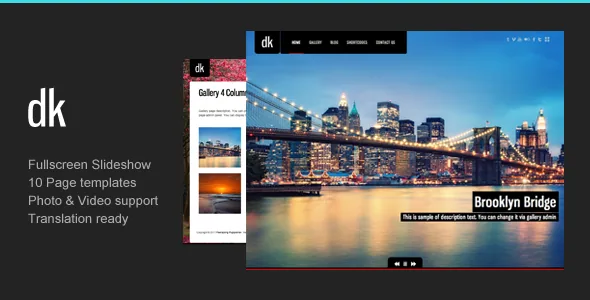
The gallery admin is where the theme's effort went
DK's vendor description opens on galleries rather than a homepage concept: an extensive gallery admin, multiple-image upload, password-protected gallery pages. Two changelog entries show that panel being refined. V1.8 (26 July 2012) reworked the upload interface to use WordPress's own Thickbox modal; V2.5 (27 April 2015) added the ability to pull images already uploaded to the media library instead of putting the same frame in twice.
That second item is the one that changes a working week. When a single image belongs in a portfolio set, a homepage slideshow and a blog post, you attach it from the library rather than leaving three copies in the uploads folder. The trade-off to know up front: this is a theme-owned gallery system, not the core WordPress gallery block, so the sets you curate here live in the theme's own structure.
Slideshow formats, gallery templates and where the password goes
The vendor lists a full-screen slideshow for the photo gallery, later joined by a Ken Burns slideshow for the homepage gallery (V2.0, 20 January 2013) and, earlier, an optional music player on the home slideshow (V1.3). The homepage presentation is therefore a full-screen image sequence, with a slow panning style as the alternate motion, and the option to pair it with audio.
The template counts are more informative than they look. Six gallery page templates are listed separately from ten page templates overall, so the gallery side of the site has its own small library of layouts while the rest covers blog, contact and standard content shells. Four homepage styles are named as well, which matters if you want the front page to differ from the gallery pages.
Password-protected gallery support appears twice in the feature list. In practice that means a client proofing set or a private family collection can be published and locked without a membership plugin, alongside a public portfolio of selected work.
Portfolio entries that are not always photographs
Portfolio items use a WordPress custom post type, and the vendor says each entry can carry videos, images or an external link. For a photographer whose output includes motion work, that means a video project does not have to be faked as a still with a hyperlink buried in the caption.
Around the portfolio sits an older outward-facing layer: seven custom widgets listed as Recent Posts, Popular Posts, a Twitter feed, a contact form, YouTube video, Vimeo video and a Flickr photostream. On a personal site these are the usual sidebar pieces — a client's Vimeo reel or your Flickr stream in a column without hunting for a third-party widget. Twitter's API and Flickr's feed terms have both moved a long way since these were written, so test the ones you intend to use on a staging install rather than assuming a live feed. A widget listed in the theme is not the same as a feed that still returns data.
Layout tools: shortcodes, fixed grid, unlimited sidebars
DK's layout tools are shortcode-based. Column shortcodes cover 2, 3, 4, 5 and 6 columns; style shortcodes such as dropcap handle inline treatments; and a bundled shortcode generator plugin gives you a UI for producing the markup. The vendor describes the overall layout as fixed with two columns, and lists unlimited sidebars — create one and assign it per page.
The marketplace attribute "Gutenberg Optimized: No" describes where the vendor put its effort, not a removal of the block editor. WordPress still gives you blocks; what you will not get is a theme designed around them. If your workflow depends on assembling pages visually from blocks, that attribute is the clearest signal in the listing that DK is not built that way. If you are comfortable writing a shortcode row and letting the theme render the grid, the arrangement is simple and predictable.
What the changelog says about the theme's direction
The changelog runs from the initial release on 6 October 2011 to version 3.2.2 on 7 June 2025, and almost every entry is maintenance. Fixes span WordPress 3.4 through 6.8.1, with PHP 7 support in 2017, a PHP 7.2 check in 2019, a PHP 8+ error fix in V3.2 (January 2024) and PHP 8.3+ compatibility in V3.2.1 (April 2025).
The gaps tell the same story. The design features you would want — gallery templates, Ken Burns, the music option — were in place by early 2013. Since then the work has been keeping an old codebase current on new PHP and WordPress releases, with long quiet stretches between compatibility patches.
Read plainly, that is a description of the product rather than a criticism: a mature, narrow photo theme with a maintained compatibility layer, not one that gains new layouts each year.
Compatibility declarations, dated
Marketplace attributes observed on 3 November 2026 list WordPress versions from 4.9.x through 7.0.x and WooCommerce 6.x through 9.x, with Chrome, Firefox, Safari, Edge, Opera and IE11 as declared browsers, PHP, CSS and JS files in the package, widget-ready sidebars and "well documented" status. The vendor's listing was last updated in June 2025.
These are declarations, not a record of anyone installing DK on your stack. Two practical readings follow. The WordPress range is wide enough that the upper end is best confirmed against your actual version. And the WooCommerce entry is a compatibility claim: the description names no shop templates or product layouts, so if you intend to sell prints through DK, expect to rely on WooCommerce's default output and check how it looks early.
The "High Resolution: No" attribute is worth a glance if your design depends on the theme shipping oversized display assets. It does not describe the resolution of the photographs you upload.
Where DK fits and where it does not
This is a theme for a photographer who wants a fixed, gallery-led site with a slideshow front page, curated sets and locked client galleries, and who is content to arrange pages with shortcodes. The gallery admin, the six gallery templates and the password option are genuinely specific to that job.
It is a weaker match if your build depends on block-based design, if you need a shop that looks designed for photography rather than skinned by WooCommerce defaults, or if you would resent a design vocabulary that dates from 2011–2013 while recent releases have focused on compatibility.
Questions & answers
Does DK use a page builder?
No builder is named in the vendor description. Layout uses shortcodes — column shortcodes for 2 to 6 columns, style shortcodes such as dropcap — plus a bundled shortcode generator plugin that produces them. The layout is described as fixed with two columns, and sidebars are created and assigned per page.
Can I hide a gallery behind a password?
Yes. Password-protected gallery support appears twice in the vendor's feature list, so a set can be published and locked without adding a membership plugin. The theme's own gallery admin manages those sets.
Will the Twitter or Flickr widgets still work?
Both services have changed their APIs and feed rules since those widgets were written in the theme's early releases. They are listed as features, but verify the ones you plan to use on a staging install before relying on them.


