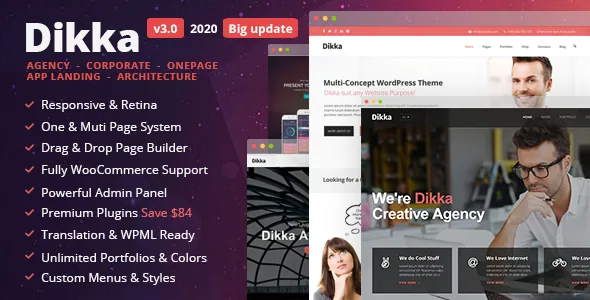
A theme sold as a closed toolkit
Dikka's vendor description opens with the packaging rather than the design: an "All-In-One package" that includes Revolution Slider, valued at $18 in the vendor's own wording, and the premium Cube Portfolio plugin, valued at $16. Those two plugins are not optional extras you go and buy; the marketplace description presents them as part of the theme, and the changelog repeatedly records bundled plugin versions being refreshed alongside WordPress updates.
That shapes what you are actually adopting. Pages, sliders and portfolio grids are three separate authoring surfaces, and each has its own interface. The theme itself is based on Twitter Bootstrap, and the vendor lists a child theme, PHP, CSS and JS files plus layered PSDs among the package contents.
So the question this theme raises is not "what does it look like" but "do I want to edit inside this particular set of tools in 2026". The record here is vendor-described: features listed on the marketplace listing, not the result of installing and running the theme.
The builder is the theme's own, with 45 widgets
Dikka does not hand page layout to the block editor. The vendor describes a drag-and-drop page builder where you compose columned layouts from 45 widgets, and elsewhere in the same description counts "35+ Page Builder Shortcodes/Widgets" — the two figures measure the same module set differently, so treat the lower number as the safe floor when planning.
The distinction worth understanding is that these widgets are the theme's, so their behaviour, styling options and content fields come from UX-Qode rather than from WordPress core. A testimonial module, a counter, a service box, a posts loop: each is a theme widget with its own settings. Changelog entries back this up at the detail level — an email field added to the Team Members widget, a slide animation speed option in the Testimonial widget, a label field for the Twitter widget, custom buttons, rounded and large button sizes.
Site-wide settings sit in a separate Redux Framework panel, which the vendor says covers logos, colours, menus, languages and social links. Think of it as two layers: Redux for global identity, the builder for page composition.
The marketplace attribute marks Gutenberg Optimized as No. Read that narrowly. It means the theme is not described as tuned for the block editor; it does not by itself prove the block editor is unavailable, and it certainly does not mean block-based page building is part of the offer.
Six header styles and what they toggle
The vendor lists six menu styles selectable from the admin panel: solid light and solid dark, transparent light and transparent dark, and full transparent light and full transparent dark. A "hide on start" menu option was added in an early release and remains in the feature list.
These are not cosmetic variants of one bar. Solid versus transparent changes whether the header competes with or recedes behind the hero area — a transparent header over a Revolution Slider reads very differently from a solid bar above it, and full transparency removes the background layer entirely. On a multi-concept theme with four demo starting points, that choice is one of the few that applies to every page at once.
The same admin area carries switches for the top bar, search and the WooCommerce cart. Turning the cart on or off is a real decision rather than a detail: a changelog entry from 2015 records a fix for a shopping cart that sometimes failed to appear, which is a reminder that this control interacts with the shop rather than sitting purely in the header.
Cube Portfolio handles grids, with three single-project modes
Cube Portfolio is where the theme's portfolio work happens, and the vendor describes a live template builder for it: type of portfolio, columns, colours, fonts, spacing and borders, all adjustable. The theme feature list adds the grid variants — masonry, fullscreen and box portfolio blocks.
More consequential for how a site behaves is the single-project display. The vendor lists three modes: AJAX, external page and lightbox. An AJAX project view loads the detail without leaving the grid; an external page sends the visitor to a normal URL; a lightbox opens the project over the grid. Each produces a different browsing rhythm, and a photography or agency portfolio usually wants one of them consistently rather than a mix.
Revolution Slider covers the motion layer: custom transitions and animations per object, video embedding, an image preloader, autoplay that stops on user interaction, and a drag-and-drop backend for building slides. The feature list also mentions a parallax image and video slider and video background sections, so the slider and the section backgrounds are separate tools in the same build.
Typography, icons and translation come from the panel
Typography options draw on 600+ Google Fonts according to the vendor, set through the theme options rather than per-block. The icon set is described as roughly 1400 icons across five style groups, and the vendor notes that the builder shows a preview of each icon — a small detail that matters when you are choosing from a set that size.
Translation is handled in two ways rather than one. The vendor states WPML compatibility and also ships .mo and .po files for translating the theme's own strings. WPML handles a multilingual site; the .po files handle a single translated site, or let you edit the theme's English wording. A language switcher style was added early in the theme's life and appears in the changelog alongside a 404 page template.
The demos are four in number — corporate, agency, app landing and one page — and the vendor says the content XML for all four is included, with one-click demo installation arriving in the 2016 version. The vendor also states that images shown in the live preview are not part of the theme sold for use, so expect placeholders to replace.
The layered PSDs are a design handoff, not a styling tool
Layered PSD files appear in the marketplace file list, and a 2015 changelog entry records 30 layered PSDs being added. That is unusual for a WordPress theme package and it changes who the archive is useful to.
If a designer is producing screens before a build, the PSDs let them work in the same visual language as the theme rather than approximating it in a separate mockup. If your team only edits in the browser, the PSDs are dead weight — you will set colours in Redux and build pages in the builder, and the layered files will go unopened.
It is worth separating that from the theme's own styling layer. Dikka ships CSS files you can extend, and a child theme is listed among the features, which is the route for changes that outlast a redesign of the options panel.
The version record is the deciding factor
The marketplace attributes, observed on 4 November 2026, list WordPress software compatibility from 4.5.2 through 5.4.x and WooCommerce from 2.5 through 4.0.x. The vendor's last update is dated 4 May 2020, and version 3.0 of 5 May 2020 states that it updated to WordPress 5.4.1, refreshed the bundled Revolution Slider, page builder and other plugins, and fixed a minor design issue.
Those two facts — a compatibility ceiling and a 2020 update date — are the practical filter for any project you plan to maintain. A theme that has not been revised since WordPress 5.4 carries bundled third-party plugins at whatever version existed then, and bundled plugins are exactly the components that need current releases. Nothing in the supplied record indicates testing against later WordPress or WooCommerce branches.
The changelog also shows the maintainer's habits while the theme was active: a 2015 entry records an XSS vulnerability fix alongside updates to the TGM Plugin Activation library and Redux Framework, and later entries are dominated by small CSS and widget fixes. That is a record of a theme being kept working, and then stopping in 2020 — not one being expanded.
When this combination still fits
Dikka makes sense when the site you are building resembles the demos it was designed around — a corporate or agency presence, a product landing page, a one-page brochure site with a portfolio grid behind it — and when the person editing it is comfortable in a widget-based drag-and-drop builder plus a separate slider interface. The bundled Cube Portfolio and Revolution Slider, the six header variants and the 1400-icon set give that kind of site a coherent starting kit without extra purchases.
It is a poor match for the opposite situation: a site that must run on current WordPress with current WooCommerce, or one where content editing should happen in the block editor. Neither is a matter of taste; both follow from the declared compatibility and the 2020 update record. Test the theme against your actual WordPress and plugin versions on a staging copy before you commit, and treat the demo import as a starting point rather than a live representation of the package's bundled plugin versions.
Questions & answers
Does Dikka work with the block editor?
The marketplace attribute marks Gutenberg Optimized as No, which means the theme isn't described as tuned for the block editor. That attribute alone doesn't prove the block editor is unavailable. What the vendor does describe is its own drag-and-drop page builder with 45 widgets, which is where page layout is expected to happen.
What does the theme package include besides the theme itself?
The vendor lists PHP, CSS and JS files, a child theme, and layered PSD files, plus content XML for the four demos. Revolution Slider and Cube Portfolio are described as included in the package, and the vendor's own values those plugins at $18 and $16 respectively. Preview images, the vendor notes, are not part of the theme sold for use.
How current is Dikka's WordPress compatibility?
The marketplace attributes observed on 4 November 2026 list WordPress 4.5.2 through 5.4.x and WooCommerce 2.5 through 4.0.x. The vendor's last recorded update is 4 May 2020, and version 3.0 of the following day updated the theme to WordPress 5.4.1. The supplied record does not document testing on later WordPress or WooCommerce releases.


