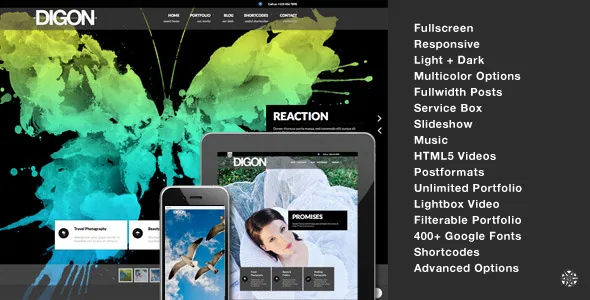
Password locks at three depths
The vendor description repeats one claim in two places: fullscreen pages can be password protected, and portfolios can be password protected too. Pages in general are also named. That repetition points at how the theme expects to be used — not as a site-wide barrier, but as separate locks you place where they are needed.
A wedding photographer collecting client selections, or a studio holding unreleased campaign work, can put a password on one set without exposing anything else. A protected fullscreen page works as a private landing screen for a single client.
What the vendor does not describe is how the gate behaves after the first visit — whether access persists, whether it expires, or how it interacts with page caching. Test those on a staging copy before you build a client workflow around them.
What a fullscreen page carries
The fullscreen page is the second building block, and the vendor allows more per-page configuration than the theme's age suggests. Captions can be switched on or off for each page, and each page can have its own audio track.
Background video comes in three forms: self-hosted HTML5 files, Vimeo, and YouTube. The changelog shows this stayed a concern late in development — version 1.8 moved HTML5 playback to VideoJS and switched YouTube embedding to the tubular script, which the entry describes as supporting HD video. Version 1.6 had added touch swipe for fullscreen slideshows, which matters when a client opens your link on a phone.
Per-page audio deserves a decision rather than a default. It suits one deliberate showreel-style entry; it is unwelcome on a page someone opens at their desk. Because the setting lives on the page, you can keep it to those one or two entries.
Portfolio grids are composed from shortcode blocks
The portfolio is a custom post type, and each project is assembled in the post rather than on a drag-and-drop canvas. The vendor lists slideshow, video and image headers for portfolio items, with related portfolio blocks underneath the content.
Collection pages come in one, two, three or four columns, and the filterable showcase can mix images and videos. Image attachment thumbnails are generated through shortcodes in small, medium and large block sizes with lightbox support — the mechanism behind the grids and image clusters in the demo. A taxonomy lister page handles browsing by category.
Reusing the same shortcodes at different sizes is what makes a homepage grid and a collection-page grid feel related without duplicating the markup. That flexibility rewards someone comfortable pasting and configuring shortcode attributes. Anyone hoping to drag blocks on a canvas will find this is not that theme.
Theme options, widgets and the blog side
Editing runs through an advanced theme options panel plus a shortcode generator, with colour pickers, light and dark skins, and a Google font selector offering more than 400 choices. Menus accept descriptions, there are multiple sidebars and several widget areas, and the widget set covers address, social icons, Flickr, gallery, Twitter, recent posts, popular posts and video.
The blog supports a fullwidth list or a two-column list with a sidebar, with matching single-post layouts. Post formats cover audio, video, gallery as slideshow, image, aside, quote and link, and the vendor includes a separate blog list template for each format. There are also templates for a contact page, a left-sidebar page and a sitemap.
The marketplace marks Gutenberg Optimized as No. Read that narrowly: nothing was prepared for block editor styling, so a page built mostly from core blocks may not inherit the theme's look. It does not mean the block editor is unavailable. If blocks are central to your plan, check that early.
The package, minus the photographs
The marketplace file list names layered PSDs alongside PHP, CSS and JavaScript. The vendor adds a 73-page PDF help guide with screenshots and an XML demo data file so the demo can be reproduced instead of rebuilt by hand.
The imagery is not part of it. The vendor states that the demo photos came from a stock library and are not in the download package, so your own photography replaces them — normal for this category, but it changes how much of the demo's finish you can reproduce on day one. The homepage service boxes, described as hover-enabled to reveal a representative image, wait on images you supply as well.
The PSDs are design sources. A designer can repaint visual assets without reverse-engineering the stylesheets, but they are not page layouts.
The declared platform ceiling
This is the fact that decides a project more than any feature above. Marketplace attributes list supported WordPress versions from 3.8 through 4.8.x, and the vendor's last recorded update is 17 July 2019. The marketplace entry carries version 1.9; the changelog's newest entry is version 1.8.
Those version numbers are a vendor declaration, not a test report, and the absence of newer WordPress releases does not prove the theme breaks on them. It does mean there is no published claim to rely on. Install it on a current release and you are the one verifying it.
The declared list also names WPML, responsive layout and high-resolution assets, plus browser versions back to IE8. The changelog records WPML fixes for the Supersized slideshow and for fullscreen video, which suggests multilingual fullscreen content was a real buyer concern rather than a checkbox.
The practical consequence is to treat Digon as a theme you maintain yourself. Budget a staging install that exercises the password gate, a fullscreen slideshow and each video source against your WordPress version, plus a decision about who fixes what later. For a small, deliberately static gated viewing site under your own control, that trade can work. For anything that needs current WordPress support, it is the wrong foundation.
Questions & answers
Can a whole portfolio set be password protected, or only single pages?
The vendor lists password protection separately for fullscreen pages, for pages and for portfolios, which suggests the lock can sit at collection level as well as on one fullscreen page. How a protected portfolio behaves for the visitor browsing it is not described, so confirm it on a test install.
Does Digon work with the block editor?
The marketplace marks Gutenberg Optimized as No. That means nothing was specifically prepared for block editor styling; it does not mean the block editor is switched off. Pages assembled mainly from core blocks may not match the theme's shortcode-driven layouts.
Are the demo images in the package?
No. The vendor states the demo photos were bought from a stock library and are excluded. You get the theme files, layered PSDs, the PDF help guide and XML demo data, and you supply your own photography.


