Choosing a viewing format, not a homepage
A photography site usually makes one decision more than any other: how the pictures are presented when someone lands on the page. GT3themes treats that as a menu rather than a fixed layout. The vendor's feature list names a fullscreen grid portfolio, a fullscreen masonry portfolio, a masonry portfolio, a Kenburns slider, a ribbon gallery, a fullscreen gallery slider, a photo listing gallery, and fullscreen grid or masonry galleries for both photos and video.
Those formats do different jobs. A masonry grid handles a large archive where images have different proportions and you want the whole set visible. A Kenburns slider or fullscreen gallery slider slows the visitor down to one image at a time, so it suits a short set of signature frames rather than a catalogue. A ribbon gallery works when you want a horizontal strip and a sense of movement. A photo listing gallery puts titles and metadata next to thumbnails, which reads more like an index of sessions or shoots.
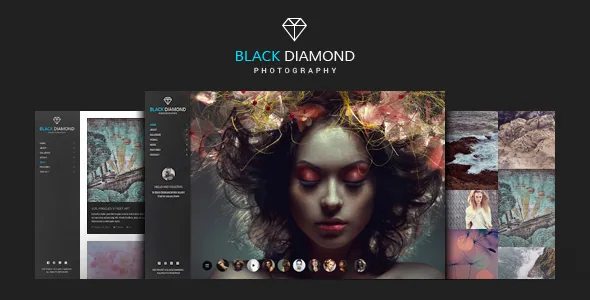
If you cannot decide from the names alone, the live demo URL is listed with the product, and the marketplace preview shows the theme running with demo photography. Looking at a few formats with real image sets in mind is faster than reading the feature list again.
Portfolio items, custom fields and filtering
The portfolio is the content type the site is built around. Each item can carry unlimited custom fields, according to the vendor, which is the detail that matters if you want a project page to record more than a title and a gallery. Camera, lens, location, client and shoot date can each become a labelled field that appears consistently across every portfolio entry instead of being typed into a paragraph.
Display side, portfolios can be set to one to four columns, support Isotope filtering, and can load further items automatically as the visitor scrolls. Filtering and auto-load pull in opposite directions on a large archive: filters are only useful when the visitor can see enough categories to choose from, and infinite scrolling can bury a footer. Both are listed as theme settings rather than fixed behaviour, so the useful step is deciding which of the two your archive actually needs before turning them on.
The marketplace attributes mark the theme responsive with 4+ columns, which is a layout capacity, not a promise about how a four-column grid behaves on a phone.
Albums, categories and client-facing galleries
Beyond the portfolio, the vendor describes gallery albums with gallery categories and the option to add margins between gallery images. Albums and categories are the organising layer: a wedding season, a set of editorial commissions and a personal series can each sit as their own collection rather than being scattered across one long stream.
One entry in the list deserves separate attention: a password-protected gallery. That is the feature that turns the site into something you can use with clients, because a protected gallery can hold a private selection without being part of the public portfolio. The vendor does not explain how passwords are issued or whether they are per gallery, so treat the capability as declared and plan to confirm the details during setup.
A before/after module is also listed, which suits restoration work, retouching comparisons or any presentation where two versions of the same image need to sit in one frame.
How pages get built: GT3 Page Builder and striped layouts
Pages are composed with the bundled GT3 Page Builder plugin, which the vendor describes as a drag-and-drop system of modules and shortcodes, each with its own settings. For a photographer, that means a landing page is assembled from blocks — a slider, a portfolio grid, a text block, a contact form — rather than being locked to a single demo arrangement.
The more unusual layout option is the striped page layout, offered in both vertical and horizontal directions with custom settings. A vertical stripe arrangement stacks full-height bands so that sections read as one continuous scroll; a horizontal one moves sideways between strips. The vendor also lists vertically aligned pages, which is a similar idea for presenting content in sections the reader advances through rather than scrolls past.
Alongside the builder, the marketplace marks the theme as Gutenberg optimized. That indicates the block editor is not excluded — it does not tell you how much of a demo page was built in blocks rather than in GT3 modules, so expect the two editing routes to coexist and check which one a given template uses.
The theme is also listed as widget ready, has an advanced settings panel, colour management and a Google Font selection the vendor puts at 600+ fonts.
What you supply: the images and the PSD files
The vendor is explicit that demo images are not part of the package and exist for demonstration only. A fresh install therefore looks nothing like the preview until you add your own photographs. Budget for that, because a photography theme's layout is largely judged on the images inside it — a masonry grid with ten images behaves very differently from one with two hundred.
The files included are listed as layered PSD and PSD files alongside PHP, CSS and JS. The PSDs are design sources, useful if you or a designer wants to adapt the visual treatment of a template outside the browser; they are not a way to add images to the site.
The vendor also lists one-click demo import, extended documentation and after-sale help through a forum and ticket system. Contact Form 7 and Mailchimp support cover the enquiry and newsletter pieces a portfolio site normally needs.
Declared compatibility, observed 3 November 2026
The vendor's compatibility attributes name WPML for multilingual sites and WordPress 6.5.x through 6.9.x for the software version. Translation-ready .po and .mo files are also listed. Browsers are declared as IE11, Firefox, Safari and Chrome.
These are vendor and marketplace declarations recorded on the listing, not the result of running the theme on a particular server, PHP build or plugin set. The marketplace entry stood at version 2.6.4 at that observation, with a vendor update date in April 2026. If your stack sits outside the declared WordPress range or relies on a plugin the listing does not mention, that is worth resolving before you commit to a build.
Questions & answers
Can I sell prints or client work through Diamond?
Nothing in the supplied feature list mentions WooCommerce or any shop integration, and the marketplace compatibility attributes name only WPML. The theme is described as a photography portfolio tool, so treat ecommerce as outside what the listing documents.
Does the theme work with the WordPress block editor?
The marketplace marks it Gutenberg optimized, which means the block editor is not excluded. Pages in the demos are built with the bundled GT3 Page Builder, so which editing route a given template uses is something to confirm on the specific layout you plan to reuse.
Are the demo photographs included?
No. The vendor states the images are not in the source zip file and are used for demo purposes only. The package includes layered PSD and PSD design files, PHP, CSS and JS files, but you provide the photography that goes on the site.


