A timetable, not a page builder, is the reason to look
Most themed site packages argue from a builder. Pirouette argues from a schedule. Visual Composer and Slider Revolution are on the bundled list, but the item that shapes the product is Events Schedule, which the vendor calls "a smart plugin that displays schedules and timetables in style" and for which the theme supplies demo content. The description also names dance timetables among the custom functionalities built for an academy.
That changes what the site is asked to do. A dance school answers the same question over and over — which class, with whom, at what time — and a schedule held as structured entries is edited differently from a timetable baked into an image. Whether you can carry a whole term's changes yourself is the thing to try in the demo, because nothing in the listing describes the admin side of the schedule.
The claims here come from the marketplace description and its declared attributes, observed on 5 November 2026. They describe what the vendor ships, not results from running the theme.
Xtender is what makes repeated class pages practical
Pirouette ships a companion plugin, Xtender, and the features it adds are mostly about repeating layouts with variation. The vendor lists custom Visual Composer elements, an "extended Individual Page Settings options panel", a sidebars generator, shortcodes for icons and buttons, custom widgets and custom footer options.
Per-page settings are the part that matters for a studio. A ballet class page, a teacher bio, a term-fees page and a hall-hire enquiry all want different headings, different sidebars and sometimes different footers. Settings attached to each page let you vary those without a child theme, and the sidebar generator removes the single-sidebar limit that plain WordPress imposes.
The custom Visual Composer elements are harder to judge from a list. Their value depends on whether the theme supplies prepared blocks for classes, instructors or pricing, so look at how a demo page is assembled before assuming you can build class pages quickly.
The demo's look is a slider and carousel design you have to fill
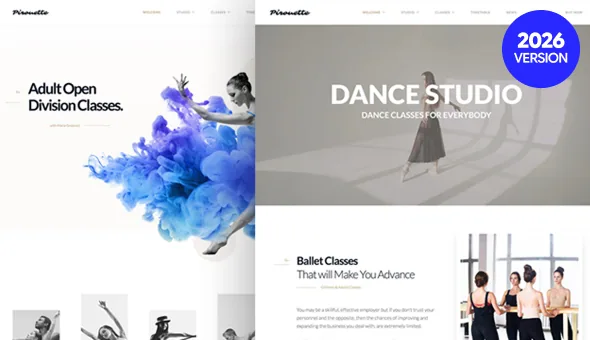
The vendor describes the theme as made for "visually impressive websites, with large sliders and images, stunning carousels and generous footers". For a studio that is a sensible emphasis — performance photography and video sell a dance school better than paragraphs — but it places the design's weight on material the theme does not give you.
The listing states that the demo content does not include videos and images. Importing the demo therefore produces the layout with placeholders rather than the photographs in the preview, so you need your own shoot or licensed stock before the design can be judged fairly. The same caution applies to the front page: large sliders and multiple carousels get heavy when they carry more than the page needs, and deciding how many slides actually earn their place is easier before you build than after.
On layout, the listing marks the theme responsive, columns 4+, high resolution yes and documentation well documented. The vendor adds that it included options for controlling how and which elements display depending on screen size — a more specific claim than responsive alone, and one to check on a phone, where a dense carousel is most likely to get in the way.
WooCommerce, WPML and Bootstrap, with their limits
The declared compatibility list names WooCommerce 6.x.x, WPML and Bootstrap 4.x. WooCommerce is the route to selling merchandise or paid classes through WordPress's own commerce plugin rather than a theme-specific shop, and the ticket element for a studio would be the class-booking step, which the listing does not describe.
WPML is declared as supported, but the vendor's own note says the plugin is not included — so a second language is a licensing decision alongside the translation work. Bootstrap 4.x describes the grid underneath the theme, which is relevant if a developer will write custom templates against it.
Gutenberg Optimized is marked no. Read that narrowly: it says the theme was not built around block-editor styling, which fits a Visual Composer-based workflow. It is not a statement that the block editor is unavailable.
Separately, the vendor widens the pitch to fitness centres, gyms, yoga studios and martial arts dojos. Take that as positioning: the timetable and class-page structure would carry over, but those businesses would build their own membership and pricing pages.
The declared platform range is the first thing to settle
The listing declares WordPress support from 4.9.x through 6.4.x, with compatible browsers given as Chrome, Firefox, Safari, Edge, Opera and IE11. The marketplace entry carries version 1.2.18 as the latest release, observed on 5 November 2026.
That range ends at 6.4.x, and it is a tested-support statement rather than proof that later releases break the theme. If your site will run a newer WordPress version and you want the theme's author to stand behind the combination, confirm it before buying. A staging copy is the cheapest way to see whether the timetable, slider and per-page settings still behave.
The included files are listed as PHP, CSS, SCSS and JS. The SCSS sources matter if the styling has to go beyond the Customizer's options, since compiled CSS can then be changed at source rather than overridden.
Questions & answers
Does the Events Schedule plugin let me manage a term's classes myself?
The vendor bundles the plugin and ships demo content for it, so the schedule is a real, editable part of the theme rather than a picture. The listing does not describe what the schedule editor can and cannot do, so add and change a class entry in the demo before you plan around it.
Do I need Visual Composer experience to build class and instructor pages?
Pages are assembled in Visual Composer, with Xtender adding theme-specific elements on top. If your team knows only the WordPress block editor, expect a different editing model rather than a block-based one; Gutenberg Optimized being marked no describes prepared block styling, not whether blocks function.
Will the demo import give me the photography I see in the preview?
No. The vendor states that the demo content excludes videos and images, so the import gives you layout and structure with placeholders. The slider-heavy design only reads as intended once your own performance photos or licensed stock are in place.