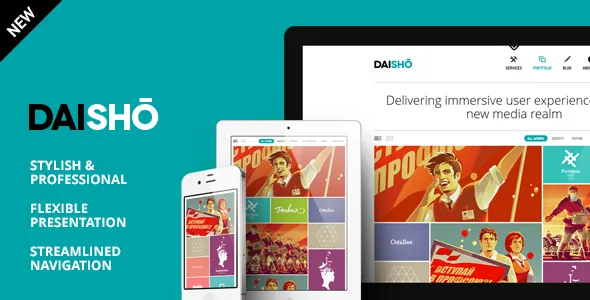
Two homepages, two ways to meet the work first
The vendor's feature list gives Daisho two homepage modes by name: Daisho Grid and Classic Homepage. The demo list separates them further, with a "Thumbnail Grid" demo and a "Classic Mode" demo shown alongside a WooCommerce demo and a mobile demo.
That choice does more than change spacing. A thumbnail grid puts several projects on the first screen, so a visitor scans a body of work and picks. A classic layout spends the opening screen on fewer projects, which suits a studio that wants each piece read on its own terms before the archive appears. Since neither preview screenshot can tell you which one matches your catalogue, the useful question is how many strong images you can show side by side without the grid looking thin.
The listing names no page builder. Layout editing therefore rests on the theme's own templates and options panel, which the vendor describes as unbranded. If you plan to rebuild the homepage from blocks or a drag-and-drop builder, treat that as unverified until you have checked the demo and documentation yourself.
The filtering model: categories on listings, tags on projects
Daisho's project browsing is described as a set of connected pieces rather than a single grid. The vendor lists a portfolio display with category filter, multi-category projects, a "Browse Projects in Selected Category" mode, and multiple portfolios support.
Read as one system: a project can sit in more than one category, so a branding job that also involved a website can appear under both Identity and Web. The listing carries the filter bar, so visitors narrow the grid themselves instead of being handed one curated order. The browse-in-selected-category mode is the tighter variant, where the theme shows only work from the category a visitor picked. Multiple portfolios means separate sets exist as well as one archive with categories — useful if you want client work and personal experiments to live apart rather than as filter options in the same grid.
The named sample categories in the description — Identity, Motion, Web, Print and Photo — are a fair sign of the intended granularity. If your practice splits into more than a handful of disciplines, plan the category list before you import anything, because every filter label is a promise to the visitor that the heading leads somewhere.
Project pages that hold video and audio
The vendor lists support for YouTube, Vimeo, SoundCloud and HTML5 video, plus WordPress Embeds. For a portfolio whose work includes motion or sound, that means a project can be presented with the piece itself rather than a still and a link out.
It also flattens the template decision. If embedded media can live inside a project entry, you do not need a separate video-gallery layout for the motion section — the same project type carries a film, a recorded track or a photo series. The listing does not say how many embeds a single project accepts or whether they sit in a slider, so confirm that in the demo before designing around a multi-clip case study.
Social sharing is also among the listed features, which matters for a portfolio that gets passed around by clients rather than found through search.
What the vendor says ships with the theme
Daisho's item description claims a set of bundled items: Advanced Custom Fields included, LayerSlider included (the vendor prices it at $23), and PSD as well as Layered PSD among the ThemeForest file types, alongside PHP, CSS and JS files.
Those are seller statements about the item's contents. Whether a bundled plugin arrives inside the download, comes as a separate installer, or needs its own licence for updates is the kind of detail the description does not settle, and it is worth confirming before you build project fields that depend on ACF's data model. The same caution applies to LayerSlider: a slider shipped with the theme at the time of the listing will not necessarily track the plugin author's later releases.
The marketplace also records Underscores as the framework. That is the WordPress starter theme rather than a page builder, which is consistent with a listing that names no builder at all: Daisho's structure is conventional theme PHP with its own options, not an editor layer bolted on top.
Gutenberg, WordPress versions and an old update stamp
Two pieces of evidence disagree, and both are worth knowing. The vendor's feature list says "Gutenberg editor ready." The marketplace attribute for Gutenberg Optimized is recorded as No. Neither statement tells you whether the block editor is absent, and the honest reading is that the theme was not built around blocks — so assume a classic-editor and template-driven workflow, then test the editor you actually intend to use.
The dated declarations are the other thing to weigh. Marketplace attributes observed on 3 November 2026 list WordPress 6.1.x as the software version, with the vendor's last recorded update on 7 February 2020. The marketplace's latest version is 4.2. None of this is evidence that the theme fails on newer WordPress releases; it is evidence that nobody has restated support in years. Declared browsers are Firefox, Safari, Opera, Chrome and Edge, with responsive layout at a single column and widget-ready areas.
If your project needs a current block-based editorial team, or plugins that assume recent WordPress internals, treat that gap as the main risk rather than a detail. For a portfolio with a stable set of project pages, the risk is smaller but not zero.
Where Daisho earns its place in a build
The strongest case for Daisho is a studio whose content model is genuinely categorical: several disciplines, projects that cross between them, and a visitor who arrives wanting to filter down rather than scroll a single curated reel. The two homepage modes let you decide whether that archive is the first thing seen or the second, and the category modes let the visitor take over from there.
Media is the second consideration. If motion and sound are part of what you sell, embedded video and audio in a project entry is more useful than a gallery theme that treats every piece as a still.
The caution is arithmetic. The vendor's declarative material has not moved since 2020, so budget time to check the theme against your current WordPress install, your forms and translation setup (Contact Form 7 and WPML appear as compatible plugins in the vendor list), and any shop requirement, since a WooCommerce demo is shown but the theme's store depth is not described.
Questions & answers
Does Daisho work with the WordPress block editor?
The evidence points in two directions: the vendor's description says "Gutenberg editor ready," while the marketplace attribute for Gutenberg Optimized is recorded as No. Treat Daisho as a classic, template-driven theme and test the editor you plan to write in before committing.
Do I need a page builder to build pages with Daisho?
No page builder is named anywhere in the vendor description or marketplace attributes. The description refers to an unbranded options panel and the ability to create other pages with custom layouts, so layout work is theme-native rather than builder-based.
Can a single project appear in more than one category?
Yes, according to the vendor's feature list, which names multi-category projects alongside a category filter on the portfolio listing and a browse-in-selected-category mode. Multiple portfolios are also listed, so you can keep separate project sets as well as categories.


