Where a shoot actually goes after the upload button
Most portfolio themes talk about what a gallery looks like. Core's marketplace description spends its detail on the admin side instead, and that is the right place to start judging it. The vendor lists an "extensive galleries admin" that supports multiple image upload, and the changelog adds two entries that spell out the workflow: version 2.1 introduced drag-and-drop reordering of images in a gallery, and version 5.3 added the ability to build a gallery from images already uploaded to the site.
For a photographer, those three things describe real time saved. Uploading a shoot of eighty frames in one pass avoids the one-file-at-a-time loop. Reordering by dragging means the sequence you decide in the gallery admin is the sequence visitors see, without renaming files to force an order. Pulling from the existing media library matters when a single photograph belongs to a portfolio piece, a blog post and the homepage at once — you place the same file rather than uploading duplicates that later need separate management.
Full-screen slideshow, and what you can switch off
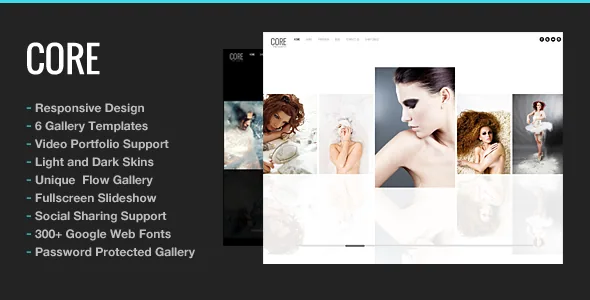
The vendor's feature list names a full-screen slideshow for the photo gallery and three homepage styles. Later changelog entries show how much of that presentation is optional rather than fixed. Version 3.4 added an option to disable thumbnails in full-screen mode, which is the difference between a clean edge-to-edge image and a slideshow that keeps a filmstrip on screen. Version 4.4 added an enable/disable switch for auto-hiding the menu and footer on the full-screen gallery; version 4.4.2 extended the auto-hide control to the Ken Burns gallery specifically.
The Ken Burns option arrived in version 4.0, alongside a fix for cropping in the full-screen gallery. That pairing is worth noting: a slow pan-and-zoom effect only looks intentional if the source image is not being cropped in a way that cuts the subject. Also from that era, version 2.1 added a toggle for the full-screen slideshow button, and version 2.2 added a disable-right-click option for image protection — a deterrent photographers often want, though no client-side script prevents someone from capturing an image they can already see on screen.
Portfolio display is separate from the homepage. Core lists four portfolio styles backed by a WordPress custom post type for portfolios, so work is stored as its own content type rather than as ordinary posts filed under categories.
Composition without a builder: shortcodes, a generator and eight widgets
Core's feature list contains no page builder. Columns are shortcode-driven, with 2, 3, 4, 5 and 6 column variants; media shortcodes cover video, slideshow and image gallery; style shortcodes handle details such as dropcap. A bundled Shortcode Generator plugin exists so you can insert those tags from an interface instead of typing brackets. On top of that sit styled typography, flexible page columns and Google Web Fonts, with Cyrillic character coverage added to the font selection at version 3.4.1.
Eight custom widgets are listed by name: Recent Posts, Popular Posts, Twitter feed, Contact Form, YouTube video, Vimeo video, Social Media icon and Flickr photostream. Sidebars are unlimited, and the vendor states you can create one and choose it for each page. That is a narrower claim than it sounds — a themed sidebar repeated across a series of project pages, with the blog keeping its own.
The vendor also lists a contact page with validation and a ready-to-use PHP mailer. Note what that means in practice: mail leaves from your own server through PHP's mail function, which is where deliverability problems usually begin. If enquiries matter, route the form through an SMTP provider or a transactional mail service and test a real submission. Some widget-era entries have aged too: the Twitter feed widget has been patched for API changes at least twice in the changelog (4.6, and earlier class conflicts), and Flickr photostream depends on a service whose own terms have moved on.
A 2011 theme with a mostly maintenance-shaped record
The changelog starts at version 1.0 on 11 May 2011 and runs to version 6.3 on 28 April 2022. The arc is visible in the entries: early releases added features at a fast clip — image flow portfolio style, video portfolio content, video background homepage, translation files in po/mo format, iPad and iPhone gesture support for galleries, responsive design in version 3.3 — while the later years read as repairs.
The most recent stretch is almost entirely compatibility work. Version 5.7 added PHP 7 support and fixed notices on WordPress 4.7+, 5.8 addressed a Gutenberg media library issue, 6.0 fixed theme-setting JavaScript against WordPress 5.5, 6.2 fixed a full-screen slideshow error with WordPress 5.6, and 6.3 records a PHP 8+ compatibility check. Security-adjacent entries also appear at points along the way, including a theme admin security update in version 4.5 and a contact-form fix in version 5.2.
What that record supports is a narrow reading: the vendor has kept a fourteen-year-old codebase running on newer WordPress and PHP versions rather than redesigning it. If you want a theme whose release notes are full of new layout features, this is not that record. If you want one whose architecture has been stable for a long time and whose recent changes are about keeping it working, the shape fits.
Compatibility claims, and the ones that are absent
The marketplace attributes, observed on 3 November 2026, list WordPress 4.9.x through 7.0.x. They also list WooCommerce 6.x.x through 9.x.x as a compatible-with entry, despite Core describing itself as a photography and portfolio template — so a shop is possible, but the theme's own feature list says nothing about store layouts, and the WooCommerce range is a vendor compatibility statement rather than a promise of styled product pages.
Compatible browsers are listed as IE11, Firefox, Safari, Opera, Chrome and Edge. High Resolution is marked No. That flag is about the theme assets rather than your photographs, but it is worth a glance if you intend to lean on the theme's own graphics at large sizes.
These are vendor and marketplace claims. None of them is a substitute for opening your own image-heavy page on a phone and watching how the slideshow behaves.
Two flags to weigh before you commit
The first is resolution. High Resolution is listed as No, and a photography theme's selling point is how your files look. Open the live demo at full width on a large display and look at the theme's own imagery and typography, not just your own photographs.
The second is the WooCommerce range. Core lists shop-plugin compatibility across four major versions, yet its documented features are galleries, portfolios, a blog and a contact form with validation and a ready-to-use PHP mailer. If selling prints is part of the plan, treat the shop as an integration to test rather than a built-in storefront; if it is not, the compatibility entry costs you nothing. Either way, the gallery admin and the slideshow controls are the parts of Core you will touch every week, and they are where the theme has put its work.
Questions & answers
Does Core require a page builder to lay out pages?
The vendor's feature list does not name one. Layout is handled with column, media and style shortcodes plus a bundled Shortcode Generator plugin, alongside eight custom widgets and unlimited sidebars assignable per page. The marketplace marks Gutenberg Optimized as No, which describes the theme's design system rather than whether the block editor is available in WordPress.
Can I order photos in a gallery without renaming files?
Yes, according to the changelog. Version 2.1 added drag-and-drop reordering of images in the gallery admin, and version 5.3 added the option to build a gallery from images already uploaded to the site. Both are vendor-described admin features; the ordering behaviour is worth confirming in your own installation.
Does Core include a shop for selling prints?
The marketplace lists WooCommerce 6.x.x through 9.x.x under compatible-with, observed on 3 November 2026. The theme's own feature list describes galleries, portfolios, a blog and a contact form, with no store layouts mentioned. Treat selling as an integration to test on a staging copy rather than a documented storefront.


