Staff and Portfolio are post types, not page templates
A clinic site needs a people directory, and Clinico treats that as structured content. The vendor changelog records archive templates for Staff and a departments filter, so practitioners can be grouped by department and browsed through an archive rather than arranged by hand on a page.
One early entry adds an option to rename the Staff and Portfolio post types. That matters more than it sounds: if your organisation calls its people practitioners, specialists or team members, the labels and URLs can follow your language instead of the theme's. Portfolio filtering and pagination are patched across several releases, which tells you the theme expects case studies or treatment showcases to sit alongside the blog.
Pages are built in CWS Builder, with settings in one options panel
Layout work happens in the vendor's CWS Builder, listed alongside a shortcode generator, a sidebar generator and custom widgets. Theme-level settings sit in a single Theme Options panel rather than being scattered through the Customizer.
The listing marks Gutenberg Optimized as No. Read that as a statement about optimisation for the block editor, not a claim that the block editor disappears from WordPress. The changelog separately records work to make the builder support Gutenberg and to stop the builder being switched into it — the block editor has been an interoperability concern for this theme rather than its main canvas. If your editors already work in a shortcode-and-builder theme, the workflow will feel familiar; if they expect to compose pages from blocks, plan for a second interface to learn.
The changelog shows where maintenance goes
The vendor's version history runs from 2015 to a November 2025 release, and the entries cluster in a few predictable places rather than spreading evenly.
WooCommerce template files are updated release after release: support for WooCommerce 3.x in 2017, then successive template refreshes through the 2025 entries. Events Calendar views get repeated attention — a month-view title fix, widget and deprecated-function fixes, an image-size correction for Events Calendar Pro. WordPress release cycles also leave marks: a missing builder button after WordPress 5.6, the builder switching itself to the block editor, compatibility passes around WordPress 5.0, 5.5 and 6.
That pattern describes a long-lived theme with a short recurring task list: keep e-commerce templates current, keep calendar views intact, keep the builder working as WordPress changes. If you plan to run a shop and an events listing alongside the clinic pages, those are exactly the surfaces where an update rhythm matters. The changelog also records PHP compatibility work up to 8.4 in the February 2025 release.
Colors, layouts and the images you have to supply
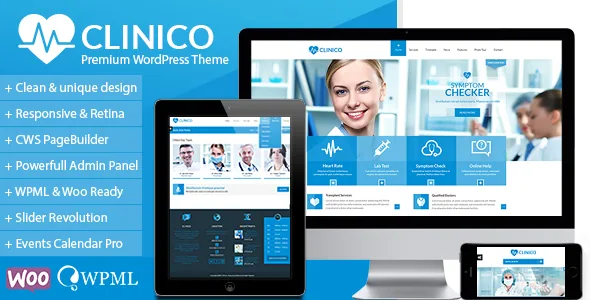
The vendor lists six predefined color schemes with unlimited variations and easy color management, plus wide and boxed page layouts. These are theme-level decisions you make before building pages: a starting palette and a container width apply across the site rather than per page.
The theme is described as fully responsive and retina ready, with Font Awesome icons and Google Fonts included. One notice at the end of the vendor description is worth catching early: stock photos are not included in the package. The demo photography is not yours to reuse, so if the clinical imagery is what attracted you to the theme, budget for a licensed image library before you start importing content.
Plugin compatibility is a declaration, not a test result
The structured listing records compatibility with WooCommerce 9.x.x, Events Calendar Pro and WPML, alongside WordPress 6.8.x. The description additionally calls the theme Contact Form 7 ready and says Revolution Slider is included.
Each carries a different weight. WooCommerce gets the most changelog attention, which suits a practice selling products or taking bookings through a shop. Events Calendar Pro is claimed and has been patched repeatedly for view titles, widgets and image sizes — recurring fixes suggest calendar display is one of the trickier surfaces, so check the views you intend to use on a staging copy. WPML appears in the compatibility field with multilingual fixes over time, though a translated build is still something you assemble. Contact Form 7 is listed as ready, and one release fixes its validation notices.
The changelog and the compatibility field also do not line up exactly: the field records WooCommerce 9.x.x while the November 2025 release note describes WooCommerce 10.2 template updates. These are vendor declarations stored with the product, not the results of running the theme on your host, so test on your own stack before committing.
What the package contains
The marketplace files field lists layered PNG files, PHP, CSS and JavaScript. The vendor says XML demo content is included, so demo pages can be imported and edited rather than rebuilt from nothing — with the photograph caveat above. The vendor also describes the code as HTML5 and CSS3 validated and the documentation as extensive, which is relevant for a theme where the builder and options panel carry most of the configuration.
Questions & answers
Can I use Clinico without the CWS Builder?
The theme's page composition is built around CWS Builder, shortcodes and the Theme Options panel, and the listing does not describe a block-first workflow. Ordinary WordPress posts and pages still publish, but the layouts shown in the demo depend on the builder's structure.
Does Clinico require WooCommerce or Events Calendar Pro?
Both appear in the vendor's compatibility list, which describes themes the vendor has written around rather than required dependencies. A brochure-style clinic site can run without either; the changelog's frequent fixes to both simply show where development effort has gone.
Are the demo images included?
No. The vendor states that stock photos are not included in the package. Demo content can be imported, but the photography must be replaced with images you have licensed.