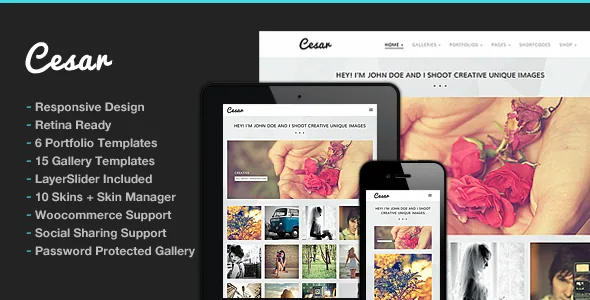
A one-click switch that turns mobile layout off
Most theme listings bury responsive behaviour in a sentence about adapting to phones. Cesar's vendor description gives it a control instead: responsive features can be deactivated with one click in the back end.
That is a blunt instrument. It is not a set of breakpoint rules or a choice of mobile layouts, just an on or off for the whole site. The reason a photographer might reach for it is visible in the rest of the feature list, where full-screen slideshows carry much of the presentation. Immersive viewing and small viewports pull against each other, and the vendor leaves the trade-off to you. Turning it off hands phone visitors the desktop layout, so it is a last resort rather than a setting to leave flipped.
The marketplace attributes still describe the theme's layout as responsive, which is the default state the switch overrides.
Galleries and portfolios are separate content types with separate template counts
Cesar registers custom post types for galleries and for portfolios, and the vendor's layout counts split along that line: 15 gallery templates and 6 portfolio templates, with unlimited pages of each and filterable portfolio listings.
In practice the split decides how you file your work. A gallery is a body of images made to be watched, so it inherits the full-screen slideshow treatment. A portfolio entry is a project record, and the vendor lets that record point at a static page, YouTube, Vimeo, a self-hosted video file or a custom link, so a single portfolio index can mix a client film, an embedded clip and a link to work hosted elsewhere.
Fifteen gallery layouts is more choice than most photographers need per shoot. The useful approach is to pick the two or three that match how you sequence images and ignore the rest.
The gallery admin sets the pace of publishing
The vendor calls the admin "extensive" and says it supports uploading multiple images at once. Two changelog entries describe how it filled out: version 1.4 in April 2015 added the ability to use already-uploaded images inside a gallery, and version 1.6 in June 2015 fixed drag-and-drop ordering on WordPress 4.2 and later.
Those are vendor statements and release notes, not a record of the theme running. Taken at face value, the workflow is: upload a batch once, attach files to a gallery, then arrange them by dragging rather than editing numbered fields. A 2013-launched theme that has kept that machinery intact is doing the part photographers care about most often.
Retina-ready high-resolution graphics are also listed. The description does not say how uploads are resized or compressed, so if you keep a large archive, look at how the theme handles originals before you commit to it.
Private galleries, image comments and what they imply
Two listed features describe a workflow beyond the public portfolio: password-protected gallery support and comments on gallery images.
Together they suggest a client-proofing setup, where a password unlocks a set of photographs and the client leaves notes on individual frames instead of in an email thread. The listing does not say whether the password is set per gallery, whether a protected gallery is excluded from indexing, or how the comment form is presented. Try that flow with a realistic gallery before you build client work on it.
Comments also bring moderation. If a gallery is publicly reachable, you take on a comment queue for photographs, not just blog posts. Enabling them per gallery rather than site-wide keeps that manageable.
Music and slider transitions on the front page
Music support for the homepage and pages is listed as a feature, with no detail about how visitors start or stop playback. Treat it as something you add deliberately for a specific presentation, not as a default: audio that begins on load is a decision about the visitor, and an obvious control is the least you owe them.
For motion, the vendor bundles a 2D and 3D LayerSlider plugin with the theme for responsive slideshows, and lists fullscreen YouTube and Vimeo video support alongside the full-screen gallery slideshow. Changelog entries between 2017 and 2020 record LayerSlider version updates inside the package; since then the entries are compatibility fixes, so check which slider build ships with the release you install.
Skin Manager, fonts and shortcodes instead of a builder
The theme's visual identity is configured above the page level. The vendor lists 11 predefined skins, a Skin Manager for assembling your own, element colours set with a colour picker, installable Google Web Fonts, and column shortcodes running from two to six columns.
Page composition uses bundled shortcodes and a shortcode generator plugin rather than a drag-and-drop or block-based builder. The marketplace attributes mark the theme as not Gutenberg optimised, which fits a shortcode-driven content model; it does not mean the block editor refuses to load. If you expect to shape layouts yourself in the block editor, plan on the shortcode route instead, plus the optional child theme the vendor mentions for customisation that survives updates.
What the update history tells you
Releases run from August 2013 to version 2.3.3, dated June 2025. The recent entries are narrow: a PHP 8+ error fix in February 2024, PHP 8.3+ compatibility in April 2025, and WordPress 6.8.1 support in June 2025. No new gallery layouts or templates appear in those releases.
For a portfolio theme that has already settled its design, that is a defensible maintenance pattern rather than a problem. It does mean the design inventory is stable rather than growing, and it means the compatibility attributes — WordPress versions, WooCommerce 6.x through 9.x, and a list of desktop browsers, observed on 3 November 2026 — are vendor declarations for your PHP build and plugin mix to confirm.
Demo photographs are licensed previews from Flickr and Shutterstock, not part of what you receive. Budget for your own imagery from the start.
Questions & answers
What happens if I deactivate responsive mode in Cesar?
The vendor describes it as a one-click switch in the back end, so mobile visitors get the desktop layout. It is a site-wide toggle rather than per-page breakpoint control, and the marketplace still lists the theme's layout as responsive, which reflects the default state.
Can a gallery be limited to the client who commissioned the shoot?
Password-protected gallery support is listed, and gallery images can carry comments, which together suggest a private viewing workflow. The description does not specify whether passwords are per gallery or how protected galleries are handled by search engines, so confirm the behaviour on the demo before using it for client delivery.
Do I need a page builder to create pages in Cesar?
The vendor describes bundled shortcodes, a shortcode generator plugin and column shortcodes rather than a bundled builder. LayerSlider is included for slideshows. Page structure therefore comes from shortcodes and theme settings, consistent with the theme being listed as not Gutenberg optimised.


