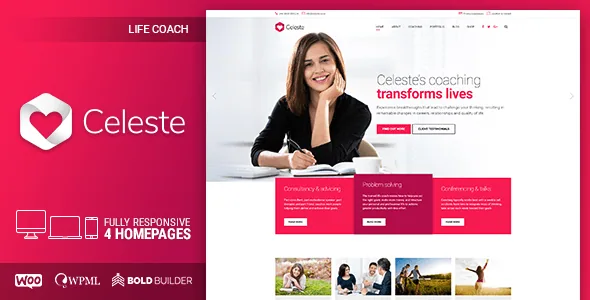
The cost calculator is the reason a coaching site picks this theme
Most WordPress themes for service businesses hand you a contact form and leave the quoting conversation to email. Celeste's vendor description includes Bold Themes' Cost Calculator among the plugins shipped with the theme, next to Bold Builder, the BT Import one-click demo importer and Contact Form 7.
A calculator changes what a coaching site can do before anyone gets in touch. Session packages, program tiers or sliding-scale rates can be presented as selectable options with a running total, so a prospective client arrives at an enquiry already knowing roughly what they are buying. That suits a health coach selling multi-week programs or a consultant quoting by scope more than a single static price table does — though the description does not detail the calculator's field types or how its output is delivered, so treat the plugin's own documentation as the place to confirm what you can configure.
The same list matters in reverse: the calculator is bundled rather than assumed. If you already own a quoting tool, the theme's version is one more plugin to decide about.
Blocks shaped around a practice, not a blog
The element list in the marketplace description reads like an inventory of what a therapy or coaching practice actually publishes. Working hours get their own element, which is the piece most likely to sit in a footer or on a contact page and the one most often faked with a text block elsewhere. A price list element handles service tiers. A service element covers the description of what a session involves, and a progress bar has obvious use for intake questionnaires or program milestones that are more illustrative than literal.
Around those sit the ordinary building blocks: accordions and tabs for FAQs, counters, testimonials-by-way-of-latest-posts, Google Maps, sliders, video and a masonry grid. None is unusual on its own. The value is that the practice-specific pieces exist as elements rather than as patterns you would rebuild from scratch on each new page.
Clipboard reuse and visibility rules in the builder
Two of the described editor features have real editorial consequences. The first is clipboard functionality that the vendor says works from one page to another and from one website to another. In practice that means a section you build for a services overview — a fee block, a booking prompt, an intake note — can be pasted into a second landing page intact, including a second site you maintain. For a solo practitioner running a main site plus a program-specific microsite, that saves rebuilding the same composition twice.
The second is visibility control. Elements can be hidden or shown per screen resolution, and content can be given a time-limited appearance. Resolution-based hiding is the practical way to swap a wide hero for something simpler on phones without maintaining two pages. Time-limited appearance lets a page carry a launch note or a promotional block that stops rendering on a set date, which is useful when you do not want to remember to take it down.
Global settings, page overrides and the Customizer
Celeste's options are described as running on the native WordPress Customizer rather than a separate settings framework. That is a smaller commitment than it sounds: colours, typography and layout choices stay where WordPress users already expect to find them, and the theme adds colour schemes, Google Fonts and a colour picker on top.
The more useful architectural detail is the option to override global settings for individual pages. A coaching practice rarely wants every page to look identical — a program page may need a different header treatment or sidebar arrangement than the homepage. Per-page overrides let those exceptions exist without a second theme or a plugin-driven layout builder. The theme is also described as child theme ready, so customisations made in a child theme survive a parent update.
Full-width and boxed layouts, multiple header styles including a sticky header, mega menu support, left or right sidebars and a custom footer are all listed as available at that same settings level.
Several homepages, one theme per practice type
The vendor positions Celeste across four practice types — life coaching, health coaching, marriage counseling and business consulting — and says the theme ships several homepage designs matched to those services. The demo sits at celeste.bold-themes.com.
Demand for a design that reads as counseling rather than consulting is real: a marriage counselor and a business consultant want different visual registers from the same structural pieces. What the description does not say is how many homepages there are, whether each practice type gets its own or how far they differ beyond colour and imagery. That is worth settling in the demo rather than from the sales copy.
The one-click importer, BT Import, is the mechanism the vendor describes for getting a full site in place: import, then replace the demo content and adjust the theme options. Import on a staging copy first if the site already has content.
Version and plugin boundaries worth checking
The marketplace compatibility attributes list WordPress 6.0.x through 7.0.x and WooCommerce 6.x through 9.x, with WPML listed alongside. Widget areas are declared ready, the theme is described as translation ready and RTL support appears in the supported-plugins list. Those are declared ranges from the listing as observed in early November 2026, not results of testing on your server.
WooCommerce appears because a coach may sell sessions, programs or digital materials. Nothing in the description suggests the theme extends WooCommerce beyond letting it run within the theme's layouts.
One label deserves a careful reading: Gutenberg Optimized is marked No. That states only that the vendor does not describe the theme as tuned for the block editor — not that the block editor is unavailable. Layout work is described as happening in the fast drag-and-drop backend editor, so plan on Bold Builder owning page composition and posts simply inheriting the theme's typography.
What ships, and the demo-image limit
The ThemeForest file list names PHP, CSS and JS files. The vendor describes the theme as well documented with online documentation, and the changelog is published separately on the Bold Themes documentation site.
A licensing point that affects planning: images on the demo site are not licensed for use on a production site. You will need your own photography — portraits, session imagery, practice interiors — or separately licensed stock. That is normal for marketplace themes, but it matters more here than usual, because a coaching site's credibility rests on the practitioner's face and space.
Celeste fits a solo practitioner or small practice that wants the quote calculator, working-hours and price-list structure already assembled and is content to build pages in Bold Builder. If your team works in the block editor and expects page composition to happen there, the vendor's own positioning points elsewhere.
Questions & answers
Can I sell coaching sessions with WooCommerce on Celeste?
WooCommerce is listed as compatible at versions 6.x through 9.x in the marketplace attributes, so a shop can run inside the theme. The description does not claim any commerce features beyond compatibility, which means product setup, checkout and payment handling are WooCommerce's own.
Does the cost calculator replace my booking system?
No evidence in the description supports that. It is described as a customizable cost calculator that produces a price estimate, and it sits beside Contact Form 7 for enquiries. Scheduling, calendar sync and payment collection are separate concerns the vendor does not address.
Is Celeste built for the block editor?
The marketplace marks Gutenberg Optimized as No, and the vendor describes page building in its drag-and-drop backend editor. The block editor is not switched off, but a block-first editing workflow is not what this theme is designed around.
Can I use the photos from the Celeste demo?
No. The vendor states that demo images are not licensed for third-party use on production sites and must be licensed separately if you want to use them. Budget for your own photography or stock licences.