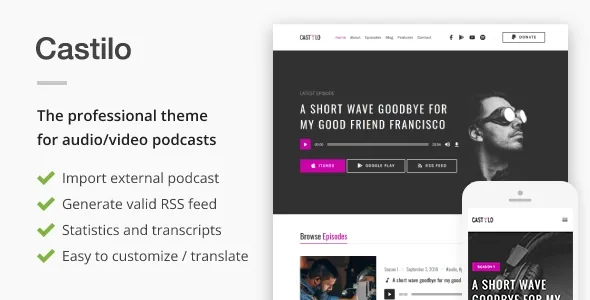
The feed is the product, not an afterthought
Plenty of WordPress themes can hold a podcast. Castilo, from liviu_cerchez, is built around the claim that the theme itself handles distribution. In the vendor's description, the theme generates the compliant RSS feed needed to submit a show to iTunes, Google Play Music or "any other RSS based directories" — with the stated aim that you do not need additional plugins or third-party tweaks.
That distinction matters if you intend to be your own host and publisher rather than routing your show through a platform that owns the feed. The feed is the thing directories read, and a theme that produces it is doing something different from a theme that merely styles episode pages. Treat the claim as a vendor statement about capability; how a specific directory validates your feed is worth confirming on the live demo with your own audio before you commit.
Bringing an existing back catalogue across
The second half of the workflow is import. The vendor describes pasting an RSS feed URL, choosing the category that new imported episodes should be assigned to, and letting the theme pull the episodes in. There is also described an advanced option to schedule the import so it runs periodically.
For someone moving an established show, that changes the size of the job. Instead of recreating years of episodes by hand, the feed URL does the transfer, and the category choice is what keeps the result organised on the new site. A recurring schedule is the more interesting part: it suggests the site can track a feed over time instead of importing once, which would suit a show whose archive lives somewhere else while the site becomes the home.
The import behaves as a feed reader would, so what arrives is what the source feed describes. Episode artwork, descriptions and audio references depend on that source. Scheduling adds an ongoing operation to your site — one more thing to monitor if the source feed moves or changes format.
Numbers the site keeps for itself
Castilo's backend panel is described as reporting daily, weekly and monthly statistics on total listens, listeners and listening sources, separating plays in the site's own audio player from iTunes, Stitcher, Google Play and direct downloads. The vendor also says audio files are permalinked, so the original files are not exposed directly.
If those reports work as described, you get a view that directory dashboards cannot give you: how much of your audience listens on your own site versus in an app. That is useful when deciding whether to push subscribers toward the site player or to the directories. It is not a download counter for every platform — a service that streams your feed elsewhere may report nothing back — so read the panel as evidence about sources the theme can observe, and check which ones actually register on your install.
Transcripts and skipping inside an episode
Two features in the vendor's list are specifically about long-form audio: transcripts and episode jumping points. A transcript turns an episode page into something searchable and skimmable, and jumping points let a listener move to a marked moment rather than scrub blindly through an hour of conversation.
These are episode-level editorial decisions, not global settings. You decide per episode whether a transcript exists and where the jump marks fall, which means the theme rewards a production process that already produces timestamps or a transcript file. If your episodes are short and unscripted, the effort may not pay off; if you publish interviews or teaching sessions, it is the part of the site listeners will actually use.
Related to that, the vendor states that the episode post type and the podcast functionality are stored in a separate plugin rather than inside the theme. That is a structural detail with practical value: the content model around your episodes is not welded to the design layer.
Where a change lands: Customizer, header media, or episode fields
This is not a page-builder theme. The vendor describes integration with Gutenberg, and the marketplace attributes mark the theme as Gutenberg optimized. Customisation of the look runs through the WordPress Customizer, where the vendor says you can preview changes live — trying a different header image, primary colour and page background colour — and upload a logo that sits in the header.
A media-rich header area is part of the pitch: an image or video behind the show's identity. That is one decision, made once, that sets the tone of the site. Everything else is per-episode: audio, show notes, transcript, jump marks.
So an edit is usually one of three things. Site-wide styling and header media live in the Customizer. Episode content lives in the episode fields. Anything structural belongs to a child theme or the theme's hooks — the vendor notes that hooks are provided for customisation, which is the route a developer would take rather than editing theme files directly.
Declared compatibility and what the package includes
The marketplace attributes observed on 4 November 2026 declare WordPress 5.5 through 7.1 and WooCommerce 8.x, 9.x and 10.x, alongside WPML and the Block Editor, with browser support listed down to IE11. Those are vendor declarations about supported versions, not the result of running the theme against your PHP build, caching layer or plugin set.
Contact Form 7 integration and RTL support are listed in the vendor's feature summary, as are sidebar and footer widget areas, a one-click demo importer, and translation readiness for any language. The Marketplace file list names PHP, CSS and JS files.
One exclusion affects planning: the vendor states that preview images are not included in the package because of licensing restrictions. Header art, episode covers and guest photography have to come from you. The theme's stated visual budget is a strong header and a restrained palette, so budget for imagery rather than assuming the demo shots travel with the theme.
Who the workflow suits
Castilo fits a show that wants its own home: a feed the theme generates, an import path for the existing archive, transcripts and jump marks for navigation, and a stats panel that attributes listens to the player and to directories where it can. The layout is deliberately quiet, tuned through the Customizer rather than assembled page by page, which keeps attention on the audio.
It fits less well if you plan a site built from block patterns and template-level design work, or if your episodes are short enough that skipping points and transcripts add overhead without adding value. The feed-generation and import behaviour are the vendor's claims, and they are the two things worth testing on the live demo with a real feed from your own show before you decide.
Questions & answers
Does Castilo need an extra podcast plugin to produce the RSS feed?
The vendor says the theme generates the compliant RSS feed itself, without additional plugins or third-party tweaks. At the same time, the episode post type and podcast functionality are described as living in a separate plugin that ships with the theme — so the podcast layer is separated from the design, but it is still part of the theme package rather than something you source independently.
Can I move an existing show's episodes into Castilo?
The vendor describes pasting an external RSS feed URL, choosing the category for imported episodes, and optionally scheduling the import to run periodically. What transfers depends on what the source feed contains, so test the import with your own feed rather than assuming every field arrives intact.
Do the listen statistics cover Spotify or Apple Podcasts?
The vendor names the site audio player, iTunes, Stitcher, Google Play and direct downloads as sources the panel can distinguish. Apple Podcasts, Spotify and other apps are not named in that list, and platforms that serve your feed themselves generally do not report plays back to your site. Read the panel as a view of sources the theme can observe on your install.
Is the theme edited with a page builder?
The vendor describes Gutenberg integration and Customizer options with live preview for header image, primary colour, page background and logo, and does not present a bundled page builder. Structural changes are handled through a child theme or the hooks the vendor provides.