Services and booking pages are part of the theme, not something you assemble
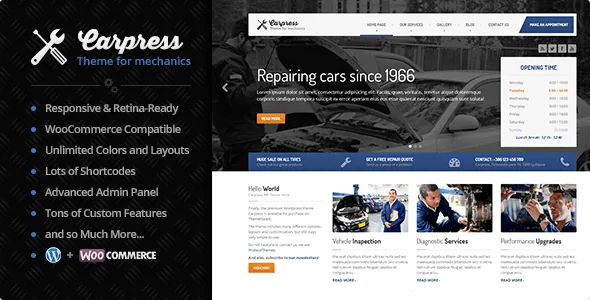
Most of the description is a feature list, but one section is concrete: the page layouts CarPress ships. They are Front Page, Blog Layout, Single Blogpost, Search Results, Galleries, Services, Contact Us and Make an Appointment, and the vendor says each can be customised through the administration area.
Two of those layouts carry the commercial work. Services gives a workshop or detailing business a structured page for what it sells, separate from blog posts. Make an Appointment is the enquiry route for a garage, handyman or car wash where the visitor's next step is a booking rather than a phone number. Filling in a page the theme already provides is a different job from building one from nothing, and it is the strongest reason to consider CarPress for a small local-service site.
Who is it aimed at? The vendor names car mechanics, car washes and handymen, and adds that it suits other kinds of website too. That wider claim is supported by nothing more than the layout list.
Editing happens in the Customizer
The headline editing claim is a real-time WordPress Customizer: you change a setting, the preview updates, and you judge the result on the spot. A separate entry says almost any aspect of the site can be changed in an advanced administration panel of theme options.
No page builder appears anywhere in the vendor's feature list, and the theme is described as built on Underscores with SASS and Bootstrap underneath. So the change you can make in the browser is a settings change, not a rearrangement of blocks on a canvas. If you have worked in Elementor or WPBakery and expect to drag sections around, this is a different discipline.
The marketplace marks Gutenberg Optimized as No, observed on 4 November 2026. Read that as a statement about block-specific styling and support. It does not mean the block editor is switched off.
Where the live preview stops
The Customizer rewards iteration on the things it controls: colours, the look of the header and content area, and the settings gathered into theme options. Since the preview refreshes as you adjust a value, a reskin can be settled in one sitting.
The limit is structural. A Customizer never edits a template's markup. If your project needs a section arrangement the theme does not already offer, the work moves into PHP templates or a child theme, and that is coding rather than configuration. The trade-off cuts both ways: the vendor can hand over a source build of the front end rather than a builder's abstractions.
Layered PSD and SASS sources for a client build
The marketplace files attribute lists Layered PSD, PSD, PHP, CSS and JS files. The description adds how the front end was assembled: SASS, Compass and Twitter Bootstrap, with Compass functions generating sprite images.
A site owner can ignore all of that. An agency reskinning the theme for a client cannot, because it changes the handoff. A layered PSD is a structured design file, so logos, banners and section imagery can be adapted before implementation instead of rebuilding a flattened mockup. SASS sources mean the compiled stylesheet is not the only copy you have; you can change variables and rebuild.
What the sources do not promise is a maintained build pipeline. A source folder proves the assets exist. Unless you rebuild them, the compiled CSS is what your site runs.
Widget regions, the type pairing and the fonts decision
The vendor claims many custom widgets and sidebars, and the marketplace marks Widget Ready as Yes. That pairing is what keeps a fixed layout set flexible: the page structure stays predictable while sidebar and widget regions hold contact details, opening hours, service lists or service callouts without template edits.
The typography is stated exactly: Dosis from Google Fonts for headings and navbars, Open Sans for content. A condensed display face over a plain body face explains much of how the demo reads. If your brand needs other type, expect to handle it through theme options or your own CSS, since the description promises fonts rather than a general font picker.
WooCommerce, WPML and what already ships translated
The feature list gives two integrations. WooCommerce is said to work with CarPress, which would let a workshop sell parts, products or vouchers. WPML is described as configurable for multilingual sites, and the marketplace's compatible-with attribute names WPML.
Translation is the more specific claim. CarPress is described as translation-ready with a carpress.pot file in the /languages/ subfolder, and shipped translations are listed for German, Spanish, French, Dutch, Polish, Portuguese, Russian, Slovenian and Catalan alongside default English. The .pot file lets you translate your own strings; the shipped .mo files mean those languages do not start from zero.
None of this is tested here, and the vendor's plugin-side details are worth confirming on your own install rather than assuming from the listing.
The 2015 changelog entry that is worth noticing
The marketplace records version 2.1.2 with a vendor update dated 18 October 2026, and lists WordPress compatibility from 5.2.x through 7.0.x. Neither is proof of behaviour on your server; your PHP version, plugin set and any child theme decide the result.
The more telling detail is older. The changelog excerpt in the listing still shows a 2015 entry at version 1.10.0, which records an update to the Options Framework (OT) and TGM, both described there as vulnerability fixes. Seeing that history is useful in two ways: it shows the codebase has been maintained for a long time, and it shows bundled library versions have needed patching before. Whether you run CarPress, keep an eye on the bundled libraries your install actually contains.
More recent changes are simply absent from the excerpt, so treat the changelog as a sample rather than a full record.
Questions & answers
Does CarPress work with the WordPress block editor?
The listing marks Gutenberg Optimized as No, which describes how the theme styles and supports block-built layouts. It does not mean blocks are unavailable. The vendor's documented editing route is the real-time Customizer plus a theme options panel.
Is a page builder included or required?
No page builder is named in the vendor's feature list. CarPress is described as built on Underscores with SASS and Bootstrap, so layout changes beyond the shipped page types are template or CSS work rather than drag-and-drop editing.
Why does the package include a PSD?
The files attribute lists a Layered PSD alongside PHP, CSS and JS files. It gives a designer the source layers behind the theme's screens, useful when adapting imagery or presenting a design to a client before implementation.
Can I run a shop on CarPress?
The vendor's feature list says WooCommerce works with the theme. That is a vendor claim about compatibility, not a statement about which WooCommerce version you should run today; confirm it against the versions in your install.