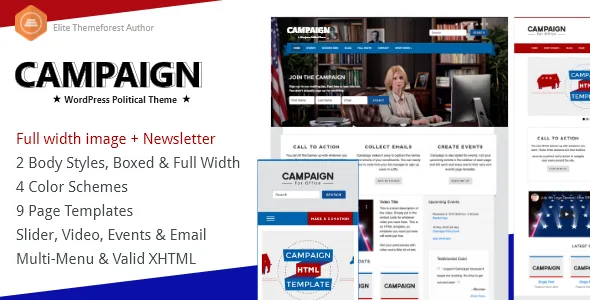
A footer field for FEC disclosure, placed with the settings
Campaign's vendor description names one feature that no generic WordPress theme has a reason to build: an optional disclaimer in the footer, included because US political committees are required to display one.
What makes the placement worth noticing is where it sits. A hand-built disclaimer usually ends up as a text widget, a chunk of HTML pasted into a footer template, or a line a plugin appends to every page. Each works until someone edits the footer for an unrelated reason and nobody remembers which text was the legally relevant one. A named disclaimer field keeps it with the other footer settings, where template work does not displace it.
The vendor keeps the field optional, which fits campaigns running under different disclosure rules. If your committee needs the line, the slot exists. If it does not, you leave it empty and nothing depends on the text being there.
The donate button adds a header link to your chosen donation page
The theme adds an optional donate button to the header menu. The vendor is specific about how it behaves: it can link anywhere, not just PayPal.
That decides more than it seems. The theme does not process donations, and the description names no required payment processor. You supply a URL and the header carries the button, so the target is usually a hosted donation form — a processor's own page, a party fundraising platform, or whatever your finance team already uses for receipts and reporting. Those choices stay outside the theme, which is where they normally belong.
The trade-off is that nothing on the payment side gets simpler. There is no donation record in WordPress, no receipt generated by the theme, and no contribution-limit logic described. You get a persistent header placement that does not tie you to one gateway. For a campaign that already has a fundraising provider, that is probably the right amount of involvement from a theme.
Email capture runs through WP Email Capture, then an export
The vendor says the theme was built with the WP Email Capture plugin in mind, in both free and premium versions, and that collected addresses can be exported to an email service such as MailChimp or Constant Contact.
That sentence describes a chain rather than a switch. WP Email Capture gathers names and emails inside WordPress; the export step moves the list to wherever the campaign actually sends mail. If your list lives in Constant Contact already, the theme gives you the form and its placement while the plugin handles storage and transfer. The description names no direct API connection to either service, so plan on the export route as described.
This is the first dependency to weigh against your own setup. If WP Email Capture is not a plugin you want to run, the vendor's contact strategy has nothing behind it. If it is, the theme contributes the styling and the form's position on the page.
Widgets, not a page builder — including one for the headline
Pages are composed from ordinary WordPress content, theme settings and widgets. There is no page-building canvas here, which puts Campaign in the widget-era camp rather than the block-era one.
The vendor lists four custom widgets and names one of them: a SlabText widget for producing large, tightly-fitted typographic headlines. SlabText is the jQuery library that splits a line of text and scales each word to fill its container, so a headline can be sized to the column instead of guessed at from a font-size box.
Widget handling elsewhere is described as elastic. The vendor says you can place any number of widgets in the Home Page Banner and in the Footer and that Campaign sizes them automatically. That removes the usual arithmetic of counting widgets and assigning a grid width to each, and it means banner and footer are flexible containers rather than fixed slots — useful when the campaign's banner has to hold a countdown, a signup form, a social row and a slogan in an order that changes during the race.
Home page controls: category filter, video fields, a slider
Several home page settings sit alongside the layout options. The theme lets you show a single category or all posts on the home page, so the front page can carry announcements while news builds up in the archive.
Video fields for YouTube and Vimeo are provided for the home page, for slides and for posts — enough to put a launch video or an endorsement clip in the header area rather than burying it inside an article. A jQuery slider handles rotating content on the home page, with jQuery hovers and lightboxes for images, and social media icons are listed as well.
The visual configuration is counted rather than described: boxed or full-width body, four colour schemes named Blue, Red, Green and Yellow, six background patterns, and a left or right content column. Party colours map onto the first two. The column-side choice changes more than colour, since a right-hand content area with the sidebar on the left can carry a standing donate or signup panel. The package also includes a translation file, with English and French shipped, if the campaign needs a second language.
Events styling, and why the stated WordPress range matters
Campaign is styled for The Events Calendar and Events Calendar Pro, which the marketplace also lists as compatible plugins. The vendor's framing is display: event pages for a rally, a town hall or a canvass launch inherit the site's look instead of the plugin default.
The marketplace attributes, observed on 3 November 2026, record a WordPress compatibility range of 4.9.x through 5.2.x and mark Gutenberg optimisation as No. Those are declarations captured when the item was updated, not tests against a current release, and the range is the clearest single signal that active development sits well behind the present. The Gutenberg attribute tells you the theme was not built around blocks; it does not by itself establish that the block editor is unavailable on your install. The vendor's feature list mentions no block styles or block patterns either way.
For a launch with a fixed date, the practical step is to try the theme against your own WordPress and PHP versions before committing. That is a question about your server and plugin stack, and only a run on your install answers it.
Questions & answers
Does Campaign process donation payments itself?
No. The header donate button links to a URL you choose, and the vendor states it is not limited to PayPal. Payment processing, receipts and reporting stay with whichever donation platform you point the button at.
Do I need WP Email Capture to collect signups?
The vendor describes the theme as built around WP Email Capture in its free and premium versions, with collected addresses exported to a service such as MailChimp or Constant Contact. No other signup mechanism is described, so treat the plugin as part of the setup if email capture matters.
Can the footer disclaimer hold wording for rules outside the US?
The theme supplies an optional footer disclaimer because US political committees are required to display one. Campaigns under other disclosure regimes would need wording that matches their own rules; the theme provides the position, not jurisdiction-specific legal text.