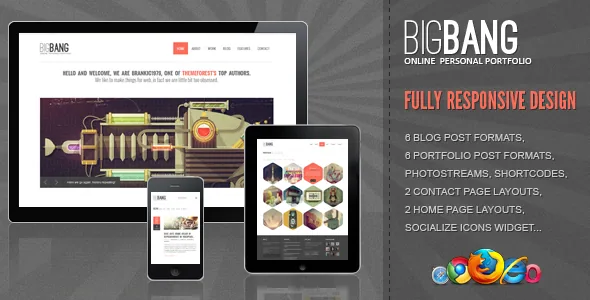
Portfolio grids that change shape, not only column count
The portfolio formats are the part of Bigbang that is genuinely unusual. Brankic1979 lists six: a two-column grid, a three-column grid, a four-column grid, and items shaped as hexagons, as triangles and as circles. Only half of that list is about width; the other half asks your images to survive a mask.
That masking is the real planning question. A hexagon or circle crop discards the corners of every thumbnail, so a subject placed at the edge of the frame, a wide panorama or a UI screenshot with content near the borders will lose information. Straight column grids stay the safe choice for mixed material; the shapes work when you can art-direct thumbnails around a centred subject. If you inherit a client's existing photography, look at the shapes as a highlight treatment rather than a default.
The description also lists a portfolio single page, so the item view comes with the theme. It does not say how many items a shape grid tolerates before the mosaic looks uneven, or whether each shape format accepts the same number of columns. Those are questions for the live demo.
Shortcodes instead of a page builder
Bigbang has no drag-and-drop page builder. Sections and elements come from shortcodes, and the vendor names the set: columns, buttons, grid, team members, a sliding graph, social networks and a Flickr photostream. Page templates cover fullwidth, sidebar, about, clients and the portfolio single page, so the structural pages are predefined and the interior of each page is assembled in the editor.
The editor note is the practical constraint. The description states the theme is not optimized for Gutenberg and recommends the Classic Editor plugin. That tells you the theme was built before blocks became the default editing surface; it does not mean the block editor cannot exist on your site. What it does mean is that your writing workflow should be classic editing with shortcodes placed by hand, and that shortcode-driven elements such as the team members and grid are worth checking once with your editor setup.
The script features are equally specific: a Flexslider slideshow, toggle and accordion content, Masonry, PrettyPhoto for image viewing and Google typography. The vendor notes that the bundled Flexslider does not carry all of the library's original options — only what appears in the live preview. Budget for a slider you configure to match the demo, not one you rebuild.
The blog gets as many layout choices as the portfolio
Six listing layouts and six single-post layouts are listed, which is a two-part decision: how the index presents your posts and how the article page reads. That combination suits a site where the blog carries real weight alongside the work samples, letting you keep a denser listing while giving individual posts a narrower column.
Widget Ready is listed as Yes, and widgets matter more here than on a builder theme. With no drag-and-drop page system to absorb sidebars, archive sidebars and footer regions depend on WordPress widget assignments together with the blog options in the Brankic Panel. The description gives counts rather than names, and says nothing about whether each layout includes a sidebar, so the index layouts are worth opening in the demo before the blog style becomes a deciding factor.
Stretched or boxed, set once in the Brankic Panel
Two layout solutions are named — stretched and boxed — and the choice is site-wide rather than page-by-page. A stretched frame runs content to the viewport edges; a boxed frame holds the site inside a container with background visible around it. Because it defines the character of every page, it belongs at the start of a build rather than the end.
Global and blog settings live in the Brankic Panel, which the vendor describes as covering global options and blog options as separate groups. The description does not enumerate individual settings, so expect site-level controls such as the container mode to sit there, with per-page variation coming from the page templates rather than from a builder.
A 2020 theme with a compatibility claim that ends at 5.4
The marketplace attributes, observed on 3 November 2026, list WordPress 4.9.x through 5.4.x, and the vendor's last update is dated September 2020. Nothing in the description covers later WordPress releases, newer PHP versions or current plugin builds. On a current install you are running outside the declared range, and only a staging copy on your intended stack answers how the theme behaves there.
Package expectations are stated plainly too: the included files are PHP, CSS and JS, no PSD files are included, and the documentation is HTML. Documentation carries a Well Documented attribute, which describes the vendor's documentation set rather than a promise that current admin screens are covered. The demo photography and illustration are credited to named artists, which is a reminder to supply your own licensed images rather than reuse the presentation assets.
What you are committing to
Bigbang is a fixed portfolio theme with a strong geometric idea. The shapes, the six-plus-six blog layouts, the two container modes and the shortcode set are defined for you, and the panel adjusts them at site level rather than letting you rebuild sections. If the project needs an unusual landing page assembled block by block, this is the wrong tool.
It makes more sense for a studio or designer portfolio where the work itself is visual, the blog is part of the offer, and the person building it is comfortable writing shortcodes in the classic editor. Two things decide the fit faster than the feature list: whether the shape masks suit your actual images, and whether the theme runs acceptably on the WordPress version you plan to use.
Questions & answers
Does Bigbang work with the block editor?
The vendor describes the theme as not optimized for Gutenberg and recommends the Classic Editor plugin. That is a statement about how the theme was designed, not a removal of the block editor from WordPress. The intended workflow is classic editing with shortcodes, and the description does not document how shortcode elements behave with blocks active.
Are the demo images and illustration files included?
No PSD files are included, and the listed theme files are PHP, CSS and JS. The demo photography and illustration are credited to named artists in the description, so plan on supplying your own assets.
Why is the slider less configurable than expected?
The vendor states that the bundled Flexslider does not include all of the library's original options, only the settings visible in the live preview. Treat it as a slider fixed to the demo's behaviour rather than one you can extensively reconfigure.
How many portfolio column options are there?
Six portfolio post formats are listed: two, three and four columns, plus hexagon-, triangle- and circle-shaped items. Portfolio single page is also a listed template.


