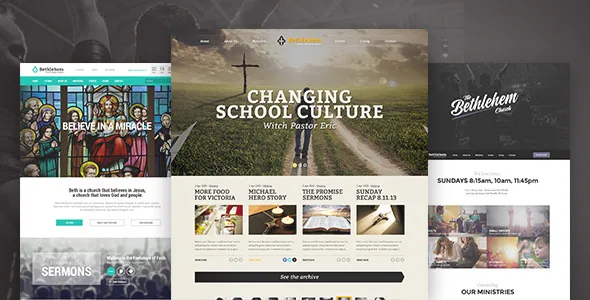
Sermons are a content type, not a page section
Bethlehem's marketplace description spends its detail on admin screens rather than on homepage sections. The one entry a church site updates most often is the clearest example: a sermons manager where you add audio and video, described as its own tool rather than as a block you arrange inside a layout.
That changes who can publish. Adding this week's recording becomes a dashboard task with a familiar screen behind it, which is usually the difference between a site that stays current and one that quietly stops being updated. The description does not describe the fields a sermon carries, so the shape of a single sermon page is something to check in the live demo rather than assume.
Four More Content Types, Three Outside Plugins
The remainder of the content model is split between theme code and named plugins, and the split matters when you plan around tools you already run. Ministries are organised from the WordPress admin panel through Our Extensions, the vendor's own plugin — so that layer depends on a plugin the theme supplies, and removing it affects ministries specifically.
Team listings go through Our Team by WooThemes. Events rely on The Events Calendar, which the vendor lists as integrated. Donation campaigns run on the Give plugin. Stories are presented as a theme feature you add for visitors, without the description defining fields or templates for them.
If your church already collects events or gifts through a different plugin, the described integrations will not carry over. Only the ministries dependency is the vendor's own; the rest come from third parties with their own release schedules.
Home, header and footer variants are options, not builder work
The front-end choice sits in configuration. The vendor lists three home pages, eight header styles, three footer styles, a megamenu, six predefined colour schemes and unlimited colour settings, all governed by the theme's own options panel.
Visual Composer and Slider Revolution are both named as integrations, so layout construction and slideshow building have their own routes. But the counted variants suggest a build can start by picking a prepared configuration and adjusting colours, which is a shorter path than composing each page from scratch.
The decision worth making before launch is navigation, not colour. Eight header styles matter when the menu is long and the logo is wide; a megamenu earns its place if ministries, events and sermons need grouped links. Both are visible in the vendor's demo, which is the sensible place to judge them.
The claims that need a direct check
The description states that Bethlehem follows the strict wordpress.org accessibility guidelines, is fully localised and ready for translation, and ships valid schema markup. These are vendor assertions, not audit results, and a feature list cannot settle any of them.
The structured-data claim is the least specific: schema markup is only as useful as the content types it describes, and the description does not say whether sermons, events or donations carry their own structured data. Localisation readiness has a concrete companion, since WPML appears among compatible plugins, but translation of a theme's strings is separate from translating the content your congregation actually reads.
What the release notes show about the codebase
Bethlehem is built on Underscores, the starter theme Automattic uses for WordPress.com themes, with a grid from Susy and styling from Sass. The base follows core conventions rather than wrapping the theme in a proprietary framework, which is the main reason customisation work stays legible.
The 1.5.0 entry in the release history records a build migration from node-sass to dart-sass and the removal of Bourbon from dependencies. If your child theme imported Bourbon or assumed the old compile step, that is the release that forces an adjustment. The same entry lists compatibility with PHP 8.3, WooCommerce 10.5.x and WordPress 6.9.x, plus fixes for a fatal error on page open, a premature text-domain load and the show-password icon.
The package is listed as containing PHP, CSS and JS files, so compiled styles arrive ready to use. PSD files are described as available on request, and demo preview images are explicitly not included — a fresh import gives you structure without the photography in the previews.
WooCommerce version records disagree
The compatibility attribute and the description's release notes were written at different times, and they do not match on WooCommerce. As observed on the marketplace listing on 3 November 2026, the attribute names WooCommerce 7.x through 9.x, while the 1.5.0 release notes describe compatibility with WooCommerce 10.5.x. Declared WordPress support runs from 5.9.x to 6.9.x.
For a church selling books or event tickets alongside its main site, that gap affects real work: the notes also mention updating outdated WooCommerce templates. Read the changelog of whichever release you install rather than the attribute, then check your shop templates against it.
Gutenberg Optimized is marked No, which describes the editing route the vendor supports. It does not establish that block content fails to render, and this theme's custom post types would in any case be managed from their own admin screens.
Questions & answers
Do I need extra plugins for sermons, ministries and donations?
The description ties ministries to the vendor's Our Extensions plugin, events to The Events Calendar, donations to Give, and team listings to Our Team by WooThemes. Sermons are described as a theme feature managed by the theme itself.
Can I restyle the theme without Sass tooling?
The package includes CSS files, so a child theme stylesheet works without a build step. Recompiling from the Sass sources is only needed if you are changing the theme's own source files, and the 1.5.0 release moved that build to dart-sass and dropped Bourbon.
Does the theme work with the block editor?
The marketplace marks Gutenberg Optimized as No, which reflects the editing route the vendor supports rather than proof that the block editor is unavailable. The sermons, ministries and other managed content types are edited from their own admin screens regardless.