Six content records instead of six page templates
The vendor's feature list names six built-in post types: Blog, FAQ, Galleries, People, Services and Testimonials. Each holds a different kind of salon information rather than being a styled page you refill by hand.
Services is described as "the bread and butter of this theme" — you publish a treatment as its own entry instead of maintaining one long price list. People pairs a portrait with a short bio, so a stylist has a page you can link to from anywhere. Galleries is for examples of your work and salon photos, Testimonials for client quotes, FAQ for the questions you keep answering by email, and Blog for tips and news.
The feature that changes daily admin work is the switch beside them. The vendor lists "Modular post types: You can disable post types you don't need to make your admin completely bloat-free." A one-chair studio that never posts articles can turn Blog off; a spa with a regular team can keep People on. Read the claim at its own level: it is about keeping the dashboard clear. The listing says nothing about what happens to entries already published when a module goes dark, so try that on a staging copy first.
Editing without a third-party builder
BeautySpot is marked Gutenberg optimized, and the vendor's position is explicit: there is "no need for a 3rd party page builder," though the theme also works with Elementor and WPBakery Page Builder. The marketplace file list names PHP, CSS and JS files, with no builder among them.
The line that matters for planning concerns the demo. The vendor notes that imported demo pages "can be edited using the WordPress block editor only." If you import the preview site and then want to rebuild the front page your own way, you are working in blocks. For a team already at home in Gutenberg that is nothing; for someone who expected to drag imported sections around in Elementor, it means starting that page again. Settle the editor question before importing rather than after.
WPBakery is a different route: the vendor's FAQ says the bundled version of the plugin is included, so it arrives with the theme rather than as a separate purchase. Its activation and updates stay in your maintenance plan either way.
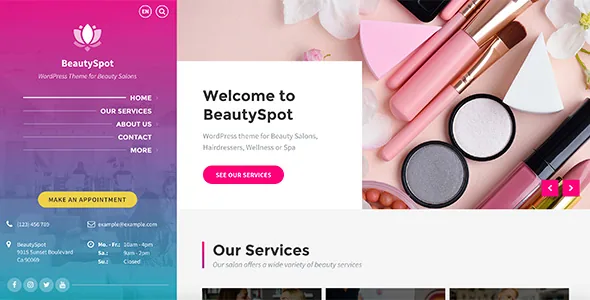
The appointment button is a link, not a booking engine
The vendor answers this in its own FAQ: the theme does not include booking functionality. The "Make An Appointment" button in the left sidebar points wherever you send it, which could be a third-party booking service, an enquiry form or a contact page.
The contact form on the live preview is a basic Contact Form 7 form, according to the same FAQ. That takes messages; it does not hold availability, take deposits or send reminders.
So the real decision sits outside the theme. Pick the booking service first, confirm it can be embedded or linked from a theme page, and check that its fields and confirmation step cover how the salon actually takes appointments. BeautySpot supplies the services and team records a booking flow usually feeds from. It does not supply the flow.
Two depths of colour control
Branding splits into two levels in the vendor's description. The quick one is an admin setting where you pick the main colours and the scheme is generated in a few clicks. The deeper one is a dedicated CSS (SCSS) file in which you can change every colour the theme uses.
That division is practical rather than decorative. The admin palette is what a salon owner can adjust after launch without touching code. The SCSS file handles the one-off job of matching a designer's palette more precisely than the presets allow — and it moves colour changes to whoever has stylesheet access, not the person publishing services.
One caveat: a palette setting that repaints theme styles will not necessarily reach plugin output or third-party embeds. Check the appointment button and any embedded booking widget against your new scheme rather than assuming they follow it.
On the theme's own terms the listing also declares a responsive layout, automatic RTL switching when the site language is RTL, and PHP 8 compatibility. Those are vendor descriptions, quoted as such rather than as results from an install.
What the demo import gives you, and what it does not
Demo content is included and the vendor says the preview site can be re-created in a few minutes. Two exclusions sit in the same paragraph. Demo images are not included for copyright reasons, so the photography that makes the preview look finished is yours to supply or shoot. And the imported pages, as noted above, are editable only in the block editor.
The package also ships a child theme, with front-end code described as overridable through it and the code as well commented — the arrangement you want when a developer inherits the site later. The theme and its bundled LSVR plugins are stated to be fully translatable with translation files included, which is the pair of facts to check against your own setup if the salon works in more than one language or in an RTL script.
WooCommerce appears only as a "basic integration," and the vendor is careful to say this is not primarily an ecommerce theme and that extra customisation may be needed. If you plan to sell retail products or gift vouchers, budget for that work instead of expecting a finished shop.
Questions & answers
Can I run BeautySpot without installing Elementor or WPBakery?
Yes. The vendor says there is no need for a third-party page builder and that the theme is optimized for the WordPress block editor. Elementor and WPBakery are supported if you prefer them, and the vendor's FAQ states the bundled WPBakery version is included. Imported demo pages can be edited in the block editor only.
Does disabling a content module delete the services or team members I already published?
The vendor describes the switch as a way to remove post types you don't need so the admin stays uncluttered; the listing does not document what happens to existing entries. Test it on a staging copy with a few sample records before switching a module off on a live salon site.
Are the demo images included with the theme?
No. The vendor states demo images are not included for copyright reasons, so the preview photography has to be replaced with your own images or licensed stock. The vendor describes the demo content itself as included, with the re-created pages editable in the block editor.


