The maintenance record shapes the decision more than the feature list
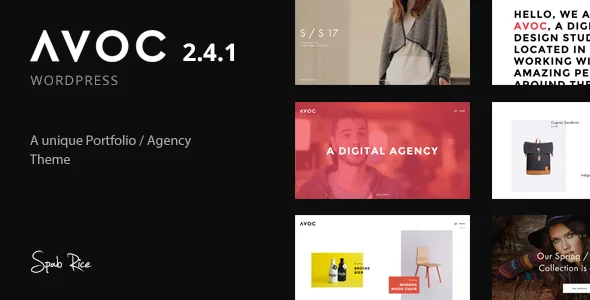
The marketplace records 2.4.1 as the latest version, published 21 August 2020. Its changelog entries are small and practical: WordPress 5.5 compatibility and WooCommerce template updates. The release before it added PHP 7.3 readiness. Nothing in the supplied material claims support past that point.
That date puts a floor under every other decision on this page. A theme last touched in 2020 still runs if your stack matches it, but a new project hosted on current PHP and WordPress needs a staging trial before anything else. The features below describe what the theme does, not a promise that those features behave the same way on a current install. Everything here comes from vendor and marketplace claims, observed on 4 November 2026, not from running the theme.
A project grid that moves
The vendor's feature list names a "Unique Portfolio parallax feature" first, and that is the theme's real selling point. A studio, photographer or freelancer gets an index of work that responds to scrolling instead of a static wall of thumbnails, and the changelog shows the theme was developed around that grid: version 1.7 fixed display of item titles in the masonry portfolio layout, 2.0 optimised GIF handling for the portfolio grid, and 1.6 fixed an Isotope rendering problem with responsive image sources.
Sorting is part of the same surface. Visitors can narrow a body of work by category, and version 1.5 added a choice between showing filters on scroll or from the start, while 1.2.1 corrected filter position when the logo is tall. For a portfolio with several disciplines or client types, filter placement is the difference between a grid that invites browsing and one that forces it.
How heavy the parallax movement feels with large images is the one thing only a demo can answer. Judge it with your own image sizes in mind.
Background media: hosted files versus embedded video
Avoc lists background parallax video and parallax background images, and the changelog splits that support into two paths. Version 1.1 added self-hosted video and audio without a lightbox. Version 2.0 added Vimeo and YouTube background options alongside a play/pause control.
So a full-bleed hero can use a file you upload and control, or a third-party embed. Self-hosting keeps the footage on your server and costs you bandwidth and storage; embedding keeps the file off your server but leaves loading behaviour and player chrome to the platform. The play/pause switch matters for a portfolio where the work should be looked at — being able to stop a loop is a content choice about attention, not a setting to skip.
Demo photography is not included. The vendor's credits name the Unsplash photographers behind the preview images and state that images are not part of the download, so your own licensed work goes in before the site represents you.
Editing happens in the theme's own builder
Layout is put together in the theme's page builder, and the changelog treats it as a maintained component: 2.4 fixed page builder appearance, 1.2.1 added an error message when the builder has errors, and 1.7 added Vimeo/YouTube and custom image lightbox options to a builder item. Version 1.2.1 also enabled a text/editor element for rows. The build starts from a one-click demo importer the vendor lists as a headline feature.
The listing marks Gutenberg Optimized as No. Read that as a statement about where the vendor put their layout tooling, not as proof that the block editor fails. If your team writes in blocks, check how the editor behaves on the theme before assuming a page can be assembled that way.
Slider support comes in two parts and deserves care. Avoc has its own slider — 2.0 added link options for it and a later fix addressed it selecting only five posts. Revolution Slider appears twice in the changelog with opposite wording: version 1.2 records "support (plugin not included)" and version 2.0 records "Plugin included". Those are years apart, so treat bundled slider access as a claim about the 2020 release and confirm what any copy you install actually contains.
Small shell settings that decide whether minimal reads as deliberate
Typography has several routes: Google Fonts, plus Typekit and custom font integration added in 2.0, which also added separate label and input font options so form fields match the rest of the page. Version 1.5 added control over responsive font sizes — useful when a display typeface is scaled down for phones.
Navigation and headers carry the rest of the tone. Version 2.0 added a third-level menu, a menu hover underline option and an opposite position for logo and menu, plus middle-left or middle-right page title placement. Header height is adjustable since 1.6, and 1.4 added an option to hide the header while loading. Individually these are small switches; together they set whether the stripped-back frame feels composed or merely bare.
Interaction options follow the same pattern. Version 1.1 added a portfolio item lightbox option and pagination without an image, so a listing can end on controls rather than a thumbnail. Later releases added a caption option for the lightcase gallery, which lets project context travel with the full-size image.
What the compatibility fields actually cover
The stored attributes, observed on 4 November 2026, list WordPress 4.7.x through 5.8.x, WooCommerce 3.4.x through 5.1.x, and browsers from IE10 through Chrome, Firefox, Safari, Opera and Edge. These are listing-level claims rather than results from installing the theme on a current host.
WooCommerce work is visible in the changelog from 2.0 onward, with template updates appearing in nearly every release up to 2.4.1. If a shop is part of the plan, that history tells you where the effort went; it does not tell you how those templates behave against a current WooCommerce release. Test the shop pages you rely on rather than the ones in the demo.
Questions & answers
Are the demo photographs included with Avoc?
No. The vendor's credits name the Unsplash photographers whose images appear in the demo and state that images are not part of the download. You will need your own image library or licensed alternatives.
Does Avoc work with the block editor?
The listing marks Gutenberg Optimized as No, and the theme's layout tooling is its own page builder. That field describes where the vendor concentrated their work rather than proving the block editor is unusable. Test the editor on a staging install if your workflow depends on it.
Is Revolution Slider bundled with Avoc?
The changelog gives conflicting records: version 1.2 describes support with the plugin not included, and version 2.0 states the plugin is included. Check what the copy you have actually ships with rather than relying on either entry.