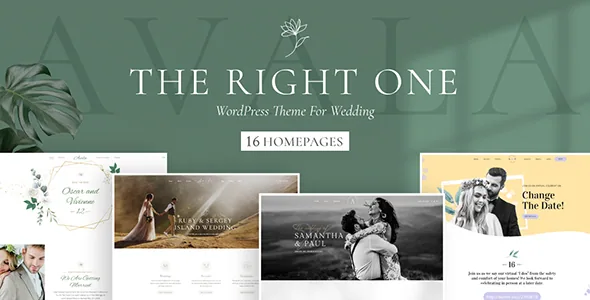
Four seasons, sixteen homepages
BoldThemes divides Avala by season rather than by colour swap. The marketplace description names four demos — Autumn, Winter, Spring and Summer — each carrying four homepages, which adds up to sixteen. The vendor points those layouts at wedding businesses (planners, dress designers, photographers, venues) and also at private occasions such as vow renewals, baby showers, reunions and birthday parties.
That structure changes how you pick a starting point. Instead of choosing one wedding demo and recolouring it, you choose the season that matches the event you are designing around, then narrow down within its four pages. A winter wedding venue and a summer garden party get different starting compositions, not just different accent colours.
The seasonal framing is a vendor description. The demo site is the place to judge whether the difference is substantial enough for your project.
What each demo actually contains
Four homepages per demo would be a thin offer if the inner pages were empty. The vendor's description says each demo comes with carefully designed inner pages, so the seasonal choice applies to more than the front page — the supporting pages you would otherwise build by hand are part of the same set.
Import happens through the Bold Themes WordPress Importer, listed among the plugins included with the theme and described as a one-click demo content importer. After the import you edit the theme options and replace the demo content with your own.
One practical caution: the demos are sold as separate seasons with four homepages each, so decide which one fits before importing. Loading a demo to test and a second demo later may leave you cleaning up more content than expected — the vendor does not describe a mixing workflow for multiple demos.
Event elements inside Bold Builder
Avala edits through Bold Builder, the vendor's own drag-and-drop backend builder, which is listed as included. The element list is unusually specific to the subject. There is a countdown with icons, a date element, a price list, a timeline, a background letter element, testimonials, a masonry post grid, a portfolio shortcode and both Google Maps and OpenStreetMap elements.
Those pieces map directly onto what a wedding or event site needs to say. A countdown works for the run-up to a date. The date element marks the day itself. Price lists suit planners and venues publishing packages, and the timeline suits a schedule of the day or a story sequence. Background letter and floating image elements are the design flourishes that make a hero section feel editorial rather than generic.
Because these are builder elements rather than separate plugins, they are arranged on the page in the same canvas as the rest of the content. The vendor's list also includes a raw HTML/JS element, which matters if you need to drop in a third-party widget such as a gift registry or RSVP service.
The Cost Calculator and quotes
Bold Themes' Cost Calculator plugin is listed as included with Avala. For a wedding planner or a venue, that is a functional addition rather than decoration: visitors can assemble choices and see a price instead of emailing for a quote.
The vendor describes the plugin as customizable and highly rated, which is a marketplace claim rather than a statement about how it behaves on your hosting or with your pricing structure. What it does not tell you is how deeply the calculator is wired into the demos. Before you promise clients a live quoting tool, confirm the configuration options cover your actual pricing rules.
The theme also supports Contact Form 7 for straightforward enquiries, listed among supported plugins alongside WPML, WooCommerce, W3 Total Cache, Yoast and RTL support.
Backend controls that matter for a short-lived site
Event sites have an odd lifecycle: heavy traffic before the day, then near silence. Bold Builder's backend feature list includes a few controls that suit that pattern.
Clipboard functionality copies and pastes content between pages, or between different websites, so a section built once can be reused without rebuilding it. Time limited content appearance lets a block show only within a set period — useful for a countdown, a booking window or a post-event thank-you. Hide/appear on screen resolutions controls which breakpoints a block appears at, so a crowded hero can shed decorative elements on phones.
Around these, the vendor lists per-page overrides of global settings, multiple header styles including a sticky header, mega menu support, full-width or boxed layouts, left or right sidebars, and a custom footer. These are declared capabilities in the vendor's feature list; they are not the results of a test install on this site.
Two boundaries: demo photography and the declared platform range
The vendor is explicit that images on the demo sites are not licensed for third-party production use and must be licensed separately if you want to keep them. Wedding themes lean hard on photography, so budget for a shoot or a stock licence rather than assuming the demo imagery comes with the theme. The ThemeForest file list names PHP, CSS and JS files only.
The marketplace attributes observed on 3 November 2026 record Gutenberg Optimized as Yes, Widget Ready as Yes, a responsive layout, high-resolution support and well-documented status. The declared software range spans WordPress 6.0.x through 7.0.x, WooCommerce 6.x through 9.x, and browsers including IE11, Firefox, Safari, Opera, Chrome and Edge. Treat those as vendor declarations rather than a tested pairing with your own stack — particularly the WordPress range, which is worth confirming against the version you actually run.
WooCommerce support is listed, but the description frames Avala around weddings and events rather than commerce. If you sell dresses or tickets, the shop side will need your own attention.
Questions & answers
Do I have to use Bold Builder, or can I build pages with the block editor?
The vendor's editing route is Bold Builder, included with the theme, and the feature list is written around drag-and-drop sections and its element set. Gutenberg Optimized is marked Yes in the marketplace attributes, which describes block-editor readiness rather than the workflow the demos are built in. The listing doesn't say how each demo page is composed.
Is the Cost Calculator part of the theme or a separate purchase?
Bold Themes' Cost Calculator appears in the vendor's Included plugins list, alongside Bold Builder, Meta Box and the demo importer. The description calls it customizable. How far its settings cover your own pricing structure is something to check before relying on it.
Can I mix homepages from different season demos?
The demos are presented as four separate season sets with four homepages each, and the importer is described as a one-click tool for installing demo content. The vendor doesn't describe a supported way to combine seasons. Choosing the season that fits first is the safer sequence.