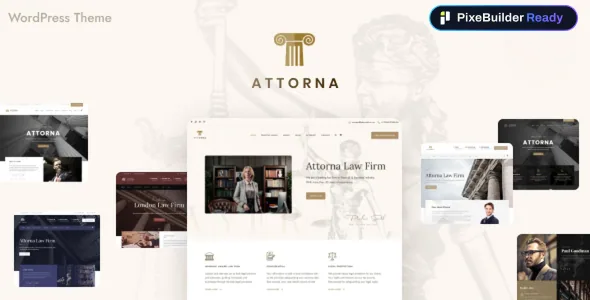
Two builders, and a conversion path between them
GoodLayers describes Attorna as ready for PixeBuilder, a separate free page builder the theme recommends, while keeping the classic GoodLayers drag-and-drop builder available. The detail that makes this more than a plug for a second tool is the conversion option: a Migrate to PixeBuilder action is described as converting existing pages at any time.
That matters for how a site ages. A firm can start on the builder the team already knows, then move individual pages later rather than committing at launch. The vendor's framing treats the two builders as coexisting rather than one replacing the other, so a mixture of pages built in each is within the stated design. Whether a converted page keeps every layout detail is the kind of thing to verify on your own content, since the description only promises the conversion action, not migration fidelity for each element type.
Seven demos, each shipping in both builder formats
The demo importer is described as offering seven demos, and each one arrives either as a PixeBuilder demo, where every page is already built in PixeBuilder, or as a classic demo built with the original GoodLayers builder. The vendor also mentions a multi-threaded image import it says speeds the process up.
That choice is more practical than demo count usually is. If your team will edit in PixeBuilder, importing the PixeBuilder version avoids rebuilding every demo page from scratch just to get a working starting point. If you are keeping the classic builder, the classic import preserves that editing surface instead.
The package also includes layered PSD files alongside PHP, CSS and JS. Those PSDs are useful for adapting a demo graphic to a firm's own branding, though they are design source files rather than a shortcut to finished content.
Law-specific content beyond ordinary pages
Attorna's description names an Attorney post type that is meant to make a lawyer listing straightforward to create. Alongside it, the theme comes with pre-built pages for practice areas and pre-built pages for case study.
For a firm, those three pieces cover most of the editorial work that recurs: adding a new partner or associate, describing a service area, and writing up a matter. Building them by hand as styled pages is possible in any theme; the value here is that the structure is already defined, and the demo content shows one arrangement of it to adapt. The listing also positions the theme for corporate and consultancy sites, so the layouts can carry non-legal content, but the content types are the part tailored to legal work.
Editing individual posts and portfolio items, not just pages
Two entries in the feature list are about where the builder is allowed to reach: page builder support inside a single post, and page builder support inside a single portfolio item. In both cases the vendor also lists the ability to set the header background per post and per portfolio entry.
This changes daily publishing rather than one-off page setup. A case study or an article can have its own layout instead of inheriting one fixed blog template, and a recurring item can open with a distinct image without touching global settings. If your site leans on long-form case studies, that per-item layout control is the feature to weigh; if it publishes short news posts, it is weight you may not use.
Per-section colour skins instead of one global palette
The vendor describes a custom skin colour feature that applies to a page builder wrapper. The example given is specific: with three wrapper sections on a page, you can create a skin and use it in each section separately.
That is a different arrangement from a single accent colour set once in theme options. Sections can be contrasted — for instance a dark band for a practice-area summary and a light band beneath it — without custom CSS for each. Colour is still handled inside the theme's own panel, and there is also an additional CSS field with a separate mobile-view box, so small overrides do not require editing template files.
A large options panel and what it costs to maintain
The theme advertises more than 600 theme options, 22 header layouts and 6 footer layouts, with the footer and copyright section able to be disabled on specific pages. A top bar can be switched on across header styles, secondary navigation can take a slide or overlay style, and unlimited sidebars can be created and assigned per page or post.
Option depth cuts both ways. Twenty-two header arrangements mean a firm can match a specific navigation and logo combination without a child theme, and per-page footer control is genuinely useful for landing pages. The tradeoff is that settings live in many places, and site options, widgets and custom page templates can be exported and re-imported — worth knowing if you maintain a staging copy.
A right-to-left stylesheet is included, and the file list points to PHP, CSS and JS rather than a single compiled bundle.
Compatibility as declared, and what is not in the package
The marketplace listing, observed on 3 November 2026, declares compatibility with WordPress 5.7.x through 7.0.x and with WooCommerce 6.x, 7.x, 9.x and 10.x, with the latest marketplace version recorded as 3.2.0. These are listing declarations, not the result of installing the theme here, so confirm the combination you plan to run rather than assuming any version in the band is tested.
The vendor is explicit that images shown on the preview site are not included in the theme package. Plan for your own photography, and treat the demo import as structure and layout rather than a finished visual identity.
Questions & answers
Do I have to choose between the GoodLayers builder and PixeBuilder before building?
No — the vendor describes them as coexisting, with a Migrate to PixeBuilder option for converting existing pages later. Each of the seven demos can be imported in either format, so your choice at import time is about which editing surface you want for the demo pages.
Does the theme include the lawyer photos and demo imagery?
The vendor states that images on the preview site are not included in the theme package. Layered PSD files are part of the package, which helps with adapting demo graphics to your own branding, but plan on supplying your own photography.