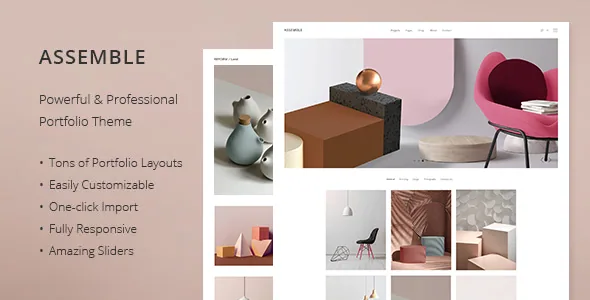
Three portfolio lists, three ways to scan a body of work
The vendor's feature list names the portfolio listing layouts individually rather than folding them into "multiple layouts": Portfolio Pinterest list, Portfolio Gallery list and Portfolio Checkered List. The names describe browsing habits, and on this theme the choice is worth settling before anything else is built.
The Pinterest-style list is the least tidy of the three. Items keep their own proportions and settle into a masonry-like column rhythm, so a set mixing tall portrait shots, wide interiors and square details arrives without forced crops. A gallery list reads closer to an exhibition wall, where pieces are compared at more even sizes. The checkered list is the most graphic option, and it earns its place when the grid itself carries part of the identity rather than just holding images.
The vendor also advertises variable grid size and multiple customizable layouts for portfolio lists, so the layout you pick is a starting structure rather than a fixed template. Between two close candidates, the decision comes from how your own images crop and sequence at their display size, which the demo can show you faster than any description.
What happens after a visitor clicks a project
The deeper decision is the single-project view. Assemble's feature list offers four: Portfolio Slider, Portfolio Accordions, Portfolio Tabs Slider, and Portfolio Image and Video Lightbox.
These behave differently enough that they pull the portfolio in different directions. An accordion keeps several projects as a stack that expands in place, so a visitor can compare work without navigating away — practical when projects carry short descriptions. A tabs slider puts horizontal, tabbed emphasis high on the page, which reads as an editorial treatment and asks the visitor to stay and read. A slider is the familiar sequence of images. The lightbox opens stills and video in an overlay, which suits a short film or a burst of photographs that benefit from a dark, distraction-free frame.
Because the vendor also lists multiple customizable layouts for portfolio single items, the project page is something you design rather than inherit from a blog post template. A workable split: lightbox or slider for photographic work, accordion where the archive itself has to persuade, tabs where each project carries enough writing to justify the structure.
The pop-art layouts narrow who the theme is for
Edge-Themes claims 18 homepages and one-click demo import. Page count is the least informative number in a theme description, but one detail in the vendor copy is specific: some layouts are described as inspired by pop art, made for anyone who wants an original artist portfolio.
That tells you the range is stylistic rather than purely numerical. A design agency, an architecture studio and a freelance illustrator are all named as intended users, and the pop-art group speaks to the last of them. If your work sits in a loud, graphic register, those layouts are the reason to look at Assemble at all. If it sits in a restrained architectural one, they are simply templates you will not open — and 18 homepages stops being a benefit you can claim.
The demo import gives you a working layout instead of a blank canvas. Treat the imported pages as scaffolding and expect to strip sections and rebuild them, not only adjust colours.
Editing happens in WPBakery, and the sliders arrive with it
The vendor states that WPBakery Page Builder and Slider Revolution are included, and WPBakery appears again among the compatibility attributes. That settles your day-to-day editing surface: pages are assembled from builder elements, and the portfolio lists and project views above are configured through that layer rather than the block editor.
If a client will edit project pages after handover, this matters. WPBakery is its own interface with its own habits, and knowing that before promising an easy handover is more useful than discovering it later.
The changelog is the better place to watch the bundled plugins. The most recent entry moves both the builder and the slider to new releases in the same update, which is evidence that they are maintained alongside the theme rather than frozen. The versions in any given package are a separate question from what the changelog records.
Header logos for the light and dark pages a portfolio produces
Assemble lists 3 header types and, more usefully for a visual site, optional separate logos for the mobile header, for light and dark header versions, for the sticky header and for the divided header, with separate styles for the mobile header as well.
The reason this matters here is that project pages tend to alternate tone. One page opens on a dark full-bleed image, the next on white. Separate logo artwork for light and dark headers is exactly what stops a mark from disappearing against one of them — a small setting that decides whether a portfolio looks finished.
The rest of the header options are conventionally generous: header top and bottom widget areas, a fullscreen menu, a mega menu, a side area, and anchor functionality for one-page builds. The vendor's own Edge Slider adds image and video support, zoom animations and parallax on its images.
The social feed widgets are the claim to check first
The feature list includes a Twitter feed widget and an Instagram feed widget. The version 2.2 changelog entry from October 2025 runs the other way: it records removing the Edge Twitter Feed plugin because of Twitter API changes and removing the Edge Instagram Feed plugin because of Instagram API changes.
Read together, the practical conclusion is that the theme's own feed integrations were retired while the feature list still advertises the widgets. Neither statement tells you what renders on the current demo. If a live social feed belongs in your plan, verify it on the demo or a staging install, and be ready to use a dedicated feed plugin instead. The same entry fixes the Edge Slider failing to show on mobile, which makes the theme's own slider the sturdier of the two moving parts.
Social sharing of pages is listed separately from social feeds, alongside a social icons widget, so sharing buttons are not affected by the plugin removals.
Declared versions, and the images you must supply
The compatibility record, observed on 4 November 2026, is a vendor declaration rather than a test: WooCommerce 10.x.x and 9.x.x, WPBakery Page Builder and WPML among compatible tools, with WordPress versions from 6.5.x through 7.0.x. The theme is marked responsive, widget ready and high resolution, and ships with a child theme, po/mo translation files and translation-ready text.
The exclusion to plan around is imagery. The vendor states plainly that demo images are presentational only and cannot be used on a live site without buying a licence from a stock library. For a portfolio that is the main cost beyond the theme itself, since the demo photography does much of the impression-making. Your own work is the substitute, and how it crops and sequences inside the list and project layouts you choose is the real brief.
Questions & answers
Can I use the built-in Instagram and Twitter feed widgets on a new site?
The feature list still names both widgets, but the October 2025 changelog says the theme's own Edge Twitter Feed and Edge Instagram Feed plugins were removed because of API changes. Confirm current behaviour on the demo before relying on either, and plan a third-party feed plugin as the fallback.
Does Assemble let me choose a different layout for each project?
The vendor advertises multiple customizable layouts for portfolio single items and names four presentation styles — slider, accordion, tabs slider and image/video lightbox — alongside multiple layouts for portfolio lists. Whether a given combination is set per project or at theme level is something the demo and documentation answer more precisely than the description.
Which WordPress versions does Assemble declare support for?
As recorded on 4 November 2026, the vendor lists WordPress 6.5.x through 7.0.x, WooCommerce 9.x.x and 10.x.x, and WPML and WPBakery Page Builder among compatible tools. These are declared ranges, not results from testing against your own PHP version and plugin stack.


