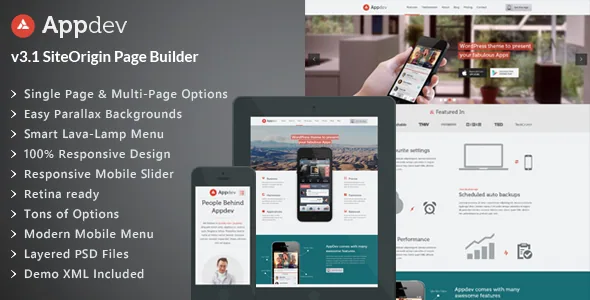
A one-page launch site, or several pages with their own menus
The vendor describes Appdev as a one-page theme first, which is the shape most app landing pages take: a hero, a feature walkthrough, screenshots, testimonials, and a call to action stacked into a single scroll. What makes the page model interesting is the alternative. The vendor says the same theme can power a multi-page site, and that individual pages can each carry a custom top menu whose links jump to internal sections.
That gives you a decision to make before you build anything. A single scroll keeps a visitor in one narrative, which suits a launch or a pre-release signup page where every section argues for the same download. Separate pages, each with an anchor menu of its own, suit a product with distinct surfaces — an app plus a pricing page plus a press or changelog area — where you still want section navigation but not a nine-screen scroll.
The vendor's own changelog confirms the mechanism is real rather than a settings checkbox: version 2.0 added the ability to set a custom WordPress menu at page level. Later entries track that area of the theme, including a fix for menu-item highlighting when a child page is not part of the menu.
What the tracking menu changes for the reader
Appdev's navigation is described as a smart, animated LavaLamp menu — the pattern where an indicator slides to the active link. On a long scroll this is more than decoration, because a section-aware menu tells visitors where they are in the page without them scrolling back up to check.
The second half of that arrangement is the mobile menu. The theme lists an auto-generated menu for smartphones and tablets, described as modern and easy to use. You do not build it by hand; the theme assembles it from your existing menu structure, which keeps you from maintaining two navigation trees.
Parallax sections with adjustable scroll speed sit alongside this. On a one-page build, full-width parallax bands mark the transitions between sections, which affects how clearly a visitor reads the boundaries. If you would rather keep the scroll calm, the theme options carry the colour, font and effect controls you would use to tone it down.
Phone sliders carry the app screenshots
For app marketing the screenshots are the argument, and Appdev treats device frames as their own element type. The vendor lists multiple touch-enabled smartphone sliders, plus a separate responsive iPhone slider, and demo content is supplied for them.
The changelog shows how seriously this was treated: version 3.2 added sliders styled for specific hardware — several iPhone 7 finishes, Samsung Galaxy S7, Google Pixel in three colours, and Nexus 6p. Those fixtures are stylised mockups rather than live device previews, so the screens inside them are whatever images you supply. Treat the device list as a design library you can pick from, not as a claim about which phones your audience uses.
The theme also ships Revolution Slider, and for top-of-page sliders the vendor's options allow you to choose the slider type from the page edit screen. Version 5 removed the Nivo and Flex options for the top slider, so a build tutorial that still describes three interchangeable top sliders is describing an older release.
Editing happens in SiteOrigin, not the block editor
Pages are assembled with SiteOrigin Page Builder, and the vendor counts roughly 35 custom builder elements available inside it, described as drag-in and configurable. The changelog traces the growth of that set: version 3.1 added SiteOrigin integration with 20+ custom elements and support for 17+ more through the vendor's companion SiteOrigin plugin.
Around the builder sit the styling controls. The theme lists 70+ shortcodes with a visual helper, 500+ fonts, 500+ retina-ready font icons, four colour schemes, unlimited colours and unlimited sidebars, plus options for custom page headings with their own backgrounds or HTML. Parallax speed, colours, fonts and header widgets are theme-level settings rather than per-page ones, so they apply across the site.
The listing marks Gutenberg Optimized as No. That records how well the theme is tuned for the block editor; it is not evidence that blocks are unavailable in WordPress. What it does tell you is where the vendor's design effort went — into SiteOrigin and shortcodes, so you should expect to work there.
One compatibility entry needs care. Visual Composer appears in the theme's compatible-with list, but the vendor describes SiteOrigin as the builder Appdev is built on. Plan on SiteOrigin and treat the Visual Composer entry as a plugin compatibility declaration.
Why old Appdev tutorials and snippets may not fit
Version 5.0 is the dividing line. The vendor rewrote the theme on a new backend framework, and the rewrite moved things out of the theme: shortcodes now live in a plugin called Livemesh Appdev Shortcodes, and widgets, custom post types and the options framework moved to Livemesh Themes Addons. The changelog states plainly that the WP hooks present in earlier versions were removed.
The same release dropped the Nivo and Flex options for the top slider and switched the lightbox from PrettyPhoto to Magnific Popup. Version 5.5, the most recent entry, cleaned up legacy code and updated SiteOrigin Page Builder compatibility.
The vendor also advises testing the upgrade in a development environment if you customised an earlier version, and points to migration notes in the documentation. If you inherit a site or follow a tutorial written before version 5, check whether it references theme hooks, direct shortcode registration or the removed sliders before you rely on it. Child-theme work is safer when it stays on templates and styling rather than the old hook layer.
Declared compatibility and package contents
The marketplace attributes, observed on 4 November 2026, record WordPress 6.0.x through 6.5.x, WooCommerce 6.x.x, bbPress 2.6.x, Easy Digital Downloads, Events Calendar and Events Calendar Pro, Gravity Forms and Visual Composer. The files field lists layered PSD, PHP, CSS and JavaScript, and the vendor lists documentation as well documented. The listing was last updated 17 July 2024.
There is a small gap worth knowing about: the vendor's own description header claims WordPress 6.6 compatibility, while the stored version attributes stop at 6.5.x. Neither is a test result on your host.
The other limit is structural rather than technical. The custom post types and widgets that make up much of the theme arrive through companion plugins, so the theme files alone are not the whole installation, and the version of those plugins matters as much as the theme number.
Questions & answers
Can Appdev run as a multi-page site rather than a single scroll?
Yes, according to the vendor. The theme is designed as a one-page site first, but the description says it can power a multi-page site, and individual pages can be given their own custom top menu that links to internal sections. The page-level menu option is recorded in the changelog.
Do I need SiteOrigin Page Builder to edit Appdev pages?
The vendor describes the theme's pages as built with SiteOrigin Page Builder, with roughly 35 custom elements available inside it. That is the editing surface the theme is designed around. Visual Composer appears in the compatibility attributes, but it is not the builder the theme is built on.
Are the phone mockups live device previews?
No. They are styled device frames, listed by the vendor as touch-enabled smartphone sliders, with changelog entries naming specific hardware finishes and models added in version 3.2. The screens shown inside them are the images you supply.
Does Gutenberg Optimized being marked No mean blocks are unavailable?
No. That attribute records how well the theme is optimised for the block editor. Appdev is built around SiteOrigin and shortcodes, so expect to build pages there rather than in blocks, but the attribute alone does not remove the block editor from WordPress.